NETGEAR is aware of a growing number of phone and online scams. To learn how to stay safe click here.
Forum Discussion

stuartmp
Jul 20, 2016Aspirant
Setting up FTP server on ReadyNAS OS6
We have set up an ftp server on our PC using FileZilla that successfully receives log files from our sites around the country. The clients at the sites, send the data themselves to our external IP, t...
- Jul 26, 2016
StephenB wrote:
stuartmp wrote:Does such a thing exist on the readyNAS system?
I believe not, but I agree it would be useful.
Ah thankyou, I will close the request for now although I haven't been able to set my clients up correctly, I am just going to run FileZilla and directly enter the files in now.
Thankyou Stephen.B, sotrack and Hopchen for your help.

sotrack
Jul 22, 2016Luminary
Check your NAS FTP configuration without router first. Connect to NAS via FTP inside local net using NAS_Local_IP. Copy any file. If connection is not OK then doesn't make a sense tune router.
We don't see NAS local IP address for ports forwarding on your screenshots. Hope you are OK with your router configuration.
stuartmp
Jul 22, 2016Aspirant
sotrack wrote:
Check your NAS FTP configuration without router first. Connect to NAS via FTP inside local net using NAS_Local_IP. Copy any file. If connection is not OK then doesn't make a sense tune router.
We don't see NAS local IP address for ports forwarding on your screenshots. Hope you are OK with your router configuration.
Port Forwarding inside my router works via the Game and Application Sharing section. You then assign a game/application to a device, here you can see I've assigned FTP transfers to my NAS.
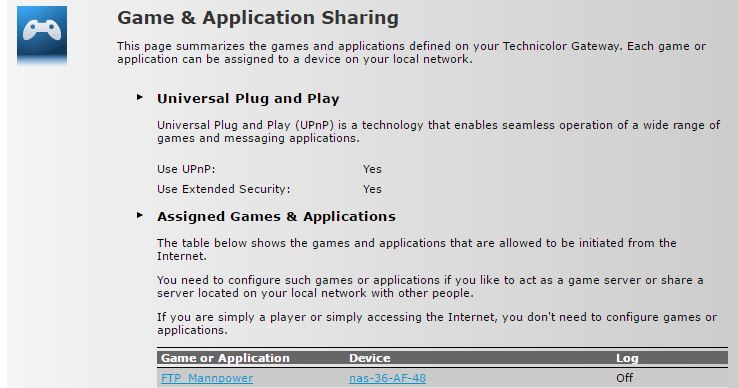
I will attempt what you are saying about testing ftp access locally first. additionally if you see anything wrong with my attempts at port forwarding (I'm obviously lacking knowledge in this area), please let me know.
- sotrackJul 22, 2016Luminary
OK. Please double check other Games and Applicftions don't use the same ports range forwading.
- stuartmpJul 25, 2016Aspirant
sotrack wrote:OK. Please double check other Games and Applicftions don't use the same ports range forwading.
No, no other Game or Application use the same port range forwarding. In fact port forwarding is working correctly as I am able to login to my ReadyNAS and see a few of the folders by entering ftp://myexternalIPaddress on my browser (and on windows in-built ftp client).
I can view the folders by entering the usernames and passwords that I've created (information that my client has), but the data is not being recieved by the ReadyNAS. Is there any kind of LOG FILE, such as the kind used in FileZilla, so I can see if my users are attempting to connect to the FTP server or not?
On FileZilla these users were correctly connecting and inputing their data, but now they're not (obviously I have assigned them access to the folders, that's why when I login via my browser using these usernames/passwords I can see specific folders and can read/write to them.
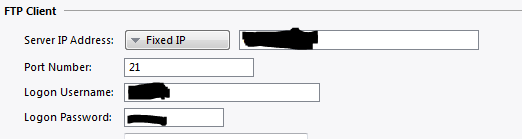
Currently I just want any of the users to just connect and write somewhere on the system, I will move on to assinging specific folders once just one user correctly connects (which they were doing when I was settting this up via FileZilla.You can see my client configuration once more here (from my original post):
I can guaruntee to you that it has, the CORRECT IP for my server, correct username and correct password. It's data connection is PASV mode, and all these settings were functioning correctly with FileZilla. - StephenBJul 25, 2016Guru - Experienced User
Is there still a question here that needs to be answered? If so, can you let us know what it is?
- stuartmpJul 25, 2016Aspirant
StephenB wrote:Is there still a question here that needs to be answered? If so, can you let us know what it is?
Is there a way to log the incoming clients attempting to log in to our readyNAS ftp, like with FileZilla, as this was very useful when setting up our ftp in working out why the clients weren't logging in (and entering their data), as we could see them attempting to log in.
Does such a thing exist on the readyNAS system?
- stuartmpJul 26, 2016Aspirant
StephenB wrote:
stuartmp wrote:Does such a thing exist on the readyNAS system?
I believe not, but I agree it would be useful.
Ah thankyou, I will close the request for now although I haven't been able to set my clients up correctly, I am just going to run FileZilla and directly enter the files in now.
Thankyou Stephen.B, sotrack and Hopchen for your help.
Related Content
NETGEAR Academy

Boost your skills with the Netgear Academy - Get trained, certified and stay ahead with the latest Netgear technology!
Join Us!
