NETGEAR is aware of a growing number of phone and online scams. To learn how to stay safe click here.
Forum Discussion

miogpsrocks
Jul 01, 2018Tutor
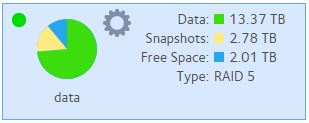
Snapshop at 2.78 TB of data, regular data at 13.3. Is this normal? Almost 21% of data is snapshot.
Snapshop at 2.78 TB of data, regular data at 13.3TB . Is this normal?
So almost 21% of my data usage is from snapshots alone?
Are snapshots needed or can they be disabled?
Thanks.
1 Reply
Replies have been turned off for this discussion
 StephenBGuru - Experienced User
miogpsrocks wrote:
Snapshop at 2.78 TB of data, regular data at 13.3TB . Is this normal?
That depends on how much your data is changing (sometimes called "churn"). My own system has 9.4 TiB of data, but only 330 GiB of snapshots.
The "smart" snapshot setting will retain snapshots indefinitely, and the space will build up over time. If you are using this, you can manually delete some of them (deleting the oldest first).
Personally I use the "custom" snapshot settings, and explicitly set retention on each share. I limit it to 3 months for most shares, with one share (for PC image backups) set to two weeks. So you might try using that feature to manage your snapshot space automatically.
miogpsrocks wrote:
Are snapshots needed or can they be disabled?
They are not needed, they simply give you a way to roll back files or folders to older versions. For instance, if you right-click on a NAS file in Windows File Explorer, you can see the previous versions and choose one if you wish.
Note that some data usage patterns aren't well suited to snapshots. For instance, they should not be used on a torrent download folder - that will create a lot of fragmentation.
Related Content
NETGEAR Academy

Boost your skills with the Netgear Academy - Get trained, certified and stay ahead with the latest Netgear technology!
Join Us!