NETGEAR is aware of a growing number of phone and online scams. To learn how to stay safe click here.
Forum Discussion

Catalyst
Jun 25, 2016Aspirant
Snapshots set to never but space still consumed by snapshots
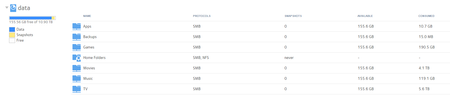
Hi I've seen several topics on this issue but am still unclear what the solution is, so sorry in advance for the repeat I have snapshots set to never yet i still have 770gb of space taken by ...
Catalyst
Jun 26, 2016Aspirant
Hi Gary, thanks for the help
Running OS 6.5.1
I've looked everywhere and can see no signs of any snapshots
I've tried balancing and it made no difference
garyd9
Jun 26, 2016Virtuoso
Your NAS is over 90% full (before snapshots), so balancing and other normal things aren't going to work very well. I know it seems silly, but the filesystem that the NAS uses (btrfs) doesn't like to actually be filled, and starts to do Odd Things when it gets maxed out. Being that I don't know your level of technical expertise, I'm not going to suggest jumping into the shell and doing things yourself by hand.
Instead, here's the best I can offer: First, try to remove 2TB of data from the NAS without putting anything new on. That will give it some free space to work in. THEN run a balance. That might clear up the snapshot issue, or it might not. If it doesn't, you should contact Netgear's support folks (via the "Chat" support.)
- CatalystJun 30, 2016Aspirant
Ok ill try move some stuff off it and see how i go
when you say odd things, do you mean like how just now i deleted 200gb of data, and it only freed up 5gb of space but added 200gb to snapshots ?
 StephenBJun 30, 2016Guru - Experienced User
Catalyst wrote:
i deleted 200gb of data, and it only freed up 5gb of space but added 200gb to snapshots ?
There might be snapshots that you can't see - did you always have them disabled?
One option which avoids using support is to back up all the data, do a factory reset, and then rebuild the NAS. If you don't have an up-to-date backup, you should probably take care of that.
- garyd9Jun 30, 2016Virtuoso
Catalyst wrote:when you say odd things, do you mean like how just now i deleted 200gb of data, and it only freed up 5gb of space but added 200gb to snapshots ?
No, but...
What you just described is EXACTLY what would happen if there was a snapshot or clone of the data you deleted. Do you do backups of your data? Have any of those backups failed? The reason I'm asking, and this is pure speculation on my part, is that the NAS creates a snapshot in order to do a backup (and deletes the snapshot when it's done.) I'm wondering if it's possible that a backup failed and left the snapshot around..
That's the type of thing that netgear support would be able to find easily (I hope.) Well, using a shell prompt, it'd be easy enough to determine if there are any rogue snapshots (that the filesystem knows about.)
- CatalystJul 12, 2016Aspirant
I dont do backups of the data on the NAS, never have. Cant see any backups enabled
I am still unable to see any snapshots, anywhere.
I dont have the hard drive space in other places to move everything off and do a format either.
I'm a bit confused how Netgear support works. Ive had this NAS for a few years now, am i missing something or do i have to pay extra for support ? All i can see is complimentary for 90 days after purchase, or "premium support".
Any other ideas ? its very close to being full now with 1tb of invisible snapshots!!! i realy need this space back
Related Content
- Jun 06, 2017Retired_Member
NETGEAR Academy

Boost your skills with the Netgear Academy - Get trained, certified and stay ahead with the latest Netgear technology!
Join Us!
