Forum Discussion

nudist
Sep 30, 2022Aspirant
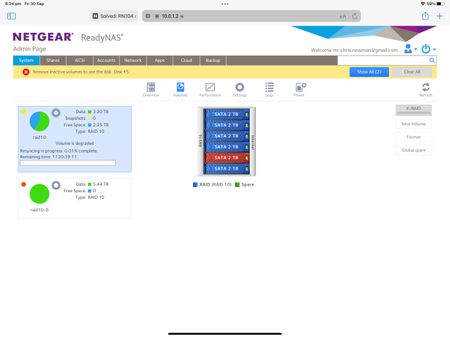
Time to swap out one of my Raid disks? RN 516 (6 bay)
It’s been quite awhile since I last dropped into this forum. Things have been going very smoothly with my RN516 and I have found in the past that your advice has been dispensable. I’ve come across a...
 Oct 01, 2022
Yes I am with Gmail. Thanks I found the reference on my Google account to thirty party app approvals and configured it back on the Readynas rhen sent a test email. it’s all working well for the first time ever I think I bought the 516 about eight years ago so thank you Stephen for helping me get the email alerts working. hopefully I’ll be alerted to a impending disk failures a bit sooner. I’ll mark this one as a solution

StephenB
Sep 30, 2022Guru - Experienced User
nudist wrote:
can I assume that disk # 5 is unserviceable and needs to be replaced?
Not sure, but the very long time on the resync estimate suggests that you do need to replace it. Your inactive volume message is also a bit unusual - the system seems a bit confused on disk 5.
You could download the log zip file and look for errors. Or just replace it.
nudist wrote:
Do I just turn off the machine and swap it out for a new brand one same specs then restart the machine and wait until the machine has done it’s magic and ready for use?
I always recommend hot-swapping (NAS running), and not powering down. The model and specs don't need to exactly match - so don't go crazy looking for a model that is no longer sold. In general, I recommend NAS-purposed disks (WD Red Plus or Seagate Ironwolf), or enterprise class disks. I don't recommend SMR drives - for example WD Reds. Many 2 TB desktop class drives are now SMR, so I recommend avoiding them.
nudist wrote:
Do I need to wait until the machine has resynced or can I just swap it out regardless of whether it’s finished or not?
You don't need to wait for it to finish.
nudist wrote:
Have I missed anything?
Do you have a current backup of the data? If not, it would be prudent to back it up before manipulating the disks.
- nudistSep 30, 2022Aspirant
The disk are relatively new and they are the red label disks. Yes I’ve made sure I have a full backup of the data last done a few months ago. Thanks for going to the trouble to respond Much obliged
- StephenBSep 30, 2022Guru - Experienced User
nudist wrote:
The disk are relatively new and they are the red label disks.
WD20EFAX? Or a different model? The WD20EFAX are SMR.
- nudistSep 30, 2022Aspirant
2 TB SATA WD20EFRX.
One more question. That fact that this disk reported an error means it shouldn't be trusted even if it can be reformatted and then appears OK. Which means it will probably fail again at some point in the future so best to discard?
Related Content
NETGEAR Academy

Boost your skills with the Netgear Academy - Get trained, certified and stay ahead with the latest Netgear technology!
Join Us!
