NETGEAR is aware of a growing number of phone and online scams. To learn how to stay safe click here.
Forum Discussion

mongoosej44
Aug 15, 2018Tutor
USB Recovery
I need to re-flash my ReadyNAS Duo V2. I have tried all of the support and FAQ suggestions that I can find with no result. I cannot access the device either using a web or SSH. It gets an IP address,...
 Oct 25, 2018Netgear tech support sorted it out for me. They were very helpful. I just put the NAS into tech support mode and they fixed it! Working fine ever since.

mdgm-ntgr
Aug 15, 2018NETGEAR Employee Retired
Can you see it in RAIDar? If so do you see an error message?
Is the NAS able to boot into tech support mode?: How do I access the boot menu on my ReadyNAS Ultra 2, Ultra 2 Plus, or Pro 2, Duo v2?
Are you sure it's a Duo v2 (says that it is a v2 on the front of the NAS).
There is a USB Boot Recovery procedure for the Duo v2. It requires a FAT32 USB key with an initrd.gz, uImage-recovery and e.g. the RAIDiator-arm-5.3.13 firmware on it. It's similar to USB Boot Recovery for the OS6 arm products but using different files.
- mongoosej44Aug 16, 2018Tutor
I have sent a reply to your private message. To answer the questions here...
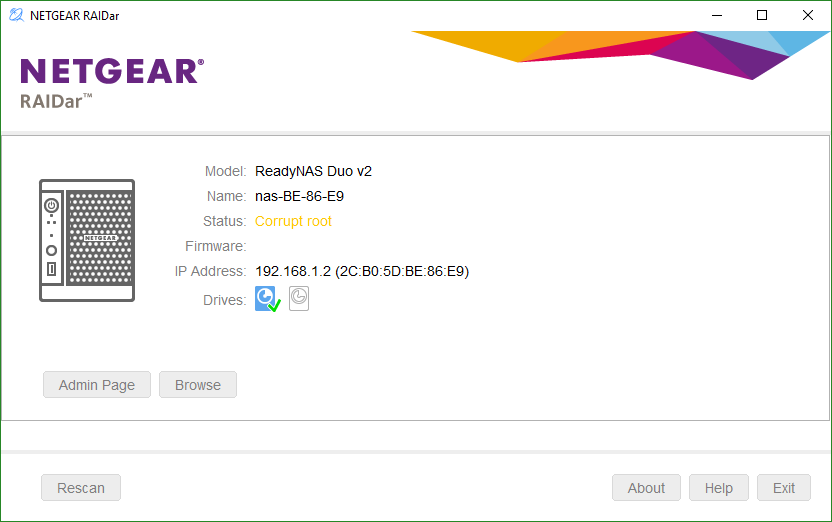
Yes it appears in Raidar with the error message "Corrupt root"
Yes I can boot into Tech Support Mode. Raidar reports "Tech support mode" and a Debug Code. I have included a screenshot. You will see it is definitely a v2! I will leave it on in Tech Support Mode.
Thanks
John
- mdgm-ntgrAug 16, 2018NETGEAR Employee Retired
As tech support mode is working USB Boot Recovery is not the best way forward.
You may not be concerned with the EEPROM, but if it gets wiped as a result of using USB Boot Recovery you'd need remote assistance to fix it for your NAS to be usable again.
Looks like your NAS has dropped off our server. You may wish to power off, wait say 5 minutes or so and then boot it back to tech support mode again.
- mongoosej44Aug 16, 2018Tutor
Powered down and up as requested. Raidar shows Tech Support Mode again. Do I need to do anything on my router to enable remote access? It is a BT Homehub.
 StephenBAug 16, 2018Guru - Experienced User
mongoosej44 wrote:
Yes it appears in Raidar with the error message "Corrupt root"
Yes I can boot into Tech Support Mode. Raidar reports "Tech support mode" and a Debug Code.
FWIW, this points to the disks and not the flash. The system boots from the disks, and the "corrupt root" message means that the boot loader isn't finding the OS on them. But if mdgm-ntgr can connect remotely he'll sort it out.
 pranavgOct 24, 2018Aspirant
Please help
I am facing the same issue.
Related Content
NETGEAR Academy

Boost your skills with the Netgear Academy - Get trained, certified and stay ahead with the latest Netgear technology!
Join Us!