NETGEAR is aware of a growing number of phone and online scams. To learn how to stay safe click here.
Forum Discussion

xtrips1
Dec 26, 2020Aspirant
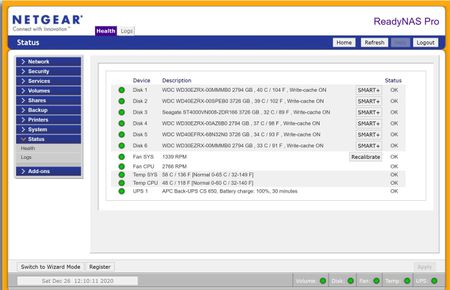
Volume expansion seems inactive
Hello, Volume expansion seems to be running for 2 days now but I have no sign of progress within the GUI. See the HDD sizes and the actual disk space. Something is wrong but I don't know what. So...

mdgm
Dec 26, 2020Virtuoso
Here's an example from a redundant single-layer volume with 6 disks:
root@MDGM-NAS:~# cat /proc/mdstat
Personalities : [raid0] [raid1] [raid10] [raid6] [raid5] [raid4]
md1 : active raid10 sdg2[5] sdf2[4] sdd2[3] sdc2[2] sdb2[1] sda2[0]
      1569792 blocks super 1.2 512K chunks 2 near-copies [6/6] [UUUUUU]

md127 : active raid6 sdg3[6] sda3[0] sdf3[5] sdd3[3] sdc3[2] sdb3[1]
      23422691328 blocks super 1.2 level 6, 64k chunk, algorithm 2 [6/6] [UUUUUU]

md0 : active raid1 sdg1[6] sda1[0] sdf1[5] sdd1[3] sdc1[2] sdb1[1]
      4190208 blocks super 1.2 [6/6] [UUUUUU]

unused devices: <none>
xtrips1
Dec 26, 2020Aspirant
Finally the screenshots are here. Now you can review my issue. Can you help? And please layman words
- xtrips1Dec 26, 2020Aspirant
I think I get it. I have 3 X 3Tb HDDs and 3 X 4Tb HDDs. But historically I started the NAS with with 6 X 3Tb HDDs.
That little f***** stayed with 3Tb disks all the time, which explains why the volume shows a capacity of 14Tb.
Why did this happen? I thought the volume expansion was automatic. Obviously! Since there is nothing proposed about expansion in the GUI.
How do I solve that now? Or are my 3 extra terrabytes wasted forever?- SandsharkDec 26, 2020Sensei
xtrips1 wrote:I think I get it. I have 3 X 3Tb HDDs and 3 X 4Tb HDDs. But historically I started the NAS with with 6 X 3Tb HDDs.
That little f***** stayed with 3Tb disks all the time, which explains why the volume shows a capacity of 14Tb.
Why did this happen? I thought the volume expansion was automatic. Obviously! Since there is nothing proposed about expansion in the GUI.
How do I solve that now? Or are my 3 extra terrabytes wasted forever?When you say you started with 6 x 3TB, you installed them initially or did a factory default with all installed, or did you start with fewer and add them along the way before switching to 4TB? That's important for the expansion limitations, one of which is the volume cannot expand more than 8TB total.
If you have run into an expansion limit, then a backup, factory default, and restore is the only way around it. You may then want to consider upgrading to OS6, which has no such limits.
.
- xtrips1Dec 26, 2020Aspirant
I don't exactly remember how I got there incrementally but that limitation seems to be exactly it.
I do not have the means to backup anywhere so I will have to pass on the expansion for now.
On the other hands I am interested to know how to upgrade to OS6 when the opportunity presents itself soon.
Is that something I can do? Or do I need a some Linux geek around, which I don't have?

Related Content
NETGEAR Academy

Boost your skills with the Netgear Academy - Get trained, certified and stay ahead with the latest Netgear technology!
Join Us!
