NETGEAR is aware of a growing number of phone and online scams. To learn how to stay safe click here.
Forum Discussion

beezer
Apr 27, 2019Apprentice
WC7500 SSL Certificate is hacked!
(This is actually for the WC7500 but the drop-down won't let me select that)
I have a very strange self-signed SSL cert on my wc7500. I cannot replace it, b/c the system wants something that is n...
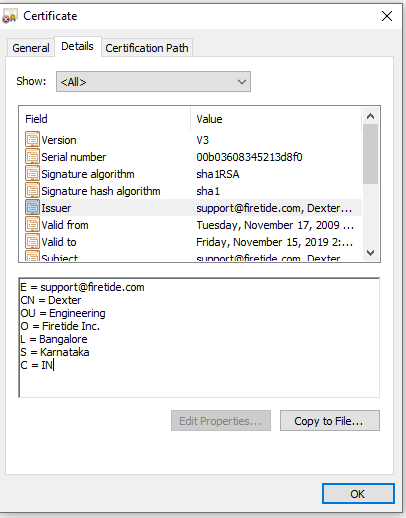
- Oct 16, 2019
Well, after all this time, the "solution" is that they have a firmware upgrade (6.5.5.18) that provides a *different* self-signed certificate in response to a TLS request.
You still cannot use PKI.
The documentation for the WC7500 certificate page still says "This page lets you to add certificates to WC7500." (not English)
The documentation for the Password field still says "This is the password for WC7500 Certificates" (certificates don't have passwords)
The documentation for the Controller Key field still says "Enter the Controller Key", etc. (not even slightly helpful)
If you tell it to boot or update "now" it schedules it for some time in the future or past, depending on your current offset from GMT.
This firmware is such a hack on its surface it is impossible to trust that it is appropriate, in terms of security, reliability, or functionality, to use in any professional environment.
beezer
May 02, 2019Apprentice
I don't want to appear sarcastic or resentful, but you appear to be asking for a use case for SSL. Is it Netgear policy to obtain justification for use of a feature before explaining how it works?
Because you asked, though:
1) We are at a sub-contracting office, working on systems in which the government specifies standards for infrastructure security. In particular, all switches and hardward with thin client management interfaces MUST NOT supply credentials or configuration in clear text without SSL/TLS. There is explicitly no exception for isolated or locally secured networks. We are permitted to satisfy this requirement by usinge SSL to configure routers and NAS. We do not wish to publish a certificate to all potential clients for this one switch, especially one that is clearly suspicious (would YOU want all your clients to trust DEXTER from Bangalor?).
2) We are not using RADIUS at this time.
3-a) The suspicious certificate for DEXTER from Bangalore CAME ON THE WC7500 OUT OF THE BOX. The WC7500 was purchased new from a reputable wholesaler, so the best case is that it was returned as unopened but was in fact returned used and resold as new, or there is some joker in QA at Netgear.
3-b) As implied in all the above, we want to install a trusted SSL certificate without expicitly trusting it in all potential clients (including clients at sub-contractors who manage our networks). We therefore want to install an SSL that will be trusted by any client that trusts our CA.
Again, apologies for what appears to be a condescending tone here; perhaps you need to re-ask your question so I can give a more pertinent answer... ?
beezer
May 02, 2019Apprentice
Really???
Yes, I am trying to install both a trusted root cert and an SSL cert, but the REQUIREMENT is only that the units present (and, obviously, have the private key for) an SSL cert. The (anemic, poorly documented) interface MAKES me use all three files. The (wholly inadequate) error messages do not make clear why the ones I am using are unacceptable or what error is occurring.
- beezerMay 05, 2019Apprentice
I keep getting message from the community ("Hello, ${recipient.login}...") which makes this thread look like I am talking to myself. The last one states that a reply "has been accepted as a solution!"
THIS THREAD IS UNRESOLVED. The questions ("Where did this bogus cert come from?" and "How do you generate a PKI trusted cert for a WC7500 on Windows?") remain unanswered.
- beezerMay 06, 2019Apprentice
Via PM, I am told that
1) NETGEAR is moving to HTTPS with NETGEAR self-signed certificates in an up-coming (mid-year) update.
2) The support of PKI will be removed (NOTE: not clear if this is true for all NETGEAR switches or just this one).
3) The suspicious self-signed certificate is a KNOWN PROBLEM. That is, the DEXTER certificate is legitimately a certificate from NETGEAR, and they will be updating with a less suspicious (O of NETGEAR?) certificate.
Not the news I wanted, but this issue is closed.
- schumakuMay 06, 2019Guru - Experienced User
beezer wrote:
1) NETGEAR is moving to HTTPS with NETGEAR self-signed certificates in an up-coming (mid-year) update..
Probably just as we have just got it on the WAC505/510/540 these hours - a crappy self-signed certificate, and no way to install REAL certificates - no CSR support, no way to create a self-signed one, no upload for private key, certificate, and CA cert, ... ?
beezer wrote:
2) The support of PKI will be removed (NOTE: not clear if this is true for all NETGEAR switches or just this one).
Somebody must be kidding, no? RaghuHR ???
- beezerMay 06, 2019Apprentice
This office selected the WC7500/WAC740's specifically for this feature (due to the requirements earlier in this thread). Now NETGEAR appear to be removing the feature and ending support for the WC7500 before we can get it to work (we had delays building premises, and we had to return defective WAC740's twice, so we lost phone support).
Suppressing some real anger here, @shumaku. $$Thousands and all my time wasted and it probably never worked (we don't know because it is undocumented and no one, including NETGEAR, can tell us how it was SUPPOSED to work).
- beezerMay 06, 2019Apprentice
Well, the request to provide a use case for SSL makes sense now. It suggests NETGEAR are in fact considering removing the PKI feature. An invalid use case can justify removing a feature, so they would like to review my use case to confirm it is not compelling, or find an alternative (often less elegant, convenient, effective) way to address it. Unfortunately, the pattern also requires that implementers not sympathise with investments made by users of the feature, and to suppress remorse for not honoring an implicit committment of support.
 RaghuHRMay 07, 2019NETGEAR Expert
Hi beezer
We are not removing PKI support which is for internal radius server authentication. This is not for installing SSL cert for the web GUI access. http://www.downloads.netgear.com/files/GDC/WC7500/WC_AllModels_UM.pdf Refer page # 97 -> point #5In future releases installing your own SSL certificate is in plan but as of now I dont have any ETA.
Thanks,
Raghu
- beezerMay 07, 2019Apprentice
Glad I asked you to comment on my assessment before closing this thread. It was imprecise and over-general to say NETGEAR is removing PKI.
OTOH, although RADIUS user authN/autZ/Acc indirectly relies on PKI, that does not seem to address my use case, which involves device authentication and securing credentials before they get forwarded over RADIUS — or not, since I am fine with a static admin password for the WC7500. (Am I mistaken?)
So, your answer begs several questions: Does the current UI to install certificates work? If so, how (The original question here)? If not, will you fix it? When you release your “planned” UI to do it, will it be available / supported / documented for the WC7500? (And, of course, when will that be?)
- beezerMay 09, 2019Apprentice
RaghuHR could you please confirm: There is no way to enter a certificate (regardless of whether you use RADIUS) on the WC7500 and that the interface does not work without buying a License (having a controller key)...
In other words, although you "strongly recommend that <the user> replace this default certificate with a custom certificate issued for your site or domain by a trusted certificate authority (CA)" it cannot be done on the WC7500, right?
- beezerMay 16, 2019Apprentice
Progress report: I had to open a support case to get an answer on how this works. Though the issue has escalated through several levels of support, no one yet knows. However, I now have recognition that:
- There appears to be no way to replace the expiring self-signed certificate via the web interface.
- There are no instructions available on how to generate an acceptable CA-signed certificate.
- There is no documentation available on what constitutes acceptable content or format for the PEM input.
The issues has now been escalated to engineering. Has anyone out there updated their controller cert?
- beezerOct 11, 2019Apprentice
Update: We were told to wait for the new firmware to solve this problem (since April '19) on a certificate that is now weeks away from expiration (Nov '19). Unfortunately, it will not load on my WC7500.
Incidentally, the WC7500 that exhibited this flaw failed, and they RMA'd me a new one ... also with the certificate from Bangalor, about to expire.
What a clown show.
- beezerOct 16, 2019Apprentice
Well, after all this time, the "solution" is that they have a firmware upgrade (6.5.5.18) that provides a *different* self-signed certificate in response to a TLS request.
You still cannot use PKI.
The documentation for the WC7500 certificate page still says "This page lets you to add certificates to WC7500." (not English)
The documentation for the Password field still says "This is the password for WC7500 Certificates" (certificates don't have passwords)
The documentation for the Controller Key field still says "Enter the Controller Key", etc. (not even slightly helpful)
If you tell it to boot or update "now" it schedules it for some time in the future or past, depending on your current offset from GMT.
This firmware is such a hack on its surface it is impossible to trust that it is appropriate, in terms of security, reliability, or functionality, to use in any professional environment.
- schumakuOct 22, 2019Guru - Experienced User
beezer wrote:The documentation for the Password field still says "This is the password for WC7500 Certificates" (certificates don't have passwords).
Hm, yes and no - you can protect the private key using a password. If it makes a lot of sense to request a certificate with a password protected private key and then permanently store the password (instead of requesting it at boot time) is more than disputable.
beezer wrote:This firmware is such a hack on its surface it is impossible to trust that it is appropriate, in terms of security, reliability, or functionality, to use in any professional environment.
+10000
RaghuHR can you please explain on how we should create certificates - e.g. on a pure OpenSSL PKI environment, or by certificate requests (how again please?) for letting the sign by a public (or internal) CA?
- beezerOct 22, 2019Apprentice
Schumaku, you make a good point about certificate passwords. A reasonable person might just assume that in the total absence of documentation.
Unfortunately -- and we found this through trial and error because I was not allowed to talk to anyone who knows -- the only password that we ever got it to accept was the login password for the unit. At which point, there is no affirmative message, so we have NO IDEA what it did once it accepted the three files.
So, the reasonable assumption that this refers to a password on a certificate store is, in this case, another example of how the software is counter-intuitive.

Related Content
NETGEAR Academy

Boost your skills with the Netgear Academy - Get trained, certified and stay ahead with the latest Netgear technology!
Join Us!
