NETGEAR is aware of a growing number of phone and online scams. To learn how to stay safe click here.
Forum Discussion

tbomb80
Jan 04, 2018Guide
Modem to router speed slower than Modem to PC speed - RP614v2
Hello all! So Xfinity recently upgraded my bwidth fro 75 - 100Mbps :) I tried testing this 2 ways. I found the speed to exceed 100 Mbps via speedtest, when my pc was connected directly to my cable m...
xtroublex
Jan 05, 2018Tutor
So, since no one has responded yet, I will share what I've done so far. I had a small 4 port unmanaged switch in the network so when I eliminated that, the speed jumped up! The problem with home networking tech is that you never know for sure when the problem is a worn out or defective piece of equipment. Unless it's just dead, it's difficult to think of it being "broken".
I'm still not at the 300Mbs that I should be, so I think I will need to simply replace my router, unless anyone has anything I can try.
xtroublex
Jan 05, 2018Tutor
OH, I almost forgot, I also adjusted the MTU speed. I read the article below. Hope this helps you a bit.
- In Windows, go to Start and select Run.
- Type in cmd (Windows 2000/XP) or command (Windows 98/ME) into the Open: field. Hit the enter key or click OK. The DOS prompt should open.
- At the DOS prompt, type in ping www.yahoo.com -f -l 1492 and hit the Enter key:
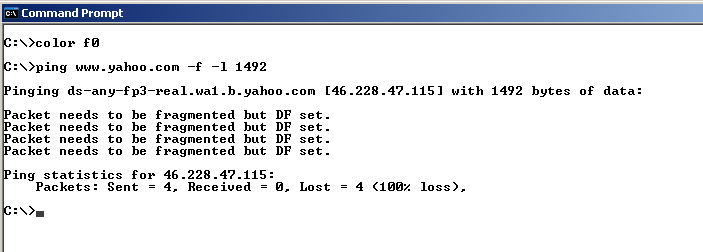
- The results above indicate that the packet needs to be fragmented. Repeat this test, lowering the size the packet in increments of +/-10 (e.g. 1472, 1462, 1440, 1400) until you have a packet size that does not fragment:
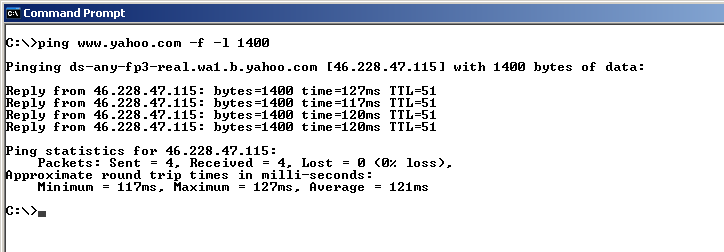
- Begin increasing the packet size from this number in small increments until you find the largest size that does not fragment. Add 28 to that number (IP/ICMP headers) to get the optimal MTU setting. For example, if the largest packet size from ping tests is 1462, add 28 to 1462 to get a total of 1490 which is the optimal MTU setting.
- Change the MTU on the routers WAN Setup.
The result was a small increase (30Mbs)