NETGEAR is aware of a growing number of phone and online scams. To learn how to stay safe click here.
Forum Discussion

Cerick895
May 02, 2023Aspirant
Netgear CAX80 cable modem router
To piggy back off this. Where is the setting to disable firmware updates? I downgraded mine and it auto updates. I looked everywhere online on how to disable it.
Cerick895
May 07, 2023Aspirant
Going to assume the firmware update block on the serial ain't going to happen. Its updated and still the same crap. Its literally only the wifi connections with this issue. Phone, ipad, or laptop.
You can see the device lose connection as it switches to LTE while it happens then pops back on after a few minutes. I can't test long enough on the older firmware to eliminate that. I would be inclined to blame my ISP if my wired connections had this issue.

FURRYe38
May 08, 2023Guru - Experienced User
So you downgraded the CAX80 and it re-updated?
- Cerick895May 08, 2023Aspirant
Yes. This weekend I uploaded 2.1.4.2 and its back to 2.1.5.2
I did it earlier in the morning so I could test it all day yesterday and I did not have any wifi issues all day and today its back to being updated. I a day isn't a good sample size but Its really making me think its my issue.
- FURRYe38May 08, 2023Guru - Experienced User
No sure about you last statement.
Let me check in to this again.
- FURRYe38May 09, 2023Guru - Experienced User
Ok, would like to request a couple of items from you please:
1) CM status 16(DS OFDM profile failure) and 24(OFDM profile recovery).
We think these logs should be OK. CM sent event code 16 and sent event code 24 within 1 minute. The frequency is low (3 per day). There may be noise that impact OFDM signal.
2) DWR violation and T3 timeout.
We suggest user calling ISP to fix the upstream issue. This may impact upstream stability.
Have the ISP check the signal and line quality UP to the modem. Be sure the ISP provisions the modem correctly.
Be sure there are no coax cable line splitters in the between the modem and ISP service box.
Be sure your using good quality RG6 coax cable up to the modem.
Start with removing any amplifiers, signal attenuators, or splitters from the coax.
From there check the line for kinks, damage, moisture in the line.
Check the connectors for improperly made ends, foil touching the copper coax line, loose connections, bad/old/cheap connectors, or corroded connections. Replace them if you do.
Actions for user:1. Hope the user provides the debug log when the issue happens (from debug GUI). Please create the problem with your devices with the debug logging enabled under the modems IP address/debug.htm. After creating the problem, let the log run for about 5 minutes then select the save logs button. Post to a cloud service like onedrive or dropbox and PM me the link.
2. If possible, call ISP tech support to check upstream DRW issue. IF they can fix this issue here, this may resolve what your seeing or experiencing. - FURRYe38May 12, 2023Guru - Experienced User
Any progress on this?
Cerick895 wrote:
Yes. This weekend I uploaded 2.1.4.2 and its back to 2.1.5.2
I did it earlier in the morning so I could test it all day yesterday and I did not have any wifi issues all day and today its back to being updated. I a day isn't a good sample size but Its really making me think its my issue.
- Cerick895May 17, 2023Aspirant
I downgraded it again and it seemed to hold yesterday so it looks like I did not get pushed the firmware update yay! I am happy for now as it will take forever to have them track down the issue on the cable companies end. I'll see where it goes.
Thanks again!
- FURRYe38May 17, 2023Guru - Experienced User
Sounds good. Keep on them about it. There are issues on the ISP side.
Keep us posted when you can.
- Cerick895Jun 28, 2023Aspirant
Update: I had my ISP come out and they checked the line again and said it was good to go. Beyond yelling at the dude I don't know what all else I can do. If there are line issues and I have zero proof if their tool checks it out as good. Whatever at this point, its was working good enough for what I need and the wireless drops reduced significantly.
Its WAS for the last month running the 2.1.4.2 firmware and its been okay but just this last weekend it died. Well actually the wifi is still functional but it can no longer gain a connection to my ISP. It dropped randomly during the day. I already tried all the resetting procedures and also just going ahead and manually updating firmware but still.. no connection. My ISP can't even see it anymore and the tech that came out said its most likely the modem.
And here I thought buying my own modem would save me money...499 down the drain in barely over a year. Expensive lesson learned and of course like always its not in warranty. I think I am done purchasing or recommending netgear stuff for the future. For the price I definitely could have gotten the same performance for less.
At least the 4th is coming up. I might as well go blow it up.
- FURRYe38Jun 28, 2023Guru - Experienced User
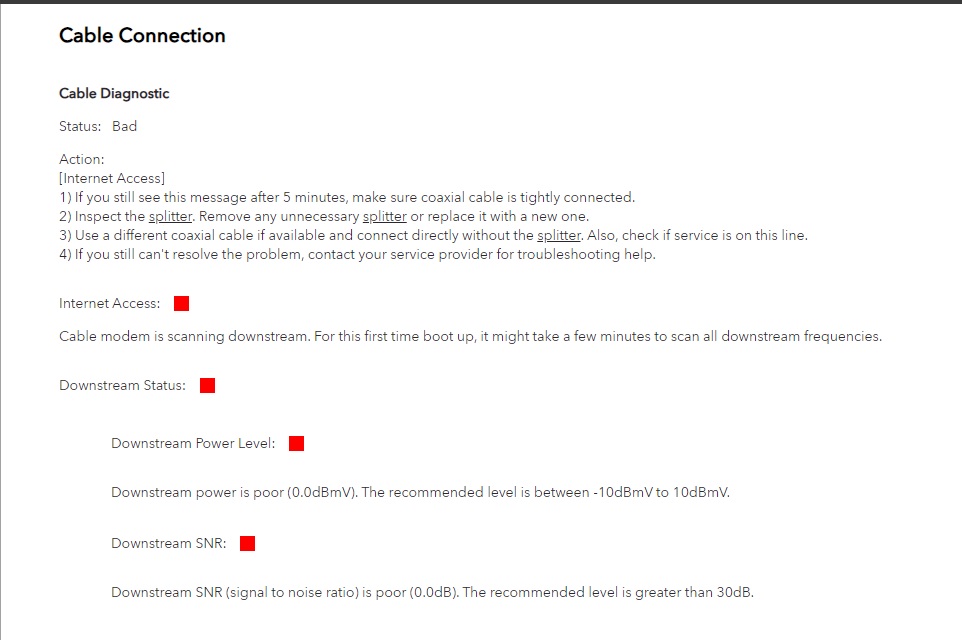
Can you repost the cable connections and event logs page data please.
Something on the ISP line is not working right.
Did the tech look at the connections and event logs while they were there?
Something to try as well, go get one of the ISPs modems and have them put it online for a short term test. If there is a problem on there side there stuff would experience issues as well. Would give direction here.
I recommend you reach out to NG support and ask for a beta that has been given out to some.
- Cerick895Jun 29, 2023Aspirant
I'll boot it up again and pull logs. I had it just sitting since it won't do anything. I did a full reset so it shouldn't have much.
I've been currently down for 3 days. I am stuck using my phones hotspot with a limited plan so I am $10 a day in data now and switching to the next plan would cost me another 30$ bucks so I was banking on the tech fixing it today with one of their modems as I know dealing with Netgear support with this being out of warranty is probably going to take weeks. So now I am eating the cost of phone data, a modem rental, and the possibility that I have a 400$ paper weight. Its hard not to be soured about Netgear right now.
Just to expand on what I said in my last post. The tech I talked to on Tuesday was actually on another call as Mediacoms earliest appointment time was Thursday. I just happened to see him driving down my street and flagged him down. He then came back that evening on his way home but since my the earliest service slot back when it died over the weekend was Thursday 6/29, he couldn't pull any of my info on his equipment since it wasn't assigned to him. He used his line analyzer tool and checked signals and said everything looks within range and there wasn't anything he could do until the appointment was assigned since he didn't have any of my account info. He asked me to contact Mediacoms HQ and see if they could check it/send a signal to it, which I did and they got nothing.
- FURRYe38Jun 29, 2023Guru - Experienced User
I recommend after capturing the logs and posting them here, run over to the ISP and see if you can get one of there modems for short term use. Have them help you get it associated with there service.
Will need a tech on site with there proper test equipment to test everything out and have a look at the CAX80 logs so they can better determine what's going on.
- FURRYe38Jun 30, 2023Guru - Experienced User
Please post new cable status and event logs page data again here, before and after loading a beta FW.
Wanna see if ISP side is better, worse or same.
- FURRYe38Jul 18, 2023Guru - Experienced User
Modem will be tested at a different location with a different ISP to see if problem follows or not. 😉
- FURRYe38Jul 22, 2023Guru - Experienced User
Hey there, got your modem online today with my ISP service. Sparklight.
I wish I had good news. 😑
A few issues with this gateway CAX80:
1. I forgot to get the log in PW from you, however a 30-30-30 reset cleared it and I could get the setup page to come up. A 10 second reset button press in back did not work from unknown reasons. This one problem item.
2. I checked the signal on the down channels, ALL were in the sub -12db range which is well below and out of spec for NG modems. Anything lower than -7db is bad. However, I had a inline 6db attenuator that was connected to my CAX80. This keeps mine around the -2db to -4db range. My CAX80 works well here. So i removed the attenuator and your modem came up around -5db to some channels on the low side of -7db and a bit lower. So kept this in mind. The ISP got it associated. FW at this point was the beta v5.1.1.2 something. Gateway rebooted and came online however I did notice that entire reboot process seem to take a bit longer than mine did. But it came online. I was able to get internet and speeds were to spec. So got of the phone with the ISP. Had internet at this point and modem seem to work ok.
https://kb.netgear.com/24311/Power-level-guidelines-for-a-NETGEAR-cable-modem-router
Took cable connections logs at various stages as well.
3. I wanted to get the gateway configured to work on my home network which uses 192.168.0.1 network configuration and a smaller DHCP IP address pool range of .100 to .150, since I don't have more then about 30 devices onliine at one time. Same config I have used on my CAX80 for years. However, using FF browser, I set the 192.168.0.1 for the router IP address the new pool range of .100 to .150 and hit apply. The modems web page said it was rebooting. I only had my Mac Book Pro laptop ethernet connected to the back of the modem and nothing else. After the modem rebooted as back to ready, I attempted to log in to the gateways web page at the new IP address 192.168.0.1 and FF browser failed to connect to this address. I looked at the networking configuration on the laptop and saw it's IP address was still 192.168.1.11 and gateway had not changed to 192.168.0.1 as was still at 192.168.1.1. Something with the new configuration did not take or make the change. I lost entire web page access to the CAX80s web page. 192.168.1.1 would not bring up the web page. I cleared browser caches to be sure as well. 10 second press on the reset button in back triggered the reboot however I still not access the web page or setup wizard at 192.168.1.1. I had to perform another 30-30-30 reset, then the setup wizard came up and I was able to complete this and get back in.
4. I thought since it was loaded with the beta v5.x FW, lets downgrade back to v.2.x released FW in hopes this would resolve the DHCP IP address change problem. Got it downgraded and still had web page access. Over all reboot process time seems a bit longer than what mine does. I factory reset the modem from the modems web page using the ERASE button. This rebooted the modem and this time it gave me the setup wizard to start setting up the modem again. It completed successfully and I had internet while using 192.168.1.1. Hoping the release FW would resolve the DHCP IP address change and WEB UI problem, I configured the modem again for 192.168.0.1 and set the pool size to .100 to .150 and hit the apply button and the web page said the modem is rebooting. Saw the front LEDs all turn off and the reboot process started. I waited and the modem came back to ready. However the laptops IP address again did not change, came back as 192.168.1.11 and the gateway was at 192.168.1.1. I got zero modem web page access at 192.168.1.1 or 192.168.0.1.
I spent enough time and since I couldn't get the modem to be configured for 192.168.0.1, I couldn't run it so took it off line and had to put my CAX80 back online with the ISP.
So to summarize, I believe there is at least 3 items that are not working on your CAX80:
1. Reset button is not clearing out prior configurations and only reboots the CAX80.
2. The modem portion of the CAX80 seems to be bad and not working to spec with ISP signals and power levels which is the main issue here. Comparing to my CAX80, your CAX80 modem portion seems to be working a low under spec -db signal levels. Even with out a 6db attenuator in the mix.
3. Changing the router portion IP address to a different configuration is not taking place and causes the WEB UI to become inaccessible after the configuration is entered in and the apply button is selected and the CAX80 reboots. Since the reset button press is not working to help clear any prior configurations, a 30-30-30 reset does work to get the setup wizard page to come up and is usable here.
I performed the 30-30-30 reset on your CAX80 and as it started to come up, I unplugged it and it should be now in a factory default state here.
I recommend that you ask NG to RMA this unit for a new one.
- Cerick895Jul 28, 2023Aspirant
I am being sent to Customer Service. That is the last update on options since it is technically out of RMA.
- FURRYe38Jul 28, 2023Guru - Experienced User
OK, keep me posted. Will check on this on Monday/Tuesday.
Have a good weekend.