NETGEAR is aware of a growing number of phone and online scams. To learn how to stay safe click here.
Forum Discussion

xMichelangelox
Dec 25, 2018Aspirant
Xbox one X will connect via wif but not with an Ethernet
I have tried all the basic things and cannot resolve the issue. Someone please help ASAP. This has to be a setting issue. ive tried two diffrent ethernets and they both have the same problem. ive put...
cravenethan
Jun 03, 2019Tutor
Hello FURRYe38!
I am surprised to see this issue gain any traction so quickly in this forum. I'll explain my details as it is very similar to the experience above. I will list all my equipment specs and pertinent information below.
I have a C7000v2 Nighthawk - AC1900 WiFi Cable Modem Router.
Brand new (and second) Xbox One X
Comcast is my ISP
CAT6 Cable running from Modem to Xbox one X
A little backstory to this issue. I previously had an original Xbox One connected to the hardline directly into the router/modem and there were no issues. I recently upgraded to the Xbox One X and connected the same cable that was previously working fine on the Xbox One to the new Xbox One X and the XB1X cannot make a connecting with the hardwire. If I disconnect the Ethernet Cable from the Xbox One X it will make a successful connection via wireless.
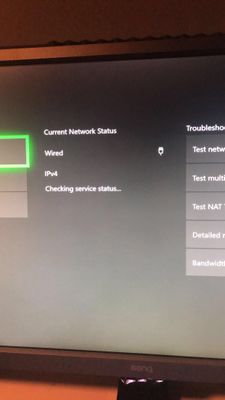
When I reconnect the CAT 6 cable to the Xbox One X it looks like it tries to make some type of connection about every 20-30 seconds and assigns it an IP Address in the Xbox menu but then drops the connecting again. It will continue to do this indefinitely if left alone.
Troubleshooting steps that have already been tried.
- Different port connection on the modem.
- Connected Cable to Desktop computer and it makes a successful connection.
- UPnP is on
- Attempted clearing Alternate MAC Address on the Xbox One X
- Factory reset modem and reopened Xbox One X Ports as per Microsoft
- Verified most up to date firmware on the unit which is updated by my ISP
- On the second Xbox now as the previous one had the same issue.
I will attach some screenshots if needed but this is basically the issue I'm coming up against. I don't know at this point if there is some compatibility issue with the modem and the Xbox one x or what might be going on but I don't even see the Xbox listed as an "attached device" in the router's settings so it is clearly not making a connection.
Hope this explanation helps some.

FURRYe38
Jun 03, 2019Guru - Experienced User
Disable "Instant ON" on the xbox one....
So do you have two xboxes now or just one?
cravenethan wrote:Hello FURRYe38!
I am surprised to see this issue gain any traction so quickly in this forum. I'll explain my details as it is very similar to the experience above. I will list all my equipment specs and pertinent information below.
I have a C7000v2 Nighthawk - AC1900 WiFi Cable Modem Router.
Brand new (and second) Xbox One X
Comcast is my ISP
CAT6 Cable running from Modem to Xbox one X
A little backstory to this issue. I previously had an original Xbox One connected to the hardline directly into the router/modem and there were no issues. I recently upgraded to the Xbox One X and connected the same cable that was previously working fine on the Xbox One to the new Xbox One X and the XB1X cannot make a connecting with the hardwire. If I disconnect the Ethernet Cable from the Xbox One X it will make a successful connection via wireless.
When I reconnect the CAT 6 cable to the Xbox One X it looks like it tries to make some type of connection about every 20-30 seconds and assigns it an IP Address in the Xbox menu but then drops the connecting again. It will continue to do this indefinitely if left alone.
Troubleshooting steps that have already been tried.
- Different port connection on the modem.
- Connected Cable to Desktop computer and it makes a successful connection.
- UPnP is on
- Attempted clearing Alternate MAC Address on the Xbox One X
- Factory reset modem and reopened Xbox One X Ports as per Microsoft
- Verified most up to date firmware on the unit which is updated by my ISP
- On the second Xbox now as the previous one had the same issue.
I will attach some screenshots if needed but this is basically the issue I'm coming up against. I don't know at this point if there is some compatibility issue with the modem and the Xbox one x or what might be going on but I don't even see the Xbox listed as an "attached device" in the router's settings so it is clearly not making a connection.
Hope this explanation helps some.
- cravenethanJun 03, 2019Tutor
I will attempt this when I am home and hopefully this will resolve the issue.
I only have one Xbox now.
- FURRYe38Jun 03, 2019Guru - Experienced User
OK, let us know.
cravenethan wrote:I will attempt this when I am home and hopefully this will resolve the issue.
I only have one Xbox now.
- cravenethanJun 04, 2019TutorHello Again,
I have removed my Xbox One X from “instant on” and changed it to “energy-saving” mode. Reset the Xbox to make sure this setting was applied on startup and plugged in the cable. This has unfortunately not resolved the issue and the same error continues when plugging in the Ethernet cable.
Hope something else might help?
Thanks - FURRYe38Jun 05, 2019Guru - Experienced User
So the xbox the only device that is not working on LAN connection? Kind of sounds like this maybe a LAN port issue with the Xbox. You've tried different ports on the modem right? Swapped in known working LAN cables between.
Do you have a spare router or prior router handy that you can just turn on and connect the xbox too to see if it gets any IP address from this router? This router doesn't have to be connected to the modem. Just need to see if the xbox gets an IP address from a different router if possible.
cravenethan wrote:
Hello Again,
I have removed my Xbox One X from “instant on” and changed it to “energy-saving” mode. Reset the Xbox to make sure this setting was applied on startup and plugged in the cable. This has unfortunately not resolved the issue and the same error continues when plugging in the Ethernet cable.
Hope something else might help?
Thanks - cravenethanJun 09, 2019TutorHi,
I don’t have an old router on hand to test but I did the next best thing to troubleshoot. A friend of mine brought over his Xbox one x to test the connectivity. A few notes:
- his Xbox one x is always connected at his house via Ethernet cable direct to modem and it works no problem. I.e. confirmed port works.
Attempted this connecting and the Xbox one x does the exact same thing as mine. This is the third Xbox one x that has had an attempted connection to this router and it will not work. Verified not a port issue.