NETGEAR is aware of a growing number of phone and online scams. To learn how to stay safe click here.
Forum Discussion

Strikersfan
Oct 23, 2020Tutor
Help Please! CM1200 Downstream Light Blinking
Been surfing through the forum posts, and seen some isues similar to mine, so I'm hoping someone can point me at a solution. My CM1200 downstream light blinks continuously, and I randomly drop my con...

plemans
Oct 25, 2020Guru - Experienced User
I've had to cave before and rent a modem for a month. If it works, then it is indeed a modem issue. If the issue re-occurs than comcast can't blame the modem.
Strikersfan
Oct 26, 2020Tutor
plemans wrote:I've had to cave before and rent a modem for a month. If it works, then it is indeed a modem issue. If the issue re-occurs than comcast can't blame the modem.
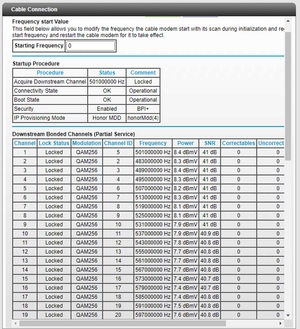
I have to be honest, I don't consider myself to be a conspiracy theory guy....but Comcast might just change my mind on this. So I go to Comcast and they give me a modem/router combo device. I Google the model and immediately my doubts start to creep in....Arris TG1682G. It's obviously used, and from what I can find online, is a model that came out 4 - 6 years ago, and is pretty universally panend as a piece of crap. The most positive reviews I can find say it's an "adequate" modem, but a real **bleep**eshow of a router. But being boxed into a corner needing to get online for work and my son's school, on it goes. After another hour of being on the phone with Comcast getting it set up, it's working and hasn't dropped my connection in over 6 hours. However, I had periods that lasted that long occasionally with my own modem not dropping so I'm not convinced yet. Plus it already dropped the wifi signal but not the internet signal once for a few minutes when only two devices were connecetd to it. But also I am now keenly aware this is not the apples to apples comparison I was looking for to get a real answer to my issue. This is not a Docsys 3.1 modem like mine, it is a Docsys 3.0. I am certain my connectivity issue was with the OFDM downstream channel not locking. This modem won't have that problem because it doesn't have that channel. It's no wonder they were convinced this crap device they gave me would "solve my problem" and they could now say, see, told you it was your modem. I can try to get my modem replaced with Netgear. But I am 100% convinced I could plug in a brand new CM1200 into my line and I would have the exact same issues of partial service and my connection dropping over and over because that channel won't lock. I just don't know what my recourse is at this point....
- plemansOct 27, 2020Guru - Experienced Userthere isn't a good one. You can get it replaced and see what happens. Maybe it was the device. If it doesn't, it points more at it being a comcast issue.