NETGEAR is aware of a growing number of phone and online scams. To learn how to stay safe click here.
Forum Discussion

Rickjones80
Feb 26, 2024Tutor
Unable to Install or uninstall apps since 6.10.10 firmware upgrade
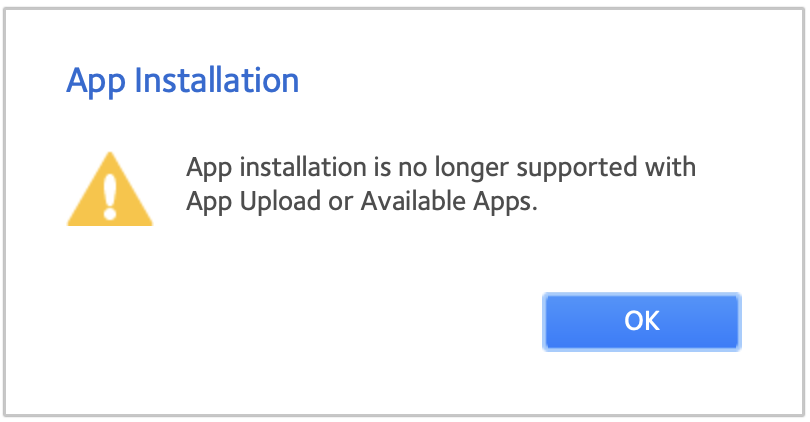
Hi I currently have a ReadyNAS 214 device which after updating to firmware version 6.10.10, no longer allows me to install or update apps via the admin page as Netgear have now disabled it I...
 Feb 26, 2024
Rickjones80 wrote:
I currently have a ReadyNAS 214 device which after updating to firmware version 6.10.10, no longer allows me to install or update apps via the admin page as Netgear have now disabled it
Any advice would be very much appreciated
You can downgrade back to 6.10.9.
Rickjones80 wrote:
will I be able to install Plex again via SSH for example?
Whether you downgrade or not, you'll also need to make the changes here:
Posts 1 and 37 are particularly relevant.
Once those changes are made, you will be able to install plex from ssh. And if you downgrade, you would also be able to install it from the web ui.
One caveat - Plex likely won't be providing the app for ReadyNAS indefinitely. You should keep a copy of the deb file. Even then you will likely have to install Plex on a different platform at some point in the future. Personally I run the Plex server on a PC, but keep the media files on my ReadyNAS.

Sandshark
Mar 09, 2024Sensei
Netgear has clearly already left the NAS market. Given that the Linux version on which the OS is based has been archived, loading apps was already impossible without making changes that could (though very unlikely) open up a path for an attacker. 6.10.10 now makes one aware of the inability to load apps instead of it just failing.
There never was an active developer base for ReadyNAS apps, and those few that were doing so have mostly gone away. But those who do use Plex or another app that is still being updated do have an issue. And so will anyone who uses apps and needs to factory default their NAS.
I personally don't believe that a change with this kind of impact should have ever been put on the update server. A version that just removed ReadyCloud would have been fine, since it's dead, but the inability to load apps should either have been made configurable or not done at all.

XrayDoc88
Mar 12, 2024Guide
I can't believe this firmware update change! I have invested in two Netgear RN628X NAS devices with very expensive, large hard drives. One NAS has 8 hard drives, the other one 6 hard drives. I use them as my PLEX servers and also to store all of my media, including 3 computer backups. I think it is criminal that Netgear would release firmware that kills significant functionality and not warn people in advance. A brief mention in the release notes is not enough! Why even bother to kill the app functionality? They could have just left the firmware at 6.10.9 and never done any more updates.
I also have never heard that Netgear was letting their NAS business go away.
I would really like to keep updating the PLEX servers for ReadyNAS as long as there are releases. I have downloaded a new release that I couldn't install. Is there a trick to downgrading back to the 6.10.9 firmware? I actually think my last firmware was 6.10.8, not 6.10.9. How can you even downgrade now that the upload option is gone?
- StephenBMar 12, 2024Guru - Experienced User
XrayDoc88 wrote:
How can you even downgrade now that the upload option is gone?
You can manually still downgrade to either 6.10.9 or 6.10.8, as the upload was never used for that.
Either way there are config changes you need with ssh to make to keep apt (and the gui upload) working.
See
Posts 1 and 37 are particularly relevant.
- XrayDoc88Mar 12, 2024Guide
Thank you StevenB. I've only ever updated the firmware by simply clicking ok. I didn't know you could choose a file manually. I still need some help if possible.
1. Did firmware 6.10.9 even apply to the RN628X? My NAS went from 6.10.8 to 6.10.10. I don't think I simply missed the option to upgrade to 6.10.9.
2. If yes, is 6.10.9 posted anywhere? When I looked at the Intel firmware on the Netgear site, 6.10.8 is the latest one listed.
3. I read posts 1 and 37, but I don't even know what SSH stands for. I thought I was pretty computer savvy, but I apparently have reached my limit. Is there any beginner, hand holding help available?
4. "Personally I run the Plex server on a PC, but keep the media files on my ReadyNAS." I'm intrigued by your statement. I've assumed that the cleanest, most efficient way to host a plex server with NAS media storage would be to install the server on the NAS. This has worked very well for me for a long time. But with Netgear spinning out of control, perhaps your method makes more sense?
5. With your method:
a. Do you use a Windows PLEX server connected to your NAS by ethernet?
b. Do you ever get notified by PLEX of server updates?
c. Is the update process simple and not likely to be killed by Netgear?
d. Could you map two separate ReadyNAS devices to the Windows server? I currently have PLEX server running on both of my ReadyNAS units so I always have a usable backup.
e. Why did you originally choose to go this route instead of just using the NAS PLEX server option?
Thanks.
- StephenBMar 12, 2024Guru - Experienced User
XrayDoc88 wrote:
1. Did firmware 6.10.9 even apply to the RN628X? My NAS went from 6.10.8 to 6.10.10. I don't think I simply missed the option to upgrade to 6.10.9.
2. If yes, is 6.10.9 posted anywhere? When I looked at the Intel firmware on the Netgear site, 6.10.8 is the latest one listed.
Netgear never pushed out 6.10.9 for any ReadyNAS, but they did release it.
Extract the image file from the zip before manually installing it.
XrayDoc88 wrote:
3. I read posts 1 and 37, but I don't even know what SSH stands for. I thought I was pretty computer savvy, but I apparently have reached my limit. Is there any beginner, hand holding help available?
Nothing here, though you might be able to find some guides on the internet.
You can download the two files Sandshark posted in post #37. If you enable ssh in the NAS, you can copy them in to the correct folder using WinSCP on your PC. Set the protocol to SFTP. Set the username to root, and use the NAS admin password.
Do be careful not to move or delete files, as that can mess up the OS. Linux operating system files aren't protected the way they are in Windows..
XrayDoc88 wrote:
a. Do you use a Windows PLEX server connected to your NAS by ethernet?
Yes. The NAS media shares are mapped to drive letters on the PC. Plex metadata libraries are stored on the PC (as usual), but the media files are all on the NAS.
XrayDoc88 wrote:
b. Do you ever get notified by PLEX of server updates?
I can see when updates are available when I connect to the server via https, and can use the check for updates feature in the settings.
I don't get emails when updates are available, I do need to check.
XrayDoc88 wrote:
c. Is the update process simple and not likely to be killed by Netgear?
Everything is on Windows, so updating doesn't involve the NAS at all. All that is required is that the PC be able to access the media files with SMB.
XrayDoc88 wrote:
d. Could you map two separate ReadyNAS devices to the Windows server? I currently have PLEX server running on both of my ReadyNAS units so I always have a usable backup.
I could have media files on multiple NAS (and also have some folders on the PC drive).
I could also have multiple plex servers (on different PCs) that access the same mediashares on one NAS.
XrayDoc88 wrote:
e. Why did you originally choose to go this route instead of just using the NAS PLEX server option?
Some of the considerations:
- My approach allows me to use Windows apps, I am not limited to Linux only.
- While the ReadyNAS performs well as a file server, it isn't the best application server. Memory is limited, the CPUs are faiirly modest, and there is no GPU. All of these limit the performance of Plex.
- There have been several instances of app compatibility issues - with apps needing to be deprecated when ReadyNAS firmware gets updates, and also app updates either not working on the NAS - or worse - crashing the NAS. Running the applications on a PC eliminates any of these risks.
- When you use a NAS as both a file server and an application server, you can easily get locked in - making it hard to upgrade the NAS, since you need to install all the apps and get them working properly on the new device. Since I only depend on SMB working, I can upgrade my applications (and my NAS) at any time, independently from each other. I can also gradually migrate to a new application server (assuming the old one is still working).
- NAS are specialized PCs, and are priced accordingly. Getting a new PC is cheaper than getting the same CPU+GPU performance in a new NAS. And even a mid-range NAS can keep up with an ethernet network, so my NAS are fast enough to deliver good storage for many years (longer than I keep my normal PCs). So upgrading the application performance over time is less expensive.
Downsides:
- Initial cost is likely higher (5 above mainly affects upgrading).
- It also takes more power.
- There are some scenarios where the ethernet speed could affect performance. For instance, if you just add enough disk space to the PC to store your media, some plex functions could run faster than using the NAS - especially if the disks are SSD. Though my main NAS (RN526x) is fast enough to keep up with what I need. I've tested video transcoding speed using the nvidia GPU, and the transcoding runs at about the same speed when the video is on the NAS as it does when it is in a local folder.
Related Content
NETGEAR Academy

Boost your skills with the Netgear Academy - Get trained, certified and stay ahead with the latest Netgear technology!
Join Us!