NETGEAR is aware of a growing number of phone and online scams. To learn how to stay safe click here.
Forum Discussion

bremenpl
Dec 06, 2023Tutor
IPTV over router issue
I have an issue with the IPTV box connected in my system. Ideally, the ISP provided setup should look like this: How I have it connected: Right now my gateway and the access p...
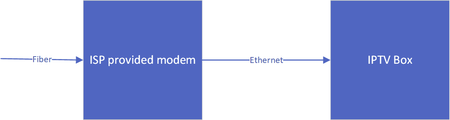
- Dec 06, 2023
Please contact Negear support for installation and configuration support. This is outside of my comfort zone.
My concerns are the probably workable IGMP proxy (IGMP level unknown), the dual-NAT situation with two NAT routers in the data path - not convinced about the IGMP snooping and multicast support. However, things might have changed since introducing the v7 bringing a major change to the RBR850/RBS850. Looks like I have to find some second-hand device in the market here, since I'm not Netgear 8-)

Loek
Dec 19, 2023Aspirant
Hey,
Did you manage to get it working using AP mode?
I have a similar IPTV issue regarding multicast and orbi's.
I believe it's due to Orbi not supporting IGMP Snooping, nor are they planning this feature afaik.
So I currently just switched my tv to unicast.
bremenpl
Dec 19, 2023Tutor
Hi, I did not manage to figure out anything here. What I did is I rebuilt my physical ethernet connections a bit and connected my IPTV box directly to the modem... I figured it was least effort.
- LoekDec 22, 2023Aspirant
Check, thanks for your reply, let's hope they will support IGMP Snooping at some point in the future.
- FURRYe38Dec 22, 2023Guru - Experienced User
Orib home systems only support the following fuction for IGMP:
"Disable IGMP Proxying
The IGMP Proxying function lets a LAN PC to receive the multicast traffic it is interested in from the Internet. You can click this check box to disable the function if you do not need it."
Found on the RBRs WAN Setup page.
- schumakuDec 22, 2023Guru - Experienced User
According to the find documentation, this is not limited to the consumer Orbi - also the Orbi Pro WiFi 6 seem to support this - here the SXR80:
Interestingly, there was just another post added from Norway:
Orbi SXR80 and IPTV from ISP Telenor
Maximum confusion for me now, as there is no NAT configuration similar to the older Nighthawk routers, allowing to configure a dedicated IPTV LAN there. Definitively need Netgear assistance here please 8-/
- FURRYe38Dec 22, 2023Guru - Experienced User
Those settings don't apply to Orbi Home systems. Maybe early says, however there are not UI settings on Orbi homes systems for those.
- schumakuDec 22, 2023Guru - Experienced User
Already added pointers to two Netgear reps for the Orbi Pro WiFi 6 system at least.
- schumakuDec 22, 2023Guru - Experienced User
FURRYe38 wrote:
Those settings don't apply to Orbi Home systems. Maybe early says, however there are not UI settings on Orbi homes systems for those.
Hmmmmm at lest the RBK50 does list BT IGMP proxy support 8-)))
Definitively lost at this point now ... IGMP Proxying on the router and at the same time no IGMP Snooping on the Orbi wired and wireless backhaul, and the satellites?!?
- schumakuDec 22, 2023Guru - Experienced User
Briefly browsing the community does bring up this where a moderator talked of "router only" ... just strange.
Less specific, but still RBR50 / RBS50 Firmware Version 1.5.0.12 from February 2017 (!!) does talk of
New Features and Enhancements:
Supports VLAN and bridging on the Orbi router.
Supports IGMP proxy...
...and on manually updating the Orbi 50 satellites. Understand every customer who is frustrated....
- schumakuDec 22, 2023Guru - Experienced User
FURRYe38 wrote:
Orib home systems only support the following fuction for IGMP:
"Disable IGMP Proxying
The IGMP Proxying function lets a LAN PC to receive the multicast traffic it is interested in from the Internet. You can click this check box to disable the function if you do not need it."
Found on the RBRs WAN Setup page.
On anything newer but the RBR50? Just asking for a friend....
- LoekDec 24, 2023Aspirant
Hi,
Yes, correct! I've this set-up correctly, however in order for everything to work correctly in my setup I also need IGMP Snooping. Proxy isn't enough unfortunately. I do get a multicast signal, but it's very stuttery. (1gbps connection). I believe snooping helps reduce the load.
I have the rb850 series.
- schumakuDec 24, 2023Guru - Experienced User
look, al we have to help are the fine documentations from https://www.netgear.com/support/product/rbr850#docs
All I can find is the "Set up a bridge for a port group or VLAN tag group" chapters, starting from p.88 ff. on the Orbi Whole Home Tri-Band Mesh WiFi 6 System User Manual (RBK85x)
What I'm reading (written or unwritten I'm afraid) is that this is applicable to the router component of your RBK85x, e.g. the RBR850 only. Convinced, the RBR850 UI does provide similar controls to my old R9000:
Said this: In either way, all you can do is assign one (or multiple) LAN ports of the router, where you could connect the IPTV Settop box. And No: This IPTV VLAN can not leave the router e.g. over the wired or wireless backhaul - the Orbi Whole Home system is limited in this aspect, the IPTV network is not tightly integrated in the similar way ISP provided routers do, where user can add either direct connected IPTV Settop boxe(s), or add a switch (configured to support IGMP Multicast).
ThomasNorway - that's why I've asked ref. your Orbi Pro SXR80. Are there no similar controls on your router? The SRS router would bring the VLAN support for the LAN 8-/
I wish Netgear would take more attention on such "basics", making the Orbi systems more useful and easier to integrate. That's all for now folks.
