NETGEAR is aware of a growing number of phone and online scams. To learn how to stay safe click here.
Forum Discussion

Jeremy_1208
Mar 10, 2019Aspirant
Fail to rename orbi satellite
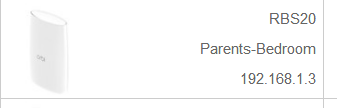
Recently I have purchased rbk20 and a rbk 40 for a better wifi coverage. Everthing works fine before this issue exists, I tried to rename the rbs 20 to ''parents-bedroom''.
However, in the m...
- Mar 11, 2019
Jeremy_1208 wrote:
Tried and it shows my devices were connected to the main router(Rbr20). After that, I unplug the lan cable and it shows ''orbi satellite'' again.:manfrustrated:
- So when you had the Ethernet Backhaul the devices showed as wired to the Router? What type of devices do you have: wired or wireless, any difference between wired and wireless devices' behavior?
- I guess you're still on Orbi SW 2.2.1.210. Can you please upgrade to next SW (2.3.0.28) and see if this will make improvement.

ekhalil
Mar 10, 2019Master
Ok, please try the following:
- Try to change the name to something simple like "Testing", apply the change then change again to another name try "Master Bedroom". Please test this and see what happens. Please do this from the web GUI not from the Orbi app.
- If this does not work, then please try to -temporarily- connect the satellite to the router by LAN cable, when you see that the connection changes to "wired", then make the name changes, and see if this will make through this time.
Jeremy_1208
Mar 10, 2019Aspirant
Tried. Issue still exists.
- ekhalilMar 10, 2019Master
Jeremy_1208 wrote:
Tried. Issue still exists.Have you also tried the cable method above? :)
- Jeremy_1208Mar 11, 2019Aspirant
Tried and it shows my devices were connected to the main router(Rbr20). After that, I unplug the lan cable and it shows ''orbi satellite'' again.:manfrustrated:
- ekhalilMar 11, 2019Master
Jeremy_1208 wrote:
Tried and it shows my devices were connected to the main router(Rbr20). After that, I unplug the lan cable and it shows ''orbi satellite'' again.:manfrustrated:
- So when you had the Ethernet Backhaul the devices showed as wired to the Router? What type of devices do you have: wired or wireless, any difference between wired and wireless devices' behavior?
- I guess you're still on Orbi SW 2.2.1.210. Can you please upgrade to next SW (2.3.0.28) and see if this will make improvement.
- Jeremy_1208Mar 11, 2019Aspirant
Let me makes it clear, if I wire connected my rbs to rbk20, it shows all my devices is wire connected to the rbr20 no matter I am using wifi or not.
On the other hand, I am still on Orbi SW 2.2.1.210 and it is because if I check software update through Web GUI or the orbi app, it shows I am on the latest version. Should I manually update the firmware and what is the sequence of the update process? satellite first or the main router first?
- Jeremy_1208Mar 12, 2019Aspirant
Just manually updated to the latest firmware and reboot the router. Everything works fine and it shows''Parents-Bedroom'' again. Hope this firmware will be the stable one. Many thanks!
- ekhalilMar 12, 2019Master
Jeremy_1208 wrote:
Just manually updated to the latest firmware and reboot the router. Everything works fine and it shows''Parents-Bedroom'' again. Hope this firmware will be the stable one. Many thanks!
That's great to know. Yes, I also hope that the new software will work as it should. So far I find it very good and stable.
Good luck!