NETGEAR is aware of a growing number of phone and online scams. To learn how to stay safe click here.
Forum Discussion

Mooose
Jan 30, 2019Luminary
Massive packet loss over Ethernet backhaul
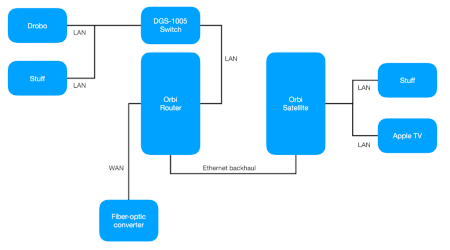
I believe I have read all the threads on this topic and tried the suggested solutions that are relevant to my particular network. My apologies if I have missed something!
My Orbi RBK50 (one rou...
- Feb 06, 2019
Mooose Good troubleshooting and interesting observations. It's clear that the packet loss is directly related to the wired backhaul.
I'm now running the ongoing beta software (2.3.0.23) and I can see that NG has done quite good improvements on wired device handling. Would you want to test this SW and see if you will see improvements? If yes, please PM to ChristineT and ask to get the SW download links.


FURRYe38
Jan 30, 2019Guru - Experienced User
What happens if you disconnect the Orbi router from the ISP modem? Similar PL?
Can you try a different laptop or PC to compare results?
"From the laptop (10.0.0.19) connected to the router through wifi with Ethernet backhaul:"
When you mention this, is the laptop connnected to the Orbi router via wifi with it's ehthernet cable connected as well or disconnected? Or is this just the ethernet backhaul enabled and connected with the satellilte?
What is the mfr and model if this ISP modem. I believe it already has a built in router. Just curious is all.
Seen bad behavior after doing the auto update. Loads of users having problems using auto update. So reason for trying a file FW load and reset and setup from scratch. Helped resolve users issues in regards to auto update.
I would take a backup snapshot of the current routers configuration and save it to file. Then if you do the FW manual re-load and setup from scratch, run some tests first. Then apply the saved configuration to file.
Mooose
Jan 30, 2019Luminary
I do not have a modem, the WAN port is connected directly to the fiber-optic to Ethernet media converter installed with the fiber-optic connection. My ISP supplies the external IP address on this interface through DHCP. There is nothing printed on the outside of the media converter enclosure except the MAC address, and I'd rather not break it open to find the model identification. I'm sure there is some way to poll it, but I do not know how. In any case, there is no router of any kind between the Orbi router and the fiber-optic connection.
I have not tried disconnecting the WAN. I will try this tomorrow, when others are not relying on the connection.
The wifi laptop (10.0.0.19) does not have an Ethernet cable connected to it, its only connection is the wifi connection to the Orbi router.
I have tried several other devices, including other computers, an Apple TV, a Nintendo Switch and the Raspberry Pi that runs Home Assistant. I haven't done any rigorous testing, but as far as I can tell the results are pretty much the same, i.e. packet loss with the Ethernet backhaul cable connected.
Thanks for the voodoo information. It may take a while to find time to try a manual update, factory-reset and retest, but I will do it when I get a chance.