NETGEAR is aware of a growing number of phone and online scams. To learn how to stay safe click here.
Forum Discussion

steechee
Jul 27, 2021Follower
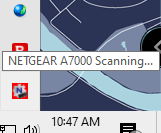
Red Netgear Icon in Windows System Tray says A7000 Scanning... but Internet is connected AND...
Running into two strange issues. So far they have not affected my connectivity, but I don't want to constantly have an error badge and incorrect info displayed. 1. The Netgear A7000 icon in my Wi...

michaelkenward
Jul 28, 2021Guru - Experienced User
steechee wrote:
1. The Netgear A7000 icon in my Windows System Tray is red and says "NETGEAR A7000 Scanning..." I cannot click, double-click, or right click on the icon to seek further information.
You don't need any software genie or otherwise, to use your WiFi USB Adapter. You can get rid of that icon from the Windows Notification Area by telling Windows not to run the genie.
Look at the Start-up tab in the Task Manager.
You have posted your message in the section of this community given over to Nighthawk WiFi Routers. (This is easily done, given Netgear's complicated community structure.)
Many questions apply to different types of device, so there may be useful responses here, but WiFi USB Adapters and routers are very different devices, so you might get more help, and find earlier questions and answers specific to your device, in the appropriate section for your hardware. That's probably here:
WiFi Adapters - NETGEAR Communities
I will ask the Netgear moderator to move your message.
In the meantime you could visit the support pages:
Support | NETGEAR
Feed in your model number and check the documentation for your hardware. Look at the label on the device for the model number.
You may have done this already. I can't tell from your message.
I mention it because Netgear stopped supplying printed manuals and CD versions some years ago and people sometimes miss the downloads.