NETGEAR is aware of a growing number of phone and online scams. To learn how to stay safe click here.
Forum Discussion

Sandshark
Jan 31, 2017Sensei
ReadyNAS 4200V2 OS6.6.1 fan control
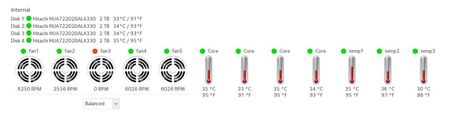
OK, I couldn't resist picking up an inexpensive ReadyNAS 4200V2. I ran it a short while on OS 4.2.30, then upgraded to 6.6.1. While the fans ran a bit higher than I thought they needed to on 4.2.x ...
 Feb 01, 2017
There is no RN4200v2 sensors config that ships with OS6. There aren't any RN4200v2 systems around here so I can't verify this, but you may be able to just copy the RN4200v1 config and start from there. It might "just work". Just do this:
# cp /etc/frontview/sensors/RN4200.conf /etc/sensors.d/
# systemctl restart readynasd

Sandshark
Feb 01, 2017Sensei
OK, I did some experiments unplugging fans:
Based on the OS6.1.6 labeling, the physical location of the fans is as follows:
Fan 1 = Fan_Sys2 = Fan 3 MB header
Fan 2 = CPU fan = Fan1 MB header
Fan 3 = Rear, uninstalled fan = Fan5 MB header
Fan 4 = Fan_Sys1 = Fan4 MB header
Fan 5 = Fan_Sys3 = Fan 2 MB header
Temp2 appears to be CPU case temp, as it rose the most when I unplugged the CPU fan..
I plugged a fan into the rear motherboard fan header and the fan control point dropped to 5200 on the case fans, 2220 on the CPU fan, and 3300 (which I believe is somewhere near its max) on the extra fan. So the fan "failure" was a factor. This was further confirmed when all the fans bumped up whenever I disconnected one of them.
The case fan speeds are still higher than expected. My curent guess is that the system wants to get the CPU and extra fan RPM higher, but they aren't the same kind of fan and won't go that high. A next possible step is to jumper the tach output of one of the case fans to the rear header and see if it slows things down any. But what to do about the CPU fan not achieving desired speed? If I fool the system on that one, I won't know if the fan really fails. But it's worth a try.
Is there any way to tweek the fan control to know what to expect from the fans rather than using a hardware hack?
I could, of course, go back to 4.2.x; but I was really hoping for 6.x.
Skywalker
Feb 01, 2017NETGEAR Expert
There is no RN4200v2 sensors config that ships with OS6. There aren't any RN4200v2 systems around here so I can't verify this, but you may be able to just copy the RN4200v1 config and start from there. It might "just work". Just do this:
# cp /etc/frontview/sensors/RN4200.conf /etc/sensors.d/
# systemctl restart readynasd
- SandsharkFeb 02, 2017Sensei
Many thanks Skywalker, the force is truly with you. It made all the difference in the world. I looked at the file contents and everything agreed with what my experiments showed, I verified the fan headers were numbered the same on the V1 and V2 motherboards, and I was satisfied it should work. Once I copied it and restarted, the fans are running at a much more reasonable speed. It's been going now for several minutes, and I'll leave it on over night.
Sometimes, none of the graphs are active after a reboot. I get some spinning wheels when I first bring up the tab, then nothing. But that may have always been the case, as I have not rebooted it a lot. Another side effect of doing this is that the Overview tab now reports the unit as a 4200 rather than a 4200V2. I tried renaming the .conf to RN4200V2.conf, but that didn't make a difference. As long as it still recognizes drives larger than 2TB (and it does, as you can see in bay 10 above), I guess it doesn't matter.
If you need anything checked on a 4200V2 for a future release, let me know. I plan to move some of my backups to the 4200, but I can always pull the drives and experiment with a couple spares.
 tdatersFeb 03, 2017Aspirant
i have the issue, but am a complete neophyte when it come to entering commands in this OS. Do i just log on once it's up and running and enter the comands as you have them listed?
thanks
- mdgm-ntgrFeb 04, 2017NETGEAR Employee Retired
You'd enable the SSH service, login as 'root' (no quotes - password is set to be the same as that for the admin user but they are separate accounts) and enter the commands. Note that you wouldn't type the # at the start. That comments out the command. We tend to post commands that way as you should always think about what you're doing rather than blindly copy and paste commands.


Related Content
NETGEAR Academy

Boost your skills with the Netgear Academy - Get trained, certified and stay ahead with the latest Netgear technology!
Join Us!
