NETGEAR is aware of a growing number of phone and online scams. To learn how to stay safe click here.
Forum Discussion

Oversteer71
May 01, 2017Guide
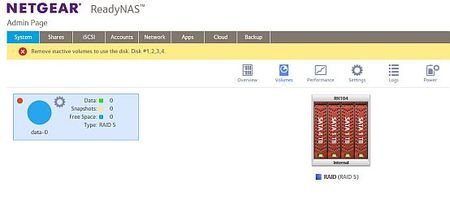
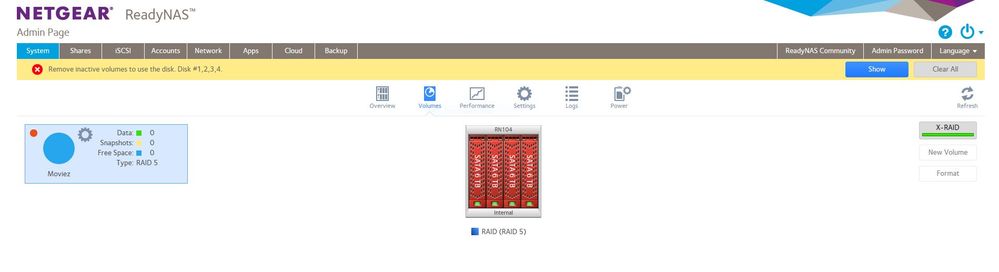
Remove inactive volumes to use the disk. Disk #1,2,3,4.
Firmware 6.6.1 I had 4 x 1TB drives in my system and planned to upgrade one disk a month for four months to aceive a 4 x 4TB system. The initial swap of the first drive seemed to go well but aft...
Oversteer71
May 02, 2017Guide
Operationaly and statistically this doesn't make any sense. The drives stay active all the time with backups and streaming media so I'm not sure why doing a disk upgrade would cause abnormal stress. But even if that is the case and drive D suddenly died, I replaced Drive A with the original fully functional drive which should recover the system. Also, the NAS is on a power conditioning UPS so power failure was not a cause.
Based on the MANY threads on this same topic, I don't think this is the result of a double drive failure. I think there is a firmware or hardware issue that is making the single most important feature of a RAID 5 NAS unreliable.
Even if I could figure out how to pay Netgear for support on this, I don't have any confidence this same thing won't happen next time so I'm not sure it's worth the investment.
Thank you for your assitance though. It was greatly appreciated.

jak0lantash
May 02, 2017Mentor
Oversteer71 wrote:
Based on the MANY threads on this same topic, I don't think this is the result of a double drive failure. I think there is a firmware or hardware issue that is making the single most important feature of a RAID 5 NAS unreliable.
I doubt that you will see a lot of people here talking about their dead toaster. It's a storage forum, so yes, there is a lot of people talking about storage issues.
Two of your drives have ATA errors, this is a serious condition. It may work perfectly fine in production, but putting strain on them and they may not sustain it. The full smart logs would allow to tell when those ATA errors were raised.
https://kb.netgear.com/19392/ATA-errors-increasing-on-disk-s-in-ReadyNAS
As I mentioned before and as StephenB explained, resync is a stressful process for all drives.
The "issue" may be elsewhere, but it's certainly not obvious that this isn't it.
From mdadm point of view, it's a dual disk failure:
[Mon May 1 17:29:22 2017] md/raid:md127: not enough operational devices (2/4 failed)
Also, if nothing happened at drive level, it is unlikely that sdd1 would get marked as out of sync, as md0 is resynced first. Yet it was:
[Mon May 1 17:29:18 2017] md: kicking non-fresh sdd1 from array!
- Ivo_mMay 03, 2017Aspirant
Hi,
I have a similar problem with my RN104 which up until tonight I had been running without issue with 4x6Tb drives installed , running a RAID5 configuration.
After a reboot I get the message Remove inactive volumes in order to use the disk. Disk #1,2,3,4
I have no backup,and i need the data !
- jak0lantashMay 03, 2017Mentor
Maybe you want to upvote this "idea": https://community.netgear.com/t5/Idea-Exchange-for-ReadyNAS/Change-the-incredibly-confusing-error-message-quot-remove/idi-p/1271658
You probably don't want to hear that right now, but you should always have a backup of your (important) data.
I can't see your screenshot as it wasn't approved by moderators yet, so I'm sorry if it would have replied to one of these questions.
What happened before the volume became red?
Are all your drives physically healthy? You can check under System / Performance, hover the mouse of the colored circled beside each Disk and look at the error counters (Reallocated Sectors, Pending Sectors, ATA Errors, etc.).
What does the LCD of your NAS show?
If you download the logs from the GUI and search for "md127" in dmesg.log, what does it tell you?
What F/W are you running?
- Ivo_mMay 03, 2017Aspirant
What happened before the volume became red? - The file transfer stopped and 1 share disappeared. After restart - no data in share folder.
Are all your drives physically healthy? You can check under System / Performance, hover the mouse of the colored circled beside each Disk and look at the error counters (Reallocated Sectors, Pending Sectors, ATA Errors, etc.).- all 4 HDD's are healthy - all errors,realocated sectors etc.... are 0
What does the LCD of your NAS show? - no error mesages on the NAS LCD
Status on the RAIDar screen is : Volume ; RAID Level 5 , Inactive , 0MB (0%) of 0 MB used
If you download the logs from the GUI and search for "md127" in dmesg.log, what does it tell you?
[Tue May 2 21:24:58 2017] md: md127 stopped.
Tue May 2 21:24:58 2017] md/raid:md127: device sdd3 operational as raid disk 0
[Tue May 2 21:24:58 2017] md/raid:md127: device sda3 operational as raid disk 3
[Tue May 2 21:24:58 2017] md/raid:md127: device sdb3 operational as raid disk 2
[Tue May 2 21:24:58 2017] md/raid:md127: device sdc3 operational as raid disk 1
[Tue May 2 21:24:58 2017] md/raid:md127: allocated 4280kB
[Tue May 2 21:24:58 2017] md/raid:md127: raid level 5 active with 4 out of 4 devices, algorithm 2
[Tue May 2 21:24:58 2017] RAID conf printout:
[Tue May 2 21:24:58 2017] --- level:5 rd:4 wd:4
[Tue May 2 21:24:58 2017] disk 0, o:1, dev:sdd3
[Tue May 2 21:24:58 2017] disk 1, o:1, dev:sdc3
[Tue May 2 21:24:58 2017] disk 2, o:1, dev:sdb3
[Tue May 2 21:24:58 2017] disk 3, o:1, dev:sda3[Tue May 2 21:24:58 2017] md127: detected capacity change from 0 to 17988626939904
[Tue May 2 21:24:59 2017] BTRFS info (device md127): setting nodatasum
[Tue May 2 21:24:59 2017] BTRFS critical (device md127): unable to find logical 9299707723776 len 4096
[Tue May 2 21:24:59 2017] BTRFS critical (device md127): unable to find logical 9299707723776 len 4096
[Tue May 2 21:24:59 2017] BTRFS critical (device md127): unable to find logical 9299707731968 len 4096
[Tue May 2 21:24:59 2017] BTRFS critical (device md127): unable to find logical 9299707731968 len 4096
[Tue May 2 21:24:59 2017] BTRFS critical (device md127): unable to find logical 9299707740160 len 4096
[Tue May 2 21:24:59 2017] BTRFS critical (device md127): unable to find logical 9299707740160 len 4096
[Tue May 2 21:24:59 2017] BTRFS critical (device md127): unable to find logical 9299707748352 len 4096
[Tue May 2 21:24:59 2017] BTRFS critical (device md127): unable to find logical 9299707748352 len 4096
[Tue May 2 21:24:59 2017] BTRFS critical (device md127): unable to find logical 9299707723776 len 4096
[Tue May 2 21:24:59 2017] BTRFS critical (device md127): unable to find logical 9299707723776 len 4096
[Tue May 2 21:24:59 2017] BTRFS critical (device md127): unable to find logical 9299707731968 len 4096
[Tue May 2 21:24:59 2017] BTRFS critical (device md127): unable to find logical 9299707731968 len 4096
[Tue May 2 21:24:59 2017] BTRFS critical (device md127): unable to find logical 9299707740160 len 4096
[Tue May 2 21:24:59 2017] BTRFS critical (device md127): unable to find logical 9299707740160 len 4096
[Tue May 2 21:24:59 2017] BTRFS critical (device md127): unable to find logical 9299707748352 len 4096
[Tue May 2 21:24:59 2017] BTRFS critical (device md127): unable to find logical 9299707748352 len 4096
[Tue May 2 21:24:59 2017] BTRFS critical (device md127): unable to find logical 9299707723776 len 4096
[Tue May 2 21:24:59 2017] BTRFS critical (device md127): unable to find logical 9299707723776 len 4096
[Tue May 2 21:24:59 2017] BTRFS critical (device md127): unable to find logical 9299707731968 len 4096
[Tue May 2 21:24:59 2017] BTRFS critical (device md127): unable to find logical 9299707731968 len 4096
[Tue May 2 21:24:59 2017] BTRFS critical (device md127): unable to find logical 9299707740160 len 4096
[Tue May 2 21:24:59 2017] BTRFS critical (device md127): unable to find logical 9299707740160 len 4096
[Tue May 2 21:24:59 2017] BTRFS critical (device md127): unable to find logical 9299707748352 len 4096
[Tue May 2 21:24:59 2017] BTRFS critical (device md127): unable to find logical 9299707748352 len 4096
[Tue May 2 21:24:59 2017] BTRFS: failed to read tree root on md127
[Tue May 2 21:24:59 2017] BTRFS warning (device md127): page private not zero on page 9299707723776
[Tue May 2 21:24:59 2017] BTRFS warning (device md127): page private not zero on page 9299707727872
[Tue May 2 21:24:59 2017] BTRFS warning (device md127): page private not zero on page 9299707731968
[Tue May 2 21:24:59 2017] BTRFS warning (device md127): page private not zero on page 9299707736064
[Tue May 2 21:24:59 2017] BTRFS warning (device md127): page private not zero on page 9299707740160
[Tue May 2 21:24:59 2017] BTRFS warning (device md127): page private not zero on page 9299707744256
[Tue May 2 21:24:59 2017] BTRFS warning (device md127): page private not zero on page 9299707748352
[Tue May 2 21:24:59 2017] BTRFS warning (device md127): page private not zero on page 9299707752448
[Tue May 2 21:24:59 2017] BTRFS: open_ctree failedWhat F/W are you running? 6.6.1
Related Content
NETGEAR Academy

Boost your skills with the Netgear Academy - Get trained, certified and stay ahead with the latest Netgear technology!
Join Us!
