NETGEAR is aware of a growing number of phone and online scams. To learn how to stay safe click here.
Forum Discussion

nsne
Dec 22, 2016Virtuoso
Sluggish AFP access, Finder hangs: Permissions issues?
I recently did a factory reset of my 314. As part of that process, I had to backup all my data to a spare NTFS-formatted drive and then transfer it back to the NAS. Since restoring, I've experien...

nsne
Dec 25, 2016Virtuoso
Did you have a chance to look at those logs I sent, mdgm-ntgr?
The sluggishness persists. I've tried switching off the apps and didn't notice any improvement.

mdgm-ntgr
Dec 27, 2016NETGEAR Employee Retired
Let me check with some colleagues on this.
- nsneDec 30, 2016Virtuoso
After trying to work with this a bit more, the big problem seems to be when deleting files on the AFP share via the macOS Finder.
For example, when I delete files via (S)FTP, it's fine. When I try to delete them on the same AFP share using the Finder, I get hangs and disconnections. I don't know where the issue lies.
- nsneJan 02, 2017Virtuoso
Okay, I'll update my own thread a bit further.
I thought maybe this was an issue with the ReadyNAS and the macOS 10.2.3 public beta, but then I experienced the same behavior on another computer that was running the latest release build of Sierra.
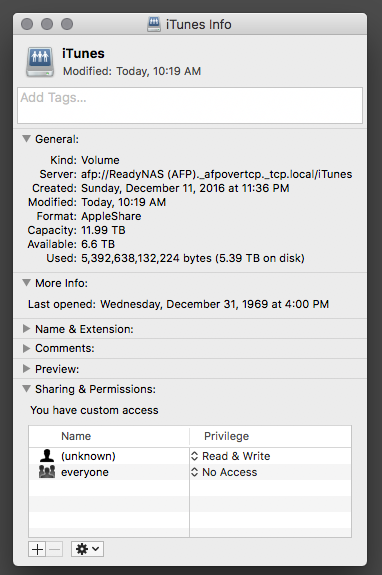
So I started adjusting my AFP settings on the NAS. What finally stopped the hangs from occurring was when I gave "Everyone" Read/Write access (see below). My previous settings limited Read/Write access to admin. (And before you ask, yes, I was always logged in to the NAS AFP share using the admin creds).
Unfortunately, this defeats the point of having restricted access! The whole point of keeping "Everyone" Read-Only was to ensure that guests didn't accidentally delete music from the share.
My question is, is this an Apple-side AFP bug or a Netgear-side AFP bug? Or have I overlooked something regarding access rights?
- nsneJan 07, 2017Virtuoso
I don't want to jump the gun, but 6.6.1 seems to have been a miracle cure. File transfers with my desired AFP settings seem to be back to normal (smooth, minimal hiccups) following the update. I'm going to give it a few more days and confirm.
- FramerVJan 09, 2017NETGEAR Employee Retired
Hi nsne,
Just wanted to verify if there were any developments after the firmware update.
Regards, - nsneJan 11, 2017Virtuoso
Everything still seems to be functioning smoothly. I also added a new disk and expanded the volume, and it's okay after that. So this issue appears to have been fully resolved by the 6.6.1 firmware update.


Related Content
NETGEAR Academy

Boost your skills with the Netgear Academy - Get trained, certified and stay ahead with the latest Netgear technology!
Join Us!
