NETGEAR is aware of a growing number of phone and online scams. To learn how to stay safe click here.
Forum Discussion

danaldo
Jul 09, 2016Aspirant
Cannot change WiFi speed with WN3000 Range Extende
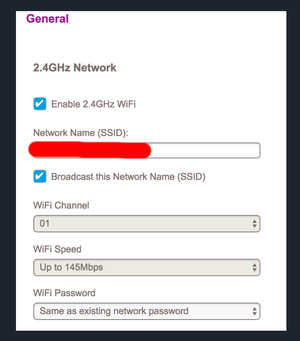
Hi all, I try to change the WiFi speed after having succesfully connected to the original WiFi network and extending it with the WN3000. But the dropdown list is blocked. When I connect to the or...
 Jul 18, 2016
Hello danaldo
Then that is why it is not allowing the 300 mbs because your main router is outputting that and the extender will cut that in half for all devices connected to the extender but not if they are on the router network. Here is a good article explaining this.
https://www.repeaterstore.com/pages/wifi-booster-repeater-extender-differences
DarrenM
danaldo
Jul 14, 2016Aspirant
Yes, :
- Hardware Version: WN3000RPv3
- Firmware Version: V1.0.2.24
DarrenM
Jul 14, 2016Sr. NETGEAR Moderator
Hello danaldo
Have you tried to use a different web browser when trying to change this setting?
DarrenM
- danaldoJul 16, 2016Aspirant
Hi DarrenM,
yes, I tried it with different browsers.
I think that the source router is not using 5Mhz, but also the 2.4 Mhz . Would then be possible at all to choose 300Mbit as speed for the Netgear extender?
Best,
Daniel
- DarrenMJul 18, 2016Sr. NETGEAR Moderator
Hello dandaldo
That could be it what is your main router? Since the extender cuts the speed in half that may be why your are only allowed to set it to 145.
DarrenM
- danaldoJul 18, 2016Aspirant
The main router is a new 300M Wireless N Gigabit RouterModel No. TL-WR840N .