NETGEAR is aware of a growing number of phone and online scams. To learn how to stay safe click here.
LLDP
3 Topics
MS108EUP not supporting LLDP in a good way?
Hi, I am working quite a bit with hardware and software POE negotiation, and my view of the 802.3 standard is that the switch should announce it's LLDP capabilities and settings (including Power-via-MDI) directly to a connected device that is powered by it. However, when I take a wireshark trace using the Netgear MS108EUP switch toward an Axis camera, it seems like the switch does not send ANY LLDP packets unless I first send a power request from the camera... I also logged into the switch and tried to find a way to enable / disable LLDP, but found no such control in the GUI. What am I doing wrong? Or is the switch just not working as a 802.3 device should work? / KennethM4300/M4250 - Keeping multicast on switch
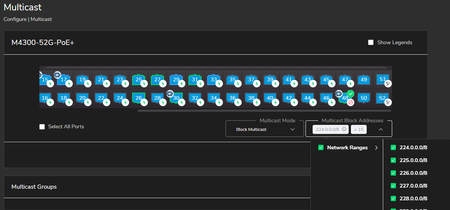
I have several M4300 / M4250 switches set up for a customer with various Crestron NVX implementations, all of which is working well. We have a very basic connection to the customer's existing network by simply connecting a standard gigabit port on the M4300/4250 (port 48) to one of their switches, used only for remote access and diagnostics. We are not directly trunked to their switches or stacks, in effect we appear as a simple unmanaged switch to their equipment (BPDU filter, disabling STP on that port - I know, I know, not good things to do, and will ultimately be resolved properly). We want to make sure multicast does not leave our dedicated M4300/4250 switch, and block all multicast traffic from leaving (or entering) port 48. In effect, I want to make sure all multicast is blocked inbound and outbound on that single switch port, but allow other TCP/IP traffic for remote diagnostics, etc. I've tried using the Configure>Multicast -> Block Multicast method in the AV GUI webpage: But I still see multicast traffic entering and leaving the switch on port 48: Does anyone have any suggestion on ensuring that all multicast traffic (even if it's by IP/range) stays on the switch and does not traverse my "uplink" port 48? Thanks Jay702Views0likes1CommentLLDP "Operational MAU type" (802.3 TLV) is zero for GS724Tv3
Versions Model Name Boot Version Software Version B5.1.1.1 5.4.2.19 I've enabled the optional LLDP TLVs on all my ports. When I receive the 802.3 organizationally specific TLV subtype 1, the oerational MAU type is zero. What the operational MAU type should be is 30. The RFC for this is: dot3MauType1000BaseTFD OBJECT-IDENTITY STATUS current DESCRIPTION "Four-pair Category 5 UTP, full duplex mode" REFERENCE "[IEEE 802.3 Std.], Section 40" ::= { dot3MauType 30 } When I check on the web interface, it shows 1000mbit, full duplex. The switch can only do 1000-base-t on 4 pair of unshielded twisted pair. It would be handy to be able to get this information and verify that everything was as it should be. But the latest firmware (just downloaded it) gives a zero. This is the wrong answer ;-) Here's what the dump of the TLV shows: ORG SPECIFIC DUMP: 00120f: DUMP (9 bytes): 00 12 0f 01 03 00 01 00 00 You can read about this in Annex G of the 802.1AB (LLDP) spec. On my copy this spans pages 132 and 133. An OUI of 00-12-0F means it's the 802.3 TLV (as I expect). The last two bytes (octets) are the "operational MAU type". As you can see they are both zero. The only reason for them to be zero is if the type of MAU isn't listed in RFC 3636. But it is. So, it's an error for it to be zero.6.7KViews0likes11Comments