Managed Switch
49 Topics
Feature Request: Disable/remove automatic port descriptions
Request: Either create a way to stop network profiles from overriding manual switch port descriptions or remove the feature. Reason for request: We use the netgear switch plugin for our control system (Q-Sys). Using the plugin and port descriptions we are able to quickly bounce devices and/or power cycle POE devices when needed. Without reliable port descriptions, this becomes a much longer and involved process. We have over 30 40 port switches in our environment plus even more of a mix smaller M4260's. Not all of our admins have detailed information on switch configs. Background: This feature was added to the firmware in version 13.0.5.20. Expected behavior: Option 1: If a manual port description is applied to a port, reapplying a network profile will not overwrite the description. Option 2: Add an option in the network profiles that turns that feature off for the profile. Option 3: Remove the automatic generation of port descriptions altogether.30Views1like0CommentsEngage Password Overwrite Notification And Other Suggestions
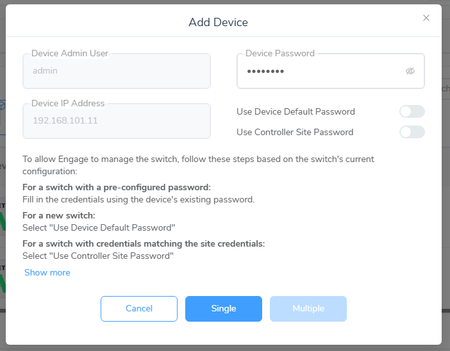
I have been using Netgear AV switches for several years, and primarily use the web UIs. When Engage came out, I started testing with it, and I found a couple features of this system that really led me to a lot of confusion. I imagine the majority of Engage installs are for fixed installs with new out of the box switches, but I use these switches for teaching workshops so I'm reconfiguring them and changing the setup all the time. This kind of configuration is not uncommon on show applications or in rental shops, and as you are pushing Engage these days for multi switches I am likely far from the only one doing a lot of configuration. Anyway, If I'm understanding correctly, when you set up a switch out of the box (or grab an existing one off the shelf) and want it to work with engage, if you want Fixed IPs and don't want to mess with setting up a DHCP server, you do this first through the web interface, and then onboard the switch. When you set it up through the web UI, you also enter a password. In a rental shop application or my lab, I have IPs allocated to each switch and a standard password. Then when you onboard the switch, you enter the password you created. You are given the option to select the “Device Default” password or the “Controller Site” password; reading the fine print, it says that use these if it matches what you’ve already got. Then--and this is what confused the hell out of me--it seems that Engage OVERWRITES the existing switch password with the site password, >>>even if I do not have the "Use Controller Site Password" selected<<<. (again, the fine print kind of explains this but I never even read that until recently because I never had that switch set. And it does this with absolutely no notice that I saw. If you used the same password in setup as you used for the site, you wouldn’t notice, but if you’re like me, and want to later access the switch by the web UI (either to check something or if you’ve disassembled the network and are using the switch in a different application), if you don’t that the password has been changed, you’ll be (like me) very confused. I went through this like six times over the last year, and kept just giving up and factory resetting the switch and starting over and abandoning Engage and going back to the web UI. Finally, I made three different passwords (Switch, Engage, and Site and figured out what was going on, and verified it through ProAV Design support. All of this confusion could have been eliminated if you simply had a Popup when you go to onboard that says "The existing password will be overwritten with the Engage Site password." This little pop up would have saved me many hours of confusion and frustration. Another thing that’s confusing in Engage is the “Save” button. When you’re on the web UI, the “Save” obviously is going to write the config file of the switch, since there’s no place the web browser would store it. When you’re new to Engage, it’s not really clear if this is going to save to the switches or to a local file. Once you go through it and see the writing process it makes more sense, but just changing that button to “Save to Connected Hardware” would be a lot more clear for people starting out. Finally, it would be really great if the columns would resize with the window size. I've often been confused when running on my laptop because some button is off the side of the screen and not visible. I have learned to look at the tiny scroll bars and move around on every screen, but it would be a lot easier (especially on smaller laptop screens) if the columns would resize automatically. Also the scroll bars would be a lot easier to use if they were bigger. Thanks, John24Views0likes0CommentsAbility to schedule Firmware updates to multiple devices at the same time needed
Wanting the ability to schedule switch firmware updates for all devices via the Insight Portal. Currently, we can only schedule on a per-switch basis. You can reschedule recurring reboots, but it would be very help for customers who a lot of devices. We have close to 300 switches on the portal. It is not very effective to have to go into every device to schedule the firmware update. Thx21Views0likes0CommentsOption to Change Time NTP Vlan in theAV ui
for the AVseries . M4250 , M4300 , M4350 To change the NTP time Vlan from Vlan 1 to Vlan 621, where i host my own time server. I need to go in to the main ui en change the Vlan there. But all other options to change from local to NTP are already in the AVui. it seems logical to me if you were able to change the vlan for the NTP server also in AVui. who can back me up ?20Views0likes0CommentsAdvanced 802.1Q VLAN Port Members: Show Tagged vs. Untagged
On my GS308E, under Advanced 802.1Q VLAN mode, I see the list of VLANs and their port members. But, to know which Port Members are tagged and which are untagged, I must edit the VLANs. It would be preferable if the Port Members were split into two columns: Tagged Ports, Untagged Ports, and the members split between the two. Also, why is the PVID table accessed by a link in the text under the title PVID Table? Why not just put the PVID table on the same page? Both tables require clicking to make an edit, so both tables should update when returning from editing. While this would distinguish tagged and untagged ports on the Advanced 802.1Q VLAN mode page, it would still be preferable if the VLAN table were updated as suggested. This suggestion is applicable to all devices with this page.56Views0likes1CommentEnhanced STP options - Manual Edge Port and BPDUGuard
Relating to case ID#: 49613834 Here is the end result of my actual feature request Product: GS110TPv3 Firmware: 7.1.0.7 Requested enhancements: Manual per‑port Edge Port enable/disable Optional BPDU Guard‑style protection on those ports My Use case: employee office port expansion, no direct monitoring, need for secure and deterministic STP handling similar to what I have on my HP/Cisco/other NETGEAR switches across all of our physical sites.72Views0likes0CommentsAdministrator Password Security
Currently we have a M4250-26G4XF-PoE+ (GSM4230PX) used for VOIP only. We also have third party contractors that manage our video. In setting up access to this switch we need to allow the guest login to have read/write access to manage the video. However, when we grant the read/write access privileges for access, it also gives the guest the ability to change the administrator password. This give us a security issue of having the possibility of a guest contractor locking us out of the switch. We would request that this security oversight be corrected as soon as possible.42Views0likes0CommentsEngage Controller - Import Site Settings
I would love to see you add a way to import site settings to a newly created site. When I add a new site to my existing Engage Controller instance I cannot import my desired site settings. I would mainly like to be able to export and import the Network Profiles, but all the Site Settings would be great. My current workaround is to add one of the switches with those profiles from another site to populate the Profiles in the new site and then move it back. It’s a bit clunky but it works until a better way can be added. -Thank you149Views0likes0CommentsImprove Web GUI for VLAN Memberships
When configuring VLAN Memberships with LAG, it is not clear if I have to define the ports as well. Some switches (GS324, GS724v6) allow me to do it, but when I define "T", it automatically changes to "U" which is definitely wrong for most of the VLANs. That is very confusing and I had some strange, not reproducible behavior at some point when I left them at "U". According to Lyn from Netgear Support who was very helpful on a weekend, you do not have to define the VLAN Membership of Ports which are LAG members. My Idea: Mark the ports on that page with the number of the LAG or just "L" and do not let the user change them. Then it's clear for everyone. P.S. In some Netgear switches, the ports automatically gets the TAG from the LAG. That is somehow inconsistent and adds to the confusion.46Views0likes0CommentsNTP Server functionality on M4000 series switches
It would be useful to enable NTP server functionality on M4000 series switches to enable all devices on our LANs to be able to obtain a single time source from the switch. The LANs we install do not routinely contain routers or PCs to offer time NTP services and so the switch represents a logical central point for client devices to pull NTP services from.48Views0likes0Comments