NETGEAR is aware of a growing number of phone and online scams. To learn how to stay safe click here.
WNA1100
2 Topics
Losing Wireless Connectivity
WNA1100 wireless USB adapter losing network connection I have a WNA1100 N150 wireless USB adapter using software 2.0.0.5 and WIN XP. I've used the WNA1100 for about a year and I mostly use it to connect to a WIN 10 computer using remote desktop. It connects fine, but after a while I lose the connection. I may be right in the middle of typing something and it loses the connection. Then a window pops up and it tries to reconnect. Sometimes it does reconnect other times I get tired of waiting and just use a WIN 10 computer to connect to my other WIN 10 computer using remote desktop. If I were to guess it seems something on the WIN 10 computer is detecting it and is interrupting the connection, I'd assume for security purposes. I do have AVG anti virus on the WIN 10 computer and no virus protection on the XP computer, since I almost never access the internet. I have the firewall turned off on the XP computer. I can regain the connection by using the Netgear interface and rejoin the network or redo the network connection. I've disabled the AVG anti virus on the WIN 10 computer and it still loses the connection. ON my WIN 10 computer the firewall and Defender have a notice saying they are being controlled by AVG. I’m using an ATT U-Verse modem – wireless connection to XP and wired connection to both WIN 10 computers. Can you give me some tips to try to get this working consistently?Solved5.3KViews0likes6CommentsWNA1100 2.0.0.5 installation : intrusion detection
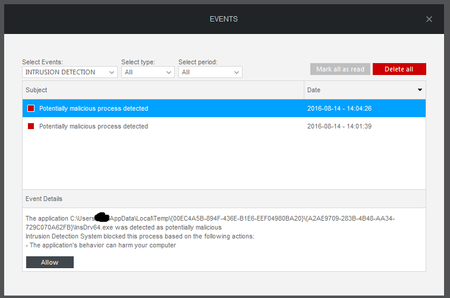
Hello, I have recently download and install le new version of my WNA1100. During the process, I choosed 'repair / modify', and my security system (bitdefender) alerts me on malicious detection. Here is the screen : Any info ? Thanks,3.3KViews0likes5Comments