NETGEAR is aware of a growing number of phone and online scams. To learn how to stay safe click here.
smart managed switch
4 Topics
The root port randomly disabled and enabled time to time.
Hi, I have 3 Netgear GS728TPV2 switches in three different locations in my company. One of them, let's say Switch 1, has a LAG setup with STP disabled for the VxRail connection. The root port for Switch 1 is Port 25, the SFP port, which has been going down and up intermittently. The remaining ports are not affected. Port 25 on Switch 1 is connected to Port 25 on Switch 2, which is also affected and goes down and up. Would like to ask the community for help to identify the issue and its resolution. Log <181>1 2026-02-02T16:08:11.982-04:00 <IP>-1 TRAPMGR-5-STP_NEW_ROOT ksi_snmp.c(484) %% This bridge has changed to be the root bridge. <182>1 2026-02-02T16:08:11.492-04:00 <IP>-1 STP-6-PORT_STATE proto_stp.c(820) %% Port GigabitEthernet25 moving from Forwarding to Disabled <181>1 2026-02-02T16:08:11.372-04:00 <IP>-1 TRAPMGR-5-PORT_LINK_DOWN ksi_snmp.c(230) %% Interface GigabitEthernet25 link down <181>1 2026-02-02T16:08:07.002-04:00 <IP>-1 TRAPMGR-5-STP_TC ksi_snmp.c(486) %% Bridge topology change. <182>1 2026-02-02T16:08:07.992-04:00 <IP>-1 STP-6-PORT_STATE proto_stp.c(820) %% Port GigabitEthernet25 moving from Blocking to Forwarding <182>1 2026-02-02T16:08:07.742-04:00 <IP>-1 STP-6-PORT_STATE proto_stp.c(820) %% Port GigabitEthernet25 moving from Disabled to Blocking <181>1 2026-02-02T16:08:07.702-04:00 <IP>-1 TRAPMGR-5-PORT_LINK_UP ksi_snmp.c(232) %% Interface GigabitEthernet25 link up <182>1 2026-02-02T16:08:07.482-04:00 <IP>-1 LLDP-6-NEIGHBOR_DEL proto_lldp.c(4321) %% Neighbor deleted on port GigabitEthernet25: Chassis ID <MAC>, Port ID g25 <182>1 2026-02-02T16:08:06.992-04:00 <IP>-1 STP-6-PORT_STATE proto_stp.c(820) %% Port GigabitEthernet25 moving from Forwarding to Disabled <181>1 2026-02-02T16:08:06.782-04:00 <IP>-1 TRAPMGR-5-PORT_LINK_DOWN ksi_snmp.c(230) %% Interface GigabitEthernet25 link down <181>1 2026-02-02T16:05:39.982-04:00 <IP>-1 TRAPMGR-5-STP_TC ksi_snmp.c(486) %% Bridge topology change. <182>1 2026-02-02T16:05:37.492-04:00 <IP>-1 LLDP-6-NEIGHBOR_DISCOVER proto_lldp.c(4579) %% New neighbor on port GigabitEthernet25: Chassis ID <MAC>, Port ID g25 <182>1 2026-02-02T16:05:36.452-04:00 <IP>-1 LLDP-6-NEIGHBOR_DEL proto_lldp.c(4321) %% Neighbor deleted on port GigabitEthernet25: Chassis ID <MAC>, Port ID g25 <182>1 2026-02-02T16:05:36.232-04:00 <IP>-1 STP-6-PORT_STATE proto_stp.c(820) %% Port GigabitEthernet25 moving from Blocking to Forwarding <182>1 2026-02-02T16:05:36.982-04:00 <IP>-1 STP-6-PORT_STATE proto_stp.c(820) %% Port GigabitEthernet25 moving from Forwarding to Blocking <181>1 2026-02-02T16:05:36.942-04:00 <IP>-1 TRAPMGR-5-PORT_LINK_UP ksi_snmp.c(232) %% Interface GigabitEthernet25 link up <181>1 2026-02-02T16:05:36.782-04:00 <IP>-1 TRAPMGR-5-PORT_LINK_DOWN ksi_snmp.c(230) %% Interface GigabitEthernet25 link down <182>1 2026-02-02T16:05:32.982-04:00 <IP>-1 LLDP-6-NEIGHBOR_DISCOVER proto_lldp.c(4579) %% New neighbor on port GigabitEthernet25: Chassis ID <MAC>, Port ID g25 <181>1 2026-02-02T16:05:31.982-04:00 <IP>-1 TRAPMGR-5-STP_TC ksi_snmp.c(486) %% Bridge topology change. <182>1 2026-02-02T16:05:28.452-04:00 <IP>-1 LLDP-6-NEIGHBOR_DEL proto_lldp.c(4321) %% Neighbor deleted on port GigabitEthernet25: Chassis ID <MAC>, Port ID g25 <182>1 2026-02-02T16:05:28.232-04:00 <IP>-1 STP-6-PORT_STATE proto_stp.c(820) %% Port GigabitEthernet25 moving from Blocking to Forwarding <182>1 2026-02-02T16:05:28.982-04:00 <IP>-1 STP-6-PORT_STATE proto_stp.c(820) %% Port GigabitEthernet25 moving from Forwarding to Blocking <181>1 2026-02-02T16:05:28.922-04:00 <IP>-1 TRAPMGR-5-PORT_LINK_UP ksi_snmp.c(232) %% Interface GigabitEthernet25 link up <181>1 2026-02-02T16:05:28.842-04:00 <IP>-1 TRAPMGR-5-PORT_LINK_DOWN ksi_snmp.c(230) %% Interface GigabitEthernet25 link down <182>1 2026-02-02T16:05:24.492-04:00 <IP>-1 LLDP-6-NEIGHBOR_DISCOVER proto_lldp.c(4579) %% New neighbor on port GigabitEthernet25: Chassis ID <MAC>, Port ID g25 <181>1 2026-02-02T16:05:23.972-04:00 <IP>-1 TRAPMGR-5-STP_TC ksi_snmp.c(486) %% Bridge topology change. <182>1 2026-02-02T16:05:21.982-04:00 <IP>-1 STP-6-PORT_STATE proto_stp.c(820) %% Port GigabitEthernet25 moving from Blocking to ForwardingSolvedIssues with LACP with VLANs
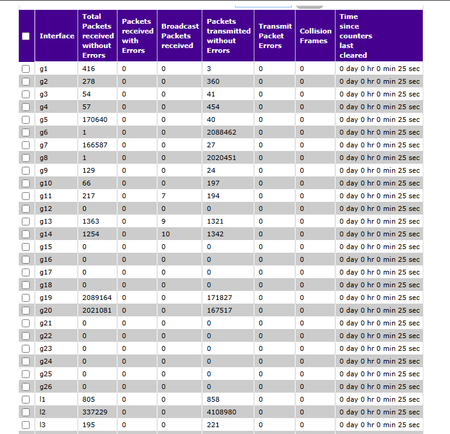
Hi all, Network newbie here. I am having some trouble with VLAN's combined with LACP. The setup I have at the moment are purely for educating my self. It consists of: One Netgear GS724Tv4 One PFsense router virtualized in Proxmox. The LAN interface of router is a separate NIC where all ports are in the same bond, which is configured for LACP. This bond have a dedicated bridge which is assigned as LAN interface for the router. This NIC is connected to port 1-4 on the switch, which is configured as "lag1" One Synology rack station with a SSD. The LAN interface is configured to use all four ports in LACP. It is connected to ports 5-8 on the switch which is configured as "lag2" I am using two computers to test the bandwidth of the system, just by simply copying a large file from each computer to the NAS. These are either connected to ports 19 and 20, or 21 and 22 depending on which VLAN I want to use. When connecting the computers to the same VLAN as the NAS everything seems to work just fine: Port 19 and 20 are receiving ~2050000 packets each. Lag2, the LACP of the NAS, is transmitting ~4100000 packets. These packages are distributed between port 6 and 8. This means that the LACP to the NAS is working, right? But when moving the computers to another VLAN the trouble begins: Port 21 and 22 are receiving ~2050000 packets each. These are transmitted to the router on lag1 and it seems like it decided to use port 2 and 3 for the task. The router is routing the packages from the VLAN with the computers to the VLAN with the NAS. The switch is receiving the packages on lag1 again, but this time on port 1 and 3. So far so good? It seems like the LACP between the switch and the router is working good to? The switch is transmitting the packages on lag2 to the NAS, but why does it only use port 8 now!? The consequence is obvious when looking at the speeds of the file transfer... What am I missing?InterVLAN on GS728TP not working
Hello, I have a configuration with three different VLAN where I want to enable the routing between them. The configuration is the following: VLAN ID 10 IP 10.0.1.254 255.255.0.0 Port in the range 2-10 and every port have the PVID 10 VLAN ID 20 IP 10.0.2.254 255.255.0.0 Port in the range 11-16 and every port have the PVID 20 VLAN ID 30 IP 10.0.3.254 255.255.0.0 Port in the range 17-24 and every port have the PVID 30 If I try to connect a PC to a port belonging to VLAN10 and set up the network card as: IP address 10.0.1.2 Subnet Mask 255.255.0.0 Default Gateway 10.0.1.254 I obtain response to the ping only from the gateway 10.0.1.254. No answer from the other VLAN IP e from every PC connected to those VLAN. I obtain the same result from any other VLAN. The managmente VLAN (ID 1) is confined to port 1 and 2 of the switch. I tried many times resettig the switch to the factory configurations. I tried to use the VLAN Static Routing Wizard and set up everything manually but nothing changed. The Routing mode is enabled. I saw that the routing table remain always empty. I looked for a solution in many forum but i didn't find anything. Any Idea of what is missing? Thanks