NETGEAR is aware of a growing number of phone and online scams. To learn how to stay safe click here.
Forum Discussion

evil_mike
Mar 01, 2019Apprentice
Armor on Orbi questions (activation issues and another question)
Hey gang,
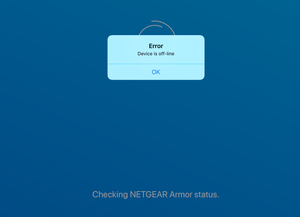
Just upgraded my Orbi to the latest firmware and, when I try to activate Armor, I keep getting the error message "Device is off-line" (see screenshot). What I've done so far: 1...
LadySapphy
Mar 17, 2019Guide
Ok update on this. Such a happy netgear customer (not). So I tried turning off Circle, and turning on Armor, but that did not help. I tried a basic reboot, that did not help. So I turned cicle back on and was back to where I had started. I went and took a shower. By the time I got out of the shower, the family was planning my demise as the network was down. I pick up my phone and our WiFi was gone, replaced with the defult orbi wifi and not handing out IPs. I had to do a factory reset to get ip up and running again. But hey armor turned on after that.
faizankhan85
Mar 17, 2019Aspirant
dear all
i can confirm that i too have done the factory reset, and this seems to now activated the orbi armor setup process.
- evil_mikeMar 17, 2019Apprentice
Yeah, I'm 100% sure that the factory reset is the solution for this issue at this point. Annoying, but at least we have the answer.
- faizankhan85Mar 17, 2019Aspirant
unfortunately i think you are right!
 tgltglMar 17, 2019Star
I was affraid of having to deal with
evil_mike wrote:
Yeah, I'm 100% sure that the factory reset is the solution for this issue at this point. Annoying, but at least we have the answer.
I was affraid I was going to have to do that as well but at least in my case it endedup up not being necessary. Just updating the Android Orbi app 'fixed' the Armor activation issue for me (I did not touch the settings or firmware on either router or satelite and it activated via the updated app - but I did recently manually update the firmware to the latest, after which the Armor activation still did not work).