NETGEAR is aware of a growing number of phone and online scams. To learn how to stay safe click here.
Forum Discussion

zazik
Dec 03, 2017Aspirant
GS110TP won't retain VLAN membership on port 8
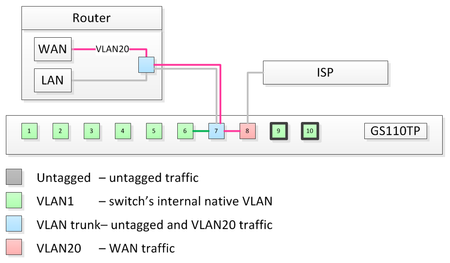
Hello, I have some weird VLAN issue on GS110TP. My setup looks like this: Router has only one ethernet port, so WAN (VLAN 20) and LAN (untagged) traffic is going through the trunk port 7...
 Dec 04, 2017
Hi Zazik,
Thanks for your reply.:smileyhappy:
We found the the reason that make your port 8 lost VLAN configuration.
The "Probe" status means that port has been set to 'destination of port mirror'.
In this status, the port will recover VLAN configuration to default after reload just as you
see.
Actually port 8 has 'Probe' status will also impact your network forwarding if the purpose is not packets capture.
So I suggest you to delete port mirror configuration on port 8 just as following screenshot if you don't want to setup packet capture debugging for your GS110TP.
Then configure VLAN PVID & member on port 8 again that will not lost after reload or power cycle.
May the solution help you:smileyhappy:
Thanks,
Daniel.
DanielZhang
Dec 03, 2017NETGEAR Expert
Hi Zazik,
Welcome to NETGEAR community!:smileyhappy:
I also has a GS110TP but can't see same issue as your step.
1. Did you have other configuration on port 7,8?
2. Could you please share you configuration about GS110TP?
Such as: LAG,VoIP.
Here is my GS110TP》
Thanks,
Daniel.
zazik
Dec 03, 2017Aspirant
Hi Daniel,
All factory defaults, no LAGG, no VoIP, the only things configured are the ones I posted.
One thing that might explain the behavior is this:
The question is what is that Port Type "Probe" on port 8?
And can I change it to some other port?
Thank for looking into this.
Really appreciate it.
- DanielZhangDec 04, 2017NETGEAR Expert
Hi Zazik,
Thanks for your reply.:smileyhappy:
We found the the reason that make your port 8 lost VLAN configuration.
The "Probe" status means that port has been set to 'destination of port mirror'.
In this status, the port will recover VLAN configuration to default after reload just as you
see.
Actually port 8 has 'Probe' status will also impact your network forwarding if the purpose is not packets capture.
So I suggest you to delete port mirror configuration on port 8 just as following screenshot if you don't want to setup packet capture debugging for your GS110TP.
Then configure VLAN PVID & member on port 8 again that will not lost after reload or power cycle.
May the solution help you:smileyhappy:
Thanks,
Daniel.
- zazikDec 04, 2017Aspirant
Hi Daniel,
You are right, not sure if that is actually made on purpose, but I was under impression that resetting into factory defaults, would clean that up. Well, sure enough, there was no explicit port mirroring configuation visible in the GUI, but saved configuration file indeed had this:
monitor session 1 destination interface 0/8
I had to enable mirroring on port 8 and then delete it to get it cleaned up.
Once "Probe" type gone everyhting worked as expected.
Thanks a lot for your efforts.
Related Content
NETGEAR Academy

Boost your skills with the Netgear Academy - Get trained, certified and stay ahead with the latest Netgear technology!
Join Us!
