NETGEAR is aware of a growing number of phone and online scams. To learn how to stay safe click here.
Forum Discussion

cw_tec
Apr 05, 2022Guide
LAG ports create DUP packets and STP chaos
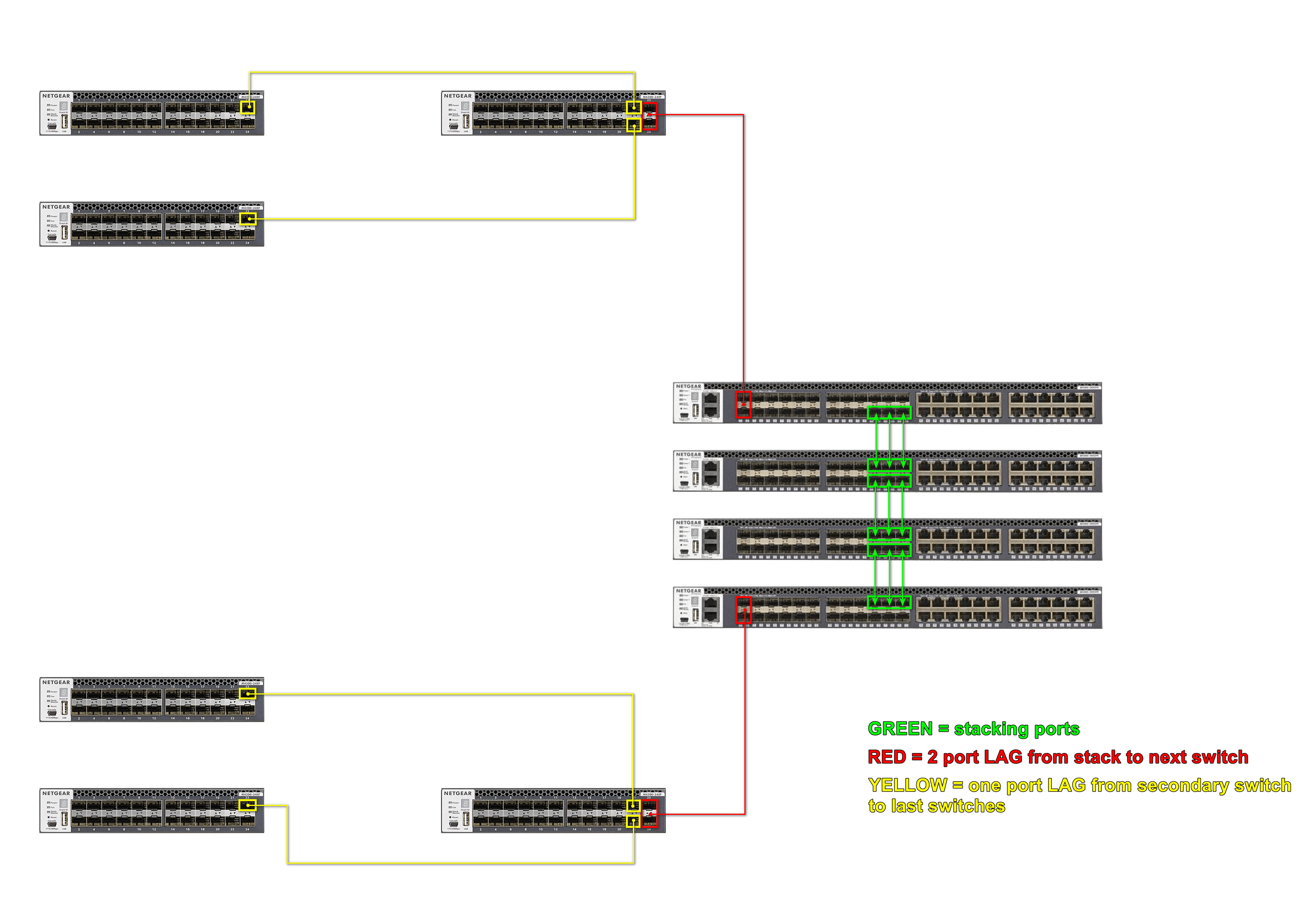
Hi all. We have exchanged or previous Aruba switches with Netgear XSM4348S switches, which are acting as a stack (4 switches). Behind these switches are GSM4328S & GS728TPPv2, which are connected...
- Apr 09, 2022
Today I gave it another try - long story short:
not the stack switch was the problem but the M4300s behind it. AFAIK all M4300 don't use the static mode by default which means that LACP is used. I had to reset the M4300 to factory defaults (but not the stack) and start over. After I reconfigured the M4300s which are connected behind the stack by re-importing the config the LAG came up as usual and works.
Side notice: when using a standard LAG in the M4300 series in combination with the mentioned Smart Managed switches (GS728TPPv2) you have to set the LACP mode on the GS728TPPv2 manually. Unlike the M4300s the Smart Managed switches seem to use the static mode by default. Same applies to other vendors like HP (ProCurve series).

schumaku
Apr 05, 2022Guru - Experienced User
Reads like we have some basic definition problem: A one-port LAG - what is the point of this? Are you probably mix up the functionality of a LAG (port aggregation) with a port or a LAG configured as a trunk for handling multiple VLAN?
Different hash modes are only defining on how the traffic is distributed on a LAG with multiple physical !inks.
If STP issues arise on LAGs, it's an indication that the LAG are not set-up correct, the duplicate packets confirm this.
Another possibility is that you mix stack ports (which automatically handle all VLAN between stack members) with LAG - an impossible config.
I would strongly suggest to configure all M4300s in a stack, with all links in stack port mode. The links to the Smart Managed switches must be configured as trunk, all VLANs tagged, probably except of one VLAN which can be operated untagged and that same PVID, on general Ethernet (not stack mode).
Different hash modes are only defining on how the traffic is distributed on a LAG with multiple physical !inks.
If STP issues arise on LAGs, it's an indication that the LAG are not set-up correct, the duplicate packets confirm this.
Another possibility is that you mix stack ports (which automatically handle all VLAN between stack members) with LAG - an impossible config.
I would strongly suggest to configure all M4300s in a stack, with all links in stack port mode. The links to the Smart Managed switches must be configured as trunk, all VLANs tagged, probably except of one VLAN which can be operated untagged and that same PVID, on general Ethernet (not stack mode).
- cw_tecApr 05, 2022Guide
Thank you for your answer.
Reads like we have some basic definition problem: A one-port LAG - what is the point of this? Are you probably mix up the functionality of a LAG (port aggregation) with a port or a LAG configured as a trunk for handling multiple VLAN?
Maybe I'm blind but I don't find any other possibilty to set up a singe trunk port but using the LAG feature in the web interface. All LAGs which are created with single or multiple ports are automatically defined as trunk (port type).
Another possibility is that you mix stack ports (which automatically handle all VLAN between stack members) with LAG - an impossible config.
I'm absolutely sure that this is not the case. Checked more than twice.
I would strongly suggest to configure all M4300s in a stack, with all links in stack port mode.
Is this the "official" way to connect switches of the same series? What if you have (for example) 12 or more of these switches? Is it really advisable to configure them all in one big stack?
The links to the Smart Managed switches must be configured as trunk, all VLANs tagged, probably except of one VLAN which can be operated untagged and that same PVID, on general Ethernet (not stack mode).
That's the reason why I configured them as LAGs and not stack ports, even if they are only connected with on SFP port.
- schumakuApr 05, 2022Guru - Experienced UserIn general, Netgear does differentiate the port or LAG usage based on theport or LAG VLAN config.
https://kb.netgear.com/11673/How-do-I-setup-a-VLAN-trunk-link-between-two-NETGEAR-switches
The simple availability for define access resp trunk port became available on the M4240/4300 models, too.
The question on the number of switches in a distributed stack I'd prefer to call in LaurentMa- cw_tecApr 05, 2022GuideThanks.
I can reconfigure the single LAG ports to the GS728TPPv2 back to normal ports and tag the uplink connections, but that doesn’t explain why the connections from the stack switch with 2 ports in each LAG don’t work.
Related Content
NETGEAR Academy

Boost your skills with the Netgear Academy - Get trained, certified and stay ahead with the latest Netgear technology!
Join Us!