NETGEAR is aware of a growing number of phone and online scams. To learn how to stay safe click here.
Forum Discussion

andrea_g
Jun 03, 2021Aspirant
Loop issue multiple lag across M4300 stack
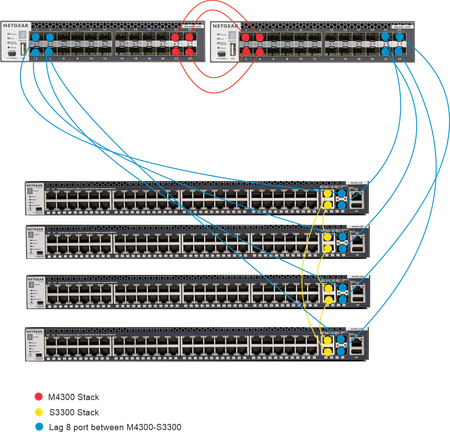
Hi, I'm experimenting different scenarios with 2 M4300 24X and 4 S3300. I'm trying the configuration below, but when I connect the 8 port between the S3300 and the M4300 in the LAG I experience netw...
bbs2web
Jun 29, 2021Guide
I would suggest that you cable the switches up whereby each leaf connects to each spine redundantly, that would give you 4 x 10 Gbps capacity from one leaf to another. Then distribute your LAGs redundantly over the leaf switches and turn on local preference mode.
To clarify, I believe the following reference diagram in the Netgear documentation to be un-optimal. We run this in production on a number of stacks without issues for 4+ years:
My understanding of the leaf-spine (Spine & Leaf) CLOS network design is to ensure each point on the spine and leaf switches has multiple paths to another in the same layer. Spine switches should connect to each leaf, never another spine. Each leaf should also never connect to another leaf, only to the spine switches.
We implemented a stack of 3 x M4300-8F8X (spine) with 4 x M4300-96X (leaf) switches.We setup distributed LAGs from the X96 leaf switches to servers and enabled local preference mode. This results in the 96X forwarding received traffic via the destination's LAG port on the same switch traffic arrived on and stops traffic unnecessarily loading stack uplinks. This works as expected, although Netgear documentation is extremely poor (something along the lines of "enabling local preference mode enables local preference").
If each 96X has 6 x 10G stack members (2 to each 8X8F) there should be 6 equal distance hops between each 96X leaf switch. If server A sends data to server B and both only have 2 x uplinks running LACP (each uplink in a unique 96X) a single steam of data would have 6 possible choices.
- bbs2webJun 29, 2021Guide
Hopefully the image works now:
- andrea_gJul 01, 2021Aspirant
Thank you for the reply.
In the switch topology you posted, the spine switches are not connected each other, and cannot be stacked using the Netgear stacking feature.
The stacking (MLAG) allow you to manage the spine switches in a single management interface, and more important allow you to create a distributed LAG. The latest allow you to connect the 2 NIC of a server, aggregated in a LACP interface, in two switches.

Related Content
NETGEAR Academy

Boost your skills with the Netgear Academy - Get trained, certified and stay ahead with the latest Netgear technology!
Join Us!
