NETGEAR is aware of a growing number of phone and online scams. To learn how to stay safe click here.
Forum Discussion

MichaelM987
Jan 11, 2020Aspirant
M4100-26G-POE (GSM7226LP) failed after Update
Hello community, I have a problem with my switch, M4100-26G-POE (GSM7226LP) | ProSafe 26 ports gigabits fully managed L2 switch with PoE. I wanted to update it and loaded the current firmware on...

DaneA
Jan 12, 2020NETGEAR Employee Retired
Have you tried to access the M4100 switch via CLI? If ever you haven't tried it yet, I suggest you to give it a try. Let me share the article below to use it as your guide:
Let us know how it goes.
Regards,
DaneA
NETGEAR Community Team
MichaelM987
Jan 12, 2020Aspirant
I tried it with a USB cable. the program HyperTerminal appeared "connected" but I couldn't see.
when I turn on the switch only the letters YYYYYY come, nothing more.
I would test it tomorrow with a Sub-D connector.
when I turn on the switch only the letters YYYYYY come, nothing more.
I would test it tomorrow with a Sub-D connector.
- msiJan 13, 2020Luminary
Hi
Since you seem to get some output, that could indicate a wrongly-configure baud rate in your terminal client.
Typically M4100's default to 115200, older models tend to use 9600. However this can be configured to 1200, 2400, 4800, 9600, 19200, 38400, 57600, 115200 (see the CLI reference under 'serial baudrate'). So maybe try another rate, and restart the switch afterwards (unplug then re-plug power)
Also check that the switch near the Mini USB and DB-9 port (should be on the back in your case?) is in the right position. As far as I remember with our GSM7224P the M4100 line only accepts input (key press etc.) on one of the 2 ports, however it will print outputs on both.
- MichaelM987Jan 13, 2020Aspirant
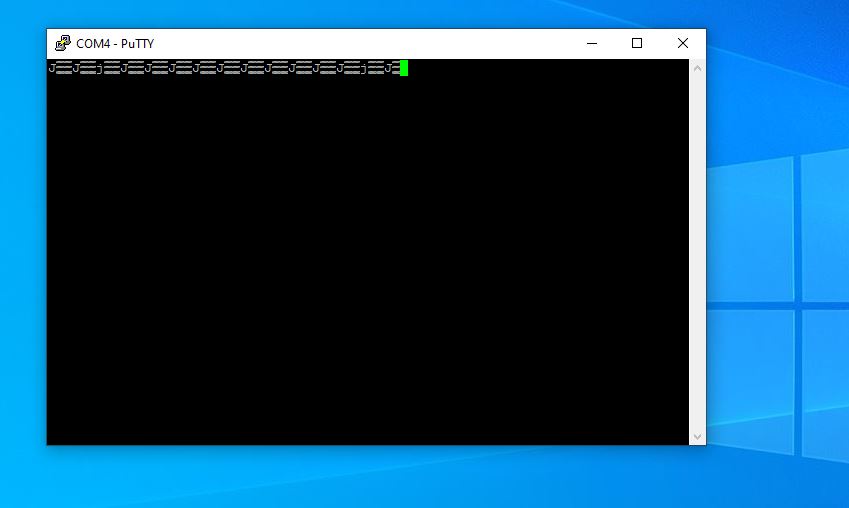
After plug in the Power Cable, i saw that in the Putty Windows:
jpg as attachment
- msiJan 13, 2020Luminary
Hi
Thanks for the screenshot, unfortunately you didn't tell us the configure baud rate, this looks quite a bit like the typical garbage given by a misconfigured baud rate. Please try the afforementioned baud rates in PuTTY (which does default to 9600 if not told otherwise).
If you are using a USB Type A to Mini-B the chance of a pinout problem is technically nil. The only possible issues left are the baud rate and the physical switch that I've mentioned previously (or a completely toast switch, let's hope not). If you use a DB-9 cable in combination you need the right pinout. Also "el-cheapo" USB to DB-9 converters can cause all sort of weird behavior. (This is a reason why I've spent the money for a "proper" genuine FTDI-based USB to DB-9 adapter cable for devices with a serial console port.)
Related Content
NETGEAR Academy

Boost your skills with the Netgear Academy - Get trained, certified and stay ahead with the latest Netgear technology!
Join Us!