NETGEAR is aware of a growing number of phone and online scams. To learn how to stay safe click here.
Forum Discussion

longbow47
Feb 28, 2019Aspirant
Management VLAN / webinterface reachable via multiple IPs
Hello @ all,
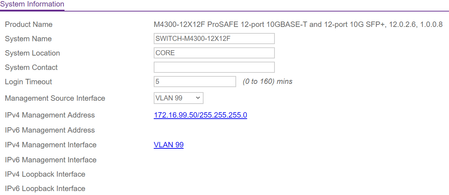
i created a management vlan 99 on stacked M4300 and changed the configuration (see picture above).
It worked and the webinterface is reacha...
MrJoshW
Mar 05, 2019NETGEAR Employee Retired
Hello,
Before changing the management vlan to 99, what IP address was 192.168.0.243 associated with? Was it vlan1? Are any of your other vlans able to access the web management interface?
longbow47
Mar 07, 2019Aspirant
Hi,
thank you for answering my question.
192.168.0.243 was the static ip of the management web interface (i think on netgear all connections are in vlan1 in default).
that was the ip i gave the switch 3 month ago when i configured it.
it seems that i now have a ipv4 mgmt webinterface and a vlan99 mgmt interface. i just want to have it on vlan 99.
i configured the same thing on 7 other netgear switches (GS748Tv5 ProSafe) and none of them showed the behaviour.
could it have something to do with routing mode?
its disabled on all GS748 but enabled on the coreswitch
Related Content
- May 25, 2022Retired_Member
NETGEAR Academy

Boost your skills with the Netgear Academy - Get trained, certified and stay ahead with the latest Netgear technology!
Join Us!
