NETGEAR is aware of a growing number of phone and online scams. To learn how to stay safe click here.
Forum Discussion

l27
Dec 13, 2016Guide
Mirror uplink on a stack
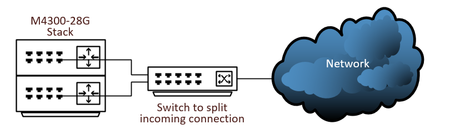
I have enabled OSPF across a connection coming in and I want to split that connection and plug it in to both switches. Is this possible? I cannot add the same IP address to a port on the other sw...

DaneA
Dec 14, 2016NETGEAR Employee Retired
Hi l27,
Based on the diagram, the M4300-28G switches are in a stack which means that it will function as one switch. Is the switch that will split the incoming connection also a NETGEAR switch? If yes, what is the model of it?
Let me share the article below as reference guide about planning your network setup:
Regards,
DaneA
NETGEAR Community Team
 l27Dec 14, 2016Guide
Thanks for the reply. It's an HP 2910al. Maybe I could create a trunk between the switches?
- l27Dec 14, 2016Guide
To add one more point. I have ospf working. I just want to split the incoming connection from the ISP which is a layer 2 connection so it's plugged into each switch should one fail. I know I still have a single point of failure with the additional switch and the ISP's equipment but it would make me feel a little better. I did ask the ISP if they would give me 2 routers, (They really aren't a router because it's a layer 2 connection so I'm not sure what to call them, I didn't put it in the diagram but it's between the switch and the cloud.), but they said no eventhough they brought in 2 pairs of fiber for redundancy.
- l27Dec 14, 2016Guide
One last bit of info. I also have an MPLS that I can use as a backup to this connection. Maybe I just rely on that and should one of the netgear switches fail I simply move the connection in the diagram from one switch to the other and reconfigure one of the ports.
Related Content
NETGEAR Academy

Boost your skills with the Netgear Academy - Get trained, certified and stay ahead with the latest Netgear technology!
Join Us!
