NETGEAR is aware of a growing number of phone and online scams. To learn how to stay safe click here.
Forum Discussion

McKwack
Oct 13, 2016Aspirant
Netgear M6100 backup port feature?
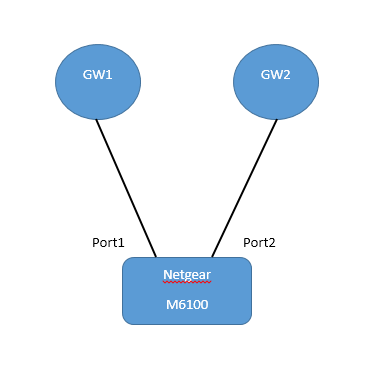
Hi guys. This is my first time writing in this forum, so please excuse me if I'm writing this at the wrong place. Anyway, my client has a Netgear M6100 chasis with a 24x10G blade attached. Right ...

LaurentMa
Oct 13, 2016NETGEAR Expert
Hi McKwack
The feature you are referring to is called Link Dependency, which we don't have yet in our 11.0 code base that M6100 is running.
Instead, we have it in our latest 12.0 (M4200 and M4300 series). The feature is designed to support enabling/disabling some ports based on the link state of some other ports (i.e. make the link state of some ports dependent on the link state of other ports). In the simplest form, if port A is dependent on port B and switch detects link loss on B, the switch automatically brings down link on port A, or up depending on the configuration. When link is restored to port B, the switch automatically restores link to port A, or brings down link depending on configuration. The link action command option determines whether link A becomes up/goes down, depending upon the state of link B.
Let us check few other options in order to mitigate your issue shortly. At Layer 3, VRRP virtual router could achieve it, but it requires changes to your routing configuration. At Layer 2, STP is another challenge, but we could try it too by creating a loop. We are thinking of Policy Based Routing instead, which maybe would require less drastic changes in your routing configuration. We will be back to you asap.
- LaurentMaOct 13, 2016NETGEAR Expert
Hi McKwack
Trying to keep it simple: could you try to set up a static LAG between Port 1 and Port 2? This way, your two gateways would be concurrently connected, but the Static LAG hashing would parse packets to one or the other, based on default hash (MAC, EtherType, VLAN), or your desired hash algorithm instead (can be Source IP, Dest IP, TCP or UDP port etc..).
Would that be a problem if your two gateways are up at the same time? If your routing configuration is able to sustain a Layer 2 connection / disconnection with any of these, it makes me believe simultaneous operation could be transparent enough for your network.
If you give it a try, please don't forget Link Aggregation Groups (LAG) are Dynamic, by default when they are created in our Managed switch code (Switching menu of our Web GUI, then LAG). Static mode will have to be manually "Enabled" for that LAG including your Port 1 & Port 2 . This way, the switch will not seek LACP handshake with your gateways, which obviously won't run any LACP on their end.
If you want to have an overview of LAG configuration using the Web interface (GUI), you can look at the explanations here (page 70-71).
You can find all technical documentation for the M6100 Chassis Switch here as well.
Please let us know how it goes, or if such simultaneous operation may cause a problem.
Regards,
Related Content
NETGEAR Academy

Boost your skills with the Netgear Academy - Get trained, certified and stay ahead with the latest Netgear technology!
Join Us!
