NETGEAR is aware of a growing number of phone and online scams. To learn how to stay safe click here.
Forum Discussion

Dr_Skepsis
Apr 11, 2024Aspirant
Setup of management VLAN for M4300 series
I am trying to have WebGUI access of NetGear M4300-8X8F switches on a local computer which resides a few switch hops from the actual devices. What I have accomplished with Aruba managed switches is t...

schumaku
Apr 11, 2024Guru - Experienced User
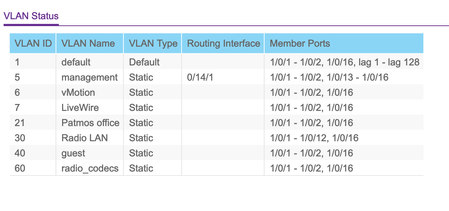
For what's worth: Here is a good example of an Aruba Switch config with a dedicated management VLAN and IP subnet. VLAN 5 is tagged on all connections, and the management VLAN is configured to 5. Exactly the same is applicable to the trunk for the link connecting the Netgear switches (no matter if we talk about simple Netgear Plus switches, Netgear Smart Switches, and Netgear Managed Switches.
Dr_Skepsis
Apr 11, 2024Aspirant
Thank you schumaku for your effort and time. I get webgui management access for Aruba switches. Access is limited to ports which are member of VLAN 5. It was very easy to get working on Aruba switches. Shame that it does not work for NetGear as easily. I’m using Out-Of-Band port for the Neatgear setup for time being.
- schumakuApr 11, 2024Guru - Experienced User
Dr_Skepsis wrote:
It was very easy to get working on Aruba switches. Shame that it does not work for NetGear as easily.
I’m using Out-Of-Band port for the Neatgear setup for time being.Works very similar anyway, very similar switch classes anyway. Must be some config issue on either side eg. on the trunks.
Dr_Skepsis wrote:
I’m using Out-Of-Band port for the Neatgear setup for time being.Convinced you can figure it out.
Curious, HAM or marine radio OP btw?
- Dr_SkepsisApr 11, 2024AspirantSmaller Finnish radio station studios. So not HAM but kind of 🙂
Related Content
NETGEAR Academy

Boost your skills with the Netgear Academy - Get trained, certified and stay ahead with the latest Netgear technology!
Join Us!
