NETGEAR is aware of a growing number of phone and online scams. To learn how to stay safe click here.
Forum Discussion

bob_smith123
Jan 27, 2022Aspirant
Camera/NAS VLAN on GS728TPv2 not working
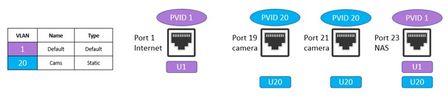
Hello, I have a GS728TPv2 and would like to set up a VLAN for my POE cameras and NAS. I would like the NAS to be able to access the internet so I can view the camera streams and recordings and wo...

JeraldM
Jan 28, 2022NETGEAR Employee Retired
Welcome to the community!
Perhaps what you'll need to do is to have a traffic rule set on your firewall to block incoming traffic from the WAN going to the IP addresses of your cameras.
Regards,
JeraldM
NETGEAR Community Team
bob_smith123
Jan 28, 2022Aspirant
Hello, thank you for the reply. This same exact setup worked perfectly with a smaller plus managed switch without needing to change firewall or router settings. Is there a reason why it is not working with the GS728TPv2 switch?
- schumakuJan 29, 2022Guru - Experienced User
bob_smith123 wrote:
This same exact setup worked perfectly with a smaller plus managed switch without needing to change firewall or router settings. Is there a reason why it is not working with the GS728TPv2 switch?
Yes. The config isn't a plain VLAN design strictly isolating the VLAN. Much more it is an Asymmetric VLAN config. The odd thing is that all the UIs allow this [in strict IEEE 802.1q sense] invalid config.
- bob_smith123Jan 29, 2022AspirantThank you for the reply. Is there a way to make the Asymmetric VLAN config work on this managed switch? Do you have a recommendation for the correct VLAN and PVID assignments for the ports? Or are there other steps needed to make it work? Thanks!

Related Content
NETGEAR Academy

Boost your skills with the Netgear Academy - Get trained, certified and stay ahead with the latest Netgear technology!
Join Us!
