NETGEAR is aware of a growing number of phone and online scams. To learn how to stay safe click here.
Forum Discussion

Retired_Member
Sep 02, 2021Cannot apply IP filtering with subnet mask on VLAN
Dear all, When I want to configure my Insight managed switch such that devices on certain VLAN's cannot reach certain IP's, a direct declaration of an IP address in the IP filtering section works...

DaneA
Sep 06, 2021NETGEAR Employee Retired
Retired_Member,
Welcome to the community! :)
The Policy you have specified is "Allow" which is why the devices on the 192.168.1.0 range are allowed. Kindly try to change the Policy to "Deny."
As reference guide, kindly access and read the article below:
How do I set up IP address filtering for an existing VLAN in Insight?
Regards,
DaneA
NETGEAR Community Team
Retired_Member
Sep 07, 2021
Thanks for the reply, I don't know why it says 'Allow' in the UI but it is in fact in the policy 'Deny', when I edit an entry in the 'Deny' policy it always shows 'Allow' for unknown reasons. Denying access without defining a subnet mask works, only when defining a subnet mask I encounter this problem.
- MrJoshWSep 15, 2021NETGEAR Employee Retired
Hello,
See screenshots:
Logging into my Insight account and going to the VLAN > IP Filtering. I do see the deny policy as it is a drop down. After delecting deny, and selecting manual. I can add a deny policy.
Even when you select the deny policy, and select manual, do you see the policy screen for deny or allow?
- Retired_MemberSep 18, 2021
Yes, 'Deny' is selected. I think the 'Allow' part is just a UI bug that shows after I edit the policy, so please don't pay attention to that. I know in fact that the 'Deny' policy is working because when I block a singular IP address, that IP address is correctly blocked but when I apply a subnet mask it doesn't work anymore.
- Retired_MemberSep 18, 2021
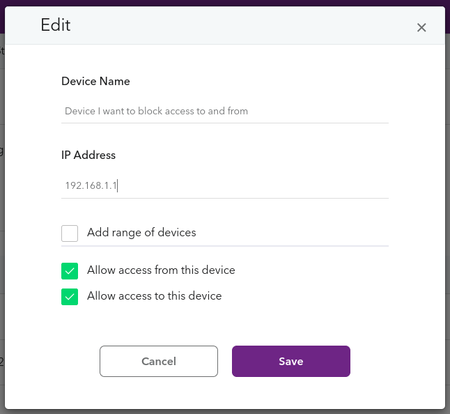
I've attached a screenshot showing I'm editing the 'Deny' option in the background, with the UI bug on the foreground. So this is not what causes the IP filtering rules to not work specifically when applying a mask.
Just to be clear, the above works, but when applying an IP mask (using the range of devices option), it does not work.
- MrJoshWSep 23, 2021NETGEAR Employee Retired
Hello,
Discussing with engineering, try using a reverse IP mask. In the IP mask field try 0.0.0.255 and let me know if that helps.
Related Content
NETGEAR Academy

Boost your skills with the Netgear Academy - Get trained, certified and stay ahead with the latest Netgear technology!
Join Us!
