NETGEAR is aware of a growing number of phone and online scams. To learn how to stay safe click here.
Forum Discussion

monika_v
Jan 31, 2022Aspirant
Configuration of switches for a VLAN
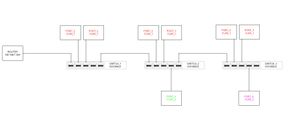
Hello, I'm trying to configure network VLANs for something like this: The idea being is that VLAN1, VLAN2 and VLAN3 all have access to the internet via the router but none of the VLANs ...

schumaku
Feb 02, 2022Guru - Experienced User
monika_v wrote:
Seems like it may solve a lot of messing around as this 'more managed' switch will be better than the 'slightly managed' switches and will be easier to understand when changes need to be made??? It would save some wiring too so there are less physical changes.
I've actually had to change the 5-port switches for 8-port switches as I needed a couple of extra ports :smileysurprised:, but other than that there are no changes as I've tried to keep everything else the same!!
The asymmetrical VLAN configuration is very similar (resp. the same) on the Plus (GSxxxE) and on the Smart Pro (GSxxxT) switch lines.
monika_v wrote:
My main concern is whether the GS108eV3 switches will allow a mixture of VLANs on each port (like switch_1 has VLAN1 & VLAN2 and switch_3 has VLAN1 and VLAN3).
It's by far not on each port - the VLAN x lines show for each port "t" for [t]agged, "u" for [u]ntagged, and "-" for no membership.
monika_v
Feb 02, 2022Aspirant
Sounds like I am better off with the configuration I have then :smileylol:
With regard to the configurations, I believe this is the information you asked for each switch:
Related Content
NETGEAR Academy

Boost your skills with the Netgear Academy - Get trained, certified and stay ahead with the latest Netgear technology!
Join Us!
