NETGEAR is aware of a growing number of phone and online scams. To learn how to stay safe click here.
Forum Discussion

PleaseWorkNow
Aug 15, 2019Aspirant
GS108Ev3 DHCP fails for VLAN
We bought this GS1088Ev3 to route multicast to dedicated port for IPTV (T-We from Telenor) as this switch are advertised with the possibility to choose which VLAN to enable IGMP Snooping. Sadly we a...
- Aug 15, 2019
If the GS105 essentially worked on the LAN - except that the ICMP multicast came up on all ports - all you have to configure is the VLAN ID 1 (and PVID 1) on all ports, [U]ntagged, and have the IGMP Snooping enabled for VLAN ID 1. Keep the validation and block unknown to disabled.
Behind the router, you won't have to deal with the VLAN ID 854 - this is used only on the WAN/Internet/ISP side of your router.
This is also the reason the IPTV STB does not receive even an IP address - it's "listening" to the isolated VLAN 854.

schumaku
Aug 15, 2019Guru - Experienced User
Before we're runing wild on troubleshooting ideas ... how is this switch connected to the Internet?
Is this a Telenor CPE/router which does (afaik) put the IPTV ot the same local subnet as the Internet?
Or have you deployed another router where the VLAN ID 845 (when I remember right) on the Telnor WAN/Internet link is bridged to the LAN somehow?
How is the router configured - and how is everything hooked up?
Strongly doubt the switch will block DHCP - neither on the default (untagged) VLAN nor on a dedicated 802.11Q tagged VLAN
- PleaseWorkNowAug 15, 2019Aspirant
Thanks for your reply.
GS108Ev3 replaced GS105 in a working setup — no other changes. Yes IPTV are over LAN, hence the upgrade to try suppress chatter.
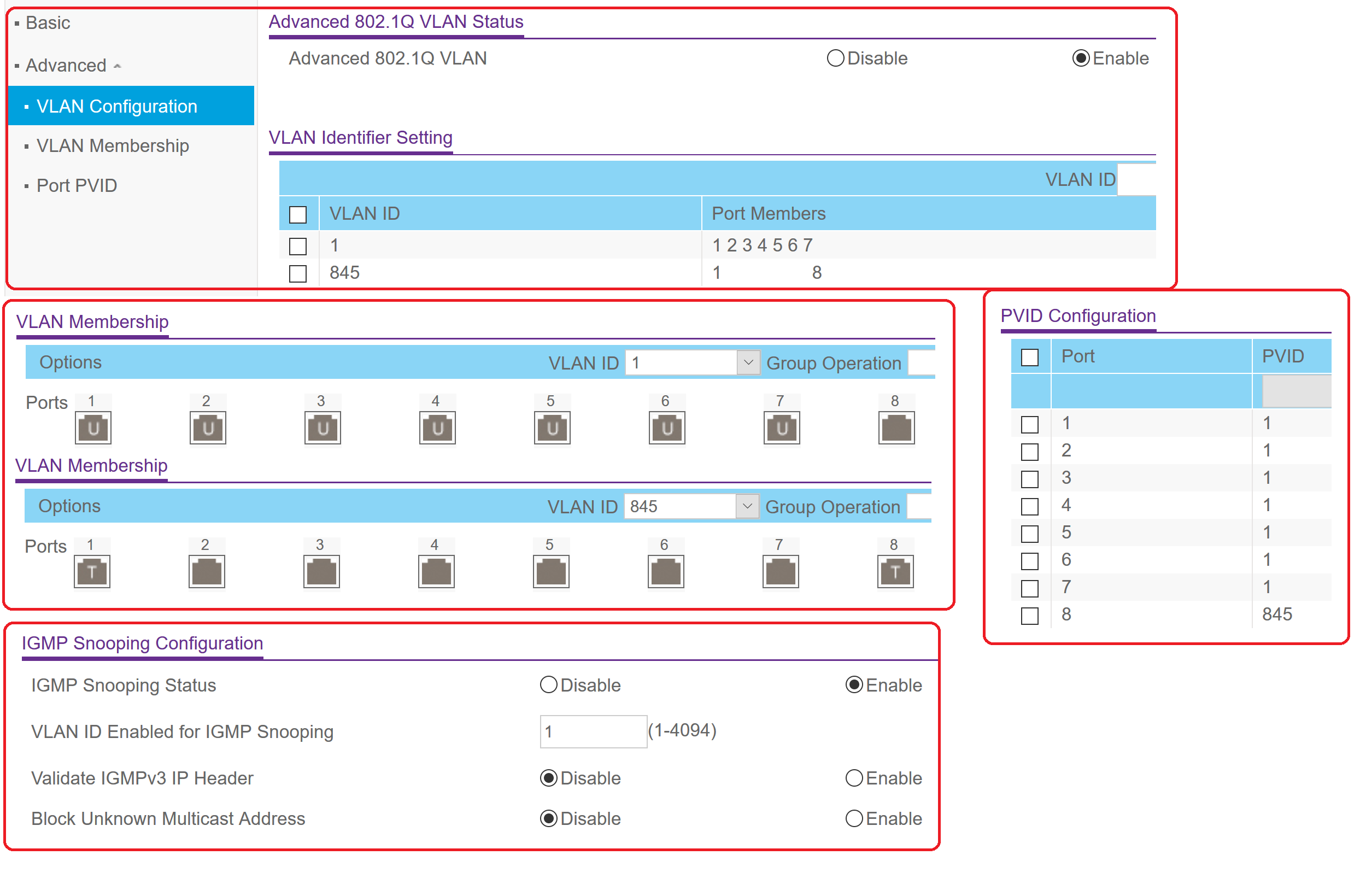
Below are my non functioning settings. Port1 are the uplink with IPTV on Port8Are there a way to flush tables on GS1080Ev3 other than reboot?
- schumakuAug 15, 2019Guru - Experienced User
If the GS105 essentially worked on the LAN - except that the ICMP multicast came up on all ports - all you have to configure is the VLAN ID 1 (and PVID 1) on all ports, [U]ntagged, and have the IGMP Snooping enabled for VLAN ID 1. Keep the validation and block unknown to disabled.
Behind the router, you won't have to deal with the VLAN ID 854 - this is used only on the WAN/Internet/ISP side of your router.
This is also the reason the IPTV STB does not receive even an IP address - it's "listening" to the isolated VLAN 854.
Related Content
- Jun 23, 2018Retired_Member
NETGEAR Academy

Boost your skills with the Netgear Academy - Get trained, certified and stay ahead with the latest Netgear technology!
Join Us!