NETGEAR is aware of a growing number of phone and online scams. To learn how to stay safe click here.
Forum Discussion

doucettea
Nov 02, 2021Aspirant
Help setting up VLANs
Hi, I'm having a hard time setting up home VLANs. I essentially want a separate VLAN for a main (trusted) network, one for the kids, one for guests, and one for IOT devices. I'm sure it's because I d...
- Nov 06, 2021
doucettea wrote:
Router has 4 VLANs configured Trusted VLAN 1 Guest VLAN 20 IOT VLAN 30 Kids VLAN 40
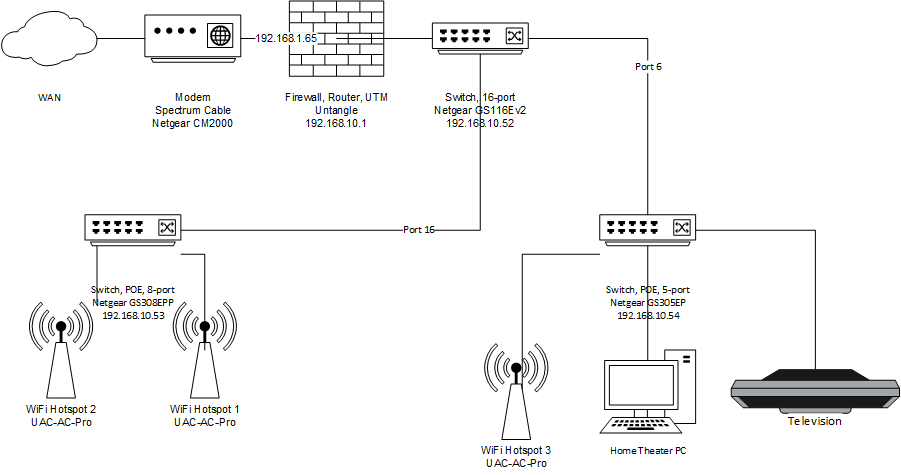
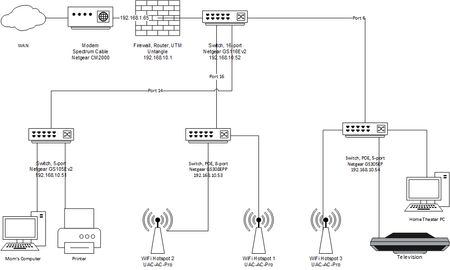
All go by one cable to main switch. 192.168.10.0/24 192.168.20.0/24 192.168.30.0/24 192.168.40.0/24 Main Switch gs116ev2: (port 1 to router, bedroom and unused ports to guest network, other ports to other switches) 1 Router (Untangle) U T T T 2 UnRaid File Server U PVID-1 3 Backup WiFi Router U PVID-1 4 Empty U PVID-20 5 Empty U PVID-20 6 Media cabinet (switch) U T T T 7 Study U PVID-20 8 Guest BR U PVID-20 9 Kitchen U PVID-20 10 Back Patio U PVID-20 11 BR2 U PVID-20 12 BR3 U PVID-20 13 BR4 U PVID-20 14 Master Bedroom (switch) U T T T 15 Office (switch) U T T T 16 Attic (switch) U T T T Media cabinet gs308epp: (want HTPC and TV on guest network, wifi hotspot broadcast one SSID for each VLAN) 1 Unifi WiFi Hotspot U T T T 2 HTPC U PVID-20 3 TV U PVID-20 4 Empty U PVID-20 5 Main Switch U T T T Office GS105Ev2: 1 Main Switch U T T T 2 Dad PC U PVID-1 3 Kids PC U PVID-20 4 Empty U PVID-40 5 Empty U PVID-20 Master Bedroom GS105Ev2: 1 Main Switch U T T T 2 Mom PC U PVID-1 3 Printer U PVID-1 4 Empty U PVID-1 5 Empty U PVID-1 Attic gs308epp: (wifi hotspots broadcast one SSID for each VLAN) 1 Main Switch U T T T 2 Unifi WiFi Hotspot U T T T 3 Unifi WiFi Hotspot U T T T 4 Empty U PVID-20 5 Empty U PVID-20 6 Empty U PVID-20 7 Empty U PVID-20 8 Empty U PVID-20 Looks fine to me, just to complete some PVIDs on Office GS105Ev2 port 3, 4, 5.
doucettea
Nov 02, 2021Aspirant
Not sure why the images got stripped out. Here they are again.
Network diagram:
https://1drv.ms/u/s!Aig4GloYYwToheh8CElHP_FaL8YVKg?e=Fh18Ok
GS116 VLAN settings:
https://1drv.ms/u/s!Aig4GloYYwToheh5Wg0muDYWiUDMGQ?e=Yb9bP1
GS305ep:
https://1drv.ms/u/s!Aig4GloYYwToheh7BsDyo2hn7kbenw?e=wMNAVf
GS308EPP:
https://1drv.ms/u/s!Aig4GloYYwToheh6UsNE89bibjtzZQ?e=9SnMbe

schumaku
Nov 02, 2021Guru - Experienced User
Nothing stripped - in-line images require moderation before these are published.
Set-up multiple VLANs is rather easy, more cumbersome is having a router able to support multiple network and IP subnetworks, being by port, or by VLAN tags.
- doucetteaNov 02, 2021AspirantI believe that the router should be able to support VLANs.
https://wiki.untangle.com/index.php/Network_Configuration#VLANs
My problem is not understanding how to configure them as above using the Netgear switches. (to be fair since I'm new to them I might need assistance regardless of the switch brand)- doucetteaNov 02, 2021Aspirant
Hmm. Cell phone autocorrection.
My problem IS in not understanding how to configure them as above using the Netgear switches. (to be fair since I'm new to them I might need assistance regardless of the switch brand)
- doucetteaNov 03, 2021Aspirant
Now that the screenshots of the switch configurations have been approved, I could really use some assistance setting this up.
I've spent time reading the manuals for the switches and perusing the posts here and still can't quite get it right.
Thanks in advance.
Related Content
NETGEAR Academy

Boost your skills with the Netgear Academy - Get trained, certified and stay ahead with the latest Netgear technology!
Join Us!