NETGEAR is aware of a growing number of phone and online scams. To learn how to stay safe click here.
Forum Discussion

Dennis-L
Dec 09, 2020Follower
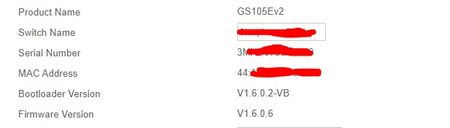
How do I update the bootloader to version V1.6.0.2-VB
Where can i find the update to update the bootloader to version V1.6.0.2-VB?

schumaku
Dec 09, 2020Guru - Experienced User
Can't see the screenshot yet - does the Web UI access challenge to upload the bootloader? Check earlier firmware builds - use "View previous versions" under the current firmware. However, the last one I can locate is GS105Ev2_loader_V1.4.0.5-VB.bin which came with v1.5.0.4.
Somehow I think we had this question before - you have to different GS105Ev2 switches, where the newer came with V1.6.0.2-VB?
Could be a manufacturing or minor hardware change requiring a newer bootloader.
Probably somebody from Netgear can answer and give some insight on the difference or the lack of availability of the V1.6.0.2-VB bootloader for download.
Edit: Same on the GS105PE - later manufactured devices come with V1.6.0.2-VB:
| Bootloader Version | V1.6.0.2-VB |
| Firmware Version | V1.6.0.6 |
The last available bootloader is on this older device, v1.5.0.5-VB became available some firmware releases ago:
| Bootloader Version | V1.4.0.5-VB |
| Firmware Version | V1.6.0.6 |
YeZ can you challenge the switch engineering please? This could explain the oddities we see on the GS105PE under some conditions.

YeZ
Dec 09, 2020NETGEAR Expert
The bootloader version difference should not cause firmware behavior difference. Will check with the engineers.
Related Content
NETGEAR Academy

Boost your skills with the Netgear Academy - Get trained, certified and stay ahead with the latest Netgear technology!
Join Us!
