NETGEAR is aware of a growing number of phone and online scams. To learn how to stay safe click here.
Forum Discussion

JonAB
Dec 11, 2025Aspirant
Issues with LACP with VLANs
Hi all, Network newbie here. I am having some trouble with VLAN's combined with LACP. The setup I have at the moment are purely for educating my self. It consists of: One Netgear GS724Tv4 On...
JonAB
Dec 12, 2025Aspirant
Hi Stephen and thank you for your answer!
I get your point regarding the distribution of the traffic. This is why I tested with two dataflows. Of course, I can set up two more computers to test with four dataflows... But the thin that is bothering me is that:
When the sources and destination is on the same VLAN, i.e. the flow is only going through the switch once, the LACP is performing flawlessly. I have tested many times, and different ports for each flow is always chosen.
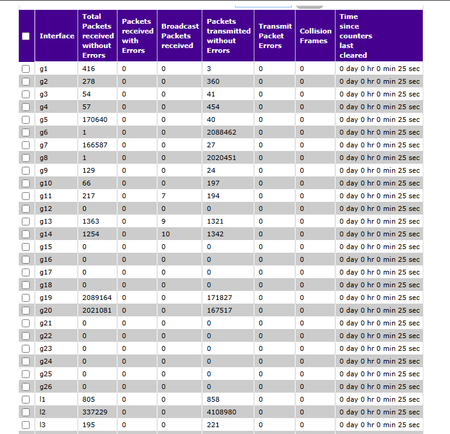
But when the sources and destination is on different VLANs, i.e. the flow has to go through the router, it is always the same story. The dataflow on the lag to the router seems to work just fine. The data transmitted from the switch to the router is distributed on two ports, as well as the data received to the switch from the router, it is always two ports (in this specific test case that will say...)
So far, everything seems to behave very well!
The data flow, sent by two computers, is received by the switch. It is re-transmitted by a lag to the router, by two different ports. The router is transmitting the same flows, but on the right VLAN, which the switch receives on two different ports.
But now, the switch is going to transmit the flows to the NAS. But the switch is always choosing to transmit both flows on the same port, even though I have confirmed that the switch and NAS knows how to properly make use of two ports. Which of course is compromising the bandwidth...
I get the feeling that there is something that I am missing in the setup, but I cannot find it...
OK, I get that there is a 50/50 chance that one of my lags would choose to make it this way. But now, lag1 (router - switch) is choosing a good way 100 % of the time, and lag2 (switch - NAS) is choosing to transmit everything on the same port 100 % of the time...

StephenB
Dec 13, 2025Guru - Experienced User
JonAB wrote:OK, I get that there is a 50/50 chance that one of my lags would choose to make it this way. But now, lag1 (router - switch) is choosing a good way 100 % of the time, and lag2 (switch - NAS) is choosing to transmit everything on the same port 100 % of the time...
The decision on which port to use is based on a hash of the source and destination mac addresses in the ethernet packet. So it will be deterministic for a specific LAG. In your particular case, the router is likely rewriting the source mac address.
Note that the transmit decision is made only by the sending device, so flows in the opposite direction can use different ports.
While some implementations give you a couple of alternative ways to make the decision, the GS724 does not. I guess you could try changing to a static lag, and see if the traffic flow changes. But likely the switch will use the same policy. Another thing you could try is removing one port from the router LAG. Then (if you are lucky) these flows will use different ports. But different flows (from different devices) will still end up with sub-optimal load-balancing, so these hacks are only useful if you are trying to optimize these specific flows.
Multigig NICs and switches are the cleanest path, but of course are expensive.
Is there a reason you want local data flows to be routed? Also, what is your ISP internet speed?
Related Content
NETGEAR Academy

Boost your skills with the Netgear Academy - Get trained, certified and stay ahead with the latest Netgear technology!
Join Us!
