NETGEAR is aware of a growing number of phone and online scams. To learn how to stay safe click here.
Forum Discussion

BeatleManiac
Oct 20, 2023Aspirant
MS510TXM need some general assistance with Routing config
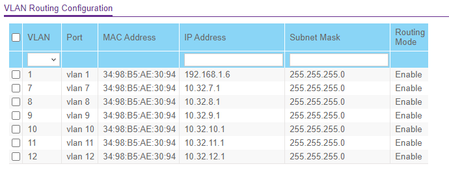
Hello everyone! I'm running a MS510TXM with fw 1.0.5.10. I'm trying to get VLAN routing working and I'm having trouble. From all subnets/VLANS (tagged & untagged) I can see the gateway addre...

schumaku
Oct 21, 2023Guru - Experienced User
Hello Steve,
The PVID does define the VLAN untagged frame entering the switch resp. the switch ports are associated to.
I've requested a moderator moving this thread to the Plus And Smart Switches Forum to discuss Smart Switches (T) and Plus Switches (E), including Local and Remote Management, simply because this isn't a Managed Switch model.
This leads to the question on how these IP subnets are supposed to be associated with VLANs - where you expect the routing to become active. A little bit lost on how you are testing with these two computers, as (for simplicity) none of these is connected to an access port. I would suggest to configure two test ports, port set [U]ntagged and associated to the VLANs (and subnet) you intend to test routing, with the PVID set to the same VLAN ID, but not associated to any other VLAN) associated with the other VLANs. 8-/
I see you have a series of ports still untagged on 1, but tagged member of multiple VLANs. Are you testing from machines, e.g. hosting VMs, able to handle multiple subnets and VLANs?
Greeting from rainy Switzerland!
-Kurt
- BeatleManiacOct 21, 2023Aspirant
Hi Kurt!!
If you're an acapella music fan you probably know about The Real Group. They're from Switzerland too. Phenomenal! I saw them in the late 90's and was blown away!
Back to my issue. the VLANs are associated with my home lab and the ingress/egress point is from the 192.168.1.0 subnet. Most of my devices outside of my vms (NAS, vcenter & esxi mgt, etc) are on the 192.168.1.0 subnet, but I'm wanting to move them into specific VLANs based on function (management, data plane, etc.) and have them communicate with each other in the tagged environment as well as able to get to the Internet if I need them to.
I want the Lab routing to be handled by the smart switch. As you can see, most of them are in the 10.32.0.0 supernet and I have the internet router set with a static route pointing 10.32.0.0 to the management address of the switch (192.168.1.6.) on the switch side the route to 192.168.1.0 is pointed to 192.168.1.6 while the default route points to 192.168.1.1, the address of the Internet Asus wireless router.
I didn't see an option for setting a port to be access in the switch config. on the Tagged laptop, I set the VLAN ID on the ethernet adapter and was able to see other devices on that VLAN. for the 192.168.1.0 device, I just set a static address in that subnet with the gateway pointing to the switch.
Hope this helps!
- schumakuOct 21, 2023Guru - Experienced User
BeatleManiac wrote:
If you're an acapella music fan you probably know about The Real Group. They're from Switzerland too. Phenomenal! I saw them in the late 90's and was blown away!
That would be Sweden ... Switzerland is slightly smaller my friend 8-)
BeatleManiac wrote:
I didn't see an option for setting a port to be access in the switch config. on the Tagged laptop, I set the VLAN ID on the ethernet adapter and was able to see other devices on that VLAN. for the 192.168.1.0 device, I just set a static address in that subnet with the gateway pointing to the switch.
Normal computers like workstations, PCs, ... are always operating on untagged, connected to an access port (VLAN Membership ID [U]ntaggd, PVID set to the same. This is regardless of the VLAN - this is why I started talking about that all your switch port re untagged and PVID 1, and some allow so tagged connections.
- BeatleManiacOct 21, 2023Aspirant
My apologies! Both beautiful mountainous countries!
Here is the Advanced adapter config for my laptop:
setting the VLAN here allows me to have the laptop talk on a Tagged network.
Related Content
NETGEAR Academy

Boost your skills with the Netgear Academy - Get trained, certified and stay ahead with the latest Netgear technology!
Join Us!
