NETGEAR is aware of a growing number of phone and online scams. To learn how to stay safe click here.
Forum Discussion

voncorp
Nov 08, 2013Aspirant
Smartwizard Discovery on machine with two IP's
Scenario: Two isolated networks, with one Win Server 2012 VM that is connected to both. There is no routing between the two networks. 6 Netgear switches, 5 of which SmartControl Center has work...
 Jul 17, 2014FYI, SmartControlCenter was unable to use any interface other than what is bound first in windows. No, changing the interface in SCC had absolutely no effect!:mad:
In order to have SmartControlCenter find the switches on network management vLAN.100, i had to make some windows system changes. Luckily, the effect is immediate and does not require a reboot.
\Control Panel\Network and Internet\Network Connections\--> Advanced--> "Adapters and Bindings" Move the management vLan interface up to the top.--> "Provider Order"
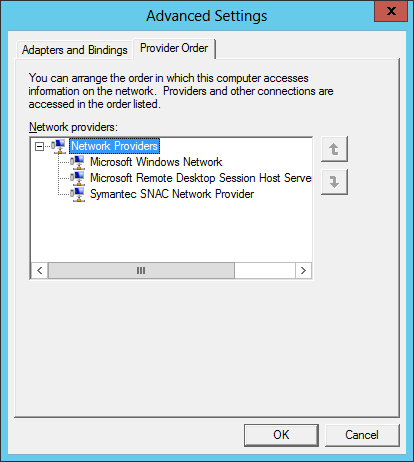 Move "Symantec SNAC Network Provider" to bottom and disable Symantec.
Move RDP session host server down.
Move "Microsoft Windows Network" to top.
Only after doing this, SmartControlCenter found only the newest purchased switches, but not any of the 9 other switches with the latest firmware, some of which were just RMAd.
SmartWizard Discovery never ever ever found anything:(
SmartWizard Discovery was replaced by Smart Control Centre in the years 2010 to 2012. In general switches on V3.xx firmware can be found by Discovery, but later switches on V5.xx firmware cannot be found.
rjt
Jul 17, 2014Tutor
I can not get it to work on Win2012 and of course all our machines have multiple NICs.
Tried elevated.
Tried launching in WinXPsp3 compatibility mode.
SmartWizard has not been updated since 2004.
How about an update NetGear?
Tried elevated.
Tried launching in WinXPsp3 compatibility mode.
SmartWizard has not been updated since 2004.
How about an update NetGear?
Related Content
NETGEAR Academy

Boost your skills with the Netgear Academy - Get trained, certified and stay ahead with the latest Netgear technology!
Join Us!
