NETGEAR is aware of a growing number of phone and online scams. To learn how to stay safe click here.
Forum Discussion

zed4
Mar 31, 2021Aspirant
VLAN for NVR - security camera isolation
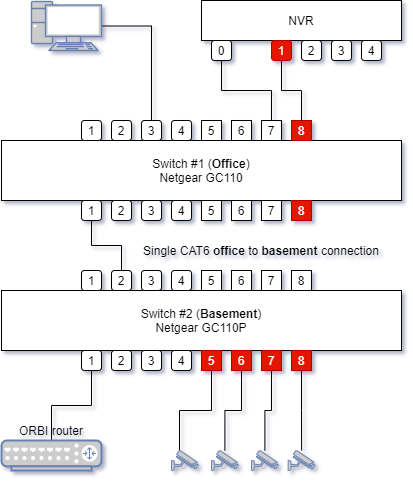
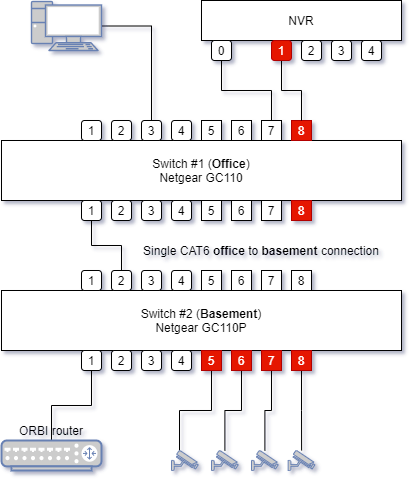
Situation : I have a NVR with 1 LAN connection and 4 POE camera connections. Camera connections and internet access are in the basement. I want to put the NVR in the office for accessibility reas...
zed4
Mar 31, 2021Aspirant
Sorry, newbie here, the diagram doesn't show in the post.

schumaku
Mar 31, 2021Guru - Experienced User
In-line images are under mandatory moderation, these will become visible when the Netgear mods are active.
Before braking a leg. Does your router have the ability to handle an additional VLAN with a dedicated IP subnet, or does this undefined NVR have the ability to handle a dedicated network for the camera, plus a dedicated link to the home/office network with the Internet access?
In general:
- Create the VLAN on both switches, eg. VLAN ID 123.
- For the ports creating the link between the two switches (sw. 1, port 1; sw. 2 port 2 - not marked yet on your design - make it a different color) add the VLAN 123 as [T]agged to both ports (on top of the VLAN 1 and PVID 1) - this does create the trunk between the two switches.
- For the ports where the cameras and the NVR are connected (all the ports marked red), change to VLAN 123 [U]ntagged, PVID 123 - this does create access ports for the VLAN 123.
Undefined to this point is what infrastructure does handle the additional network, the dedicated IP subnet, it's DHCP server, .... is it's unclear if/how the NVR does handle it.
Last but not least: Does the GC110P power the cameras? Some NVR have dedicated ports with non-standard power-over-network-cables.
- zed4Apr 01, 2021Aspirant
Hello schumaku
The router is a Netgear Orbi RBR50, the NVR is an Ezviz X5S.
If I remove the vlan, the camera is found by the NVR and works, so connection to and power from GC110P is ok.
As a test, I have connected a camera directly to POE port 1 of the NVR.
To my surpise, I can ping that camera from my desktop, apparently it gets an ip address from the Orbi router. I expected the camera to be isolated from the LAN courtesy of the direct connection to the NVR and the NVR then managing the camera, but that's obviously not the case.
So my idea of "just" setting up a vlan between one of the NVR POE ports and the camera's, that would not isolate the camera's anyway.
How can I proceed ?
- schumakuApr 01, 2021Guru - Experienced User
Configure the VLAN as suggested, make the ports connecting to the NVR camera port and the cameras as access ports for the dedicated/new VLAN, plus make the connection between the switches as a trunk - just as explained above.
- zed4Apr 01, 2021Aspirant
Your remarks in your first reply were spot-on :
"what infrastructure does handle the additional network, the dedicated IP subnet, it's DHCP server, .... is it's unclear if/how the NVR does handle it." : my test shows the NVR does not handle it.
"Does your router have the ability to handle an additional VLAN with a dedicated IP subnet, or does this undefined NVR have the ability to handle a dedicated network for the camera, plus a dedicated link to the home/office network with the Internet access?"
No idea yet if/how my Orbi RBR50 router can handle an addition VLAN with dedicated subnet and act as DHCP server. I now know the NVR does not handle a dedicated network, so I'm going to need that ?
I've used the Insight app to do as you explained but that does not yet do the trick.
Knowing the NVR does not handle a dedicated subnet, I suppose "just" the vlan won't be enough ?
Related Content
NETGEAR Academy

Boost your skills with the Netgear Academy - Get trained, certified and stay ahead with the latest Netgear technology!
Join Us!