Forum Discussion

CrimpOn
Mar 27, 2025Guru - Experienced User
VLAN Puzzle
I would appreciate assistance diagnosing a VLAN problem. Now that many homes have Ethernet cables installed from most rooms to a central patch panel, some users find that the patch panel is not a gre...

CrimpOn
Apr 11, 2025Guru - Experienced User
A common situation for people with 'wired' houses is having only a single Ethernet cable from the central patch panel to each room. Placing a simple switch in that location allows many devices to be connected to the network. However, there is one specific application that does not work. Often that central patch panel location is not suitable for a WiFi access point and users would prefer to locate their WiFi router in a different room. This works great as long as the Orbi satellites are connected to the router using the default WiFi connection ('backhaul'). Netgear Orbi routers are designed to expect the ISP connection to appear on their WAN port and any 'wired' satellites on the LAN ports. Thus, connecting a satellite to the router with Ethernet requires another Ethernet cable. This is often inconvenient or very expensive.
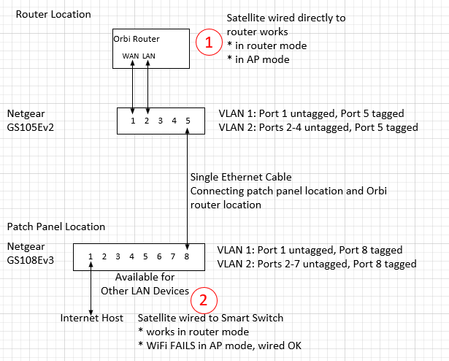
One solution is to place one managed switch at the patch panel and another managed switch at the router location. Using 802.1Q VLAN tagging, the single Ethernet cable can carry both the WAN connection and the LAN connection:
In attempting to discover what causes this solution to fail, the following experiment was conducted:
- Using a single Netgear GS105Ev2 managed switch, connect a router LAN port to one port and the satellite to a different port. (see below) i.e. do not utilize the 'tagged' VLAN ports for the WAN connection.
- With this configuration, everything works except when attempting to connect a device to the Guest WiFi. That fails. The device generates DHCP requests that are visible on Tap2, but those DHCP requests do not appear on Tap 1. They do not get through the managed switch!
The solution is to change from Advanced VLAN to an ordinary Port Based VLAN. i.e. put ports 1 and 5 in VLAN 1 and ports 2,3,4 in VLAN 2. Then, a device connected to the satellite Guest WiFi sends DHCP requests that go trough the managed switch to the router and the device receives a Guest WiFi assignment back from the router.
This "solution", of course, is not a solution at all because it does not account for the WLAN traffic that needs to be separated from the LAN traffic by using an 802.1Q 'tagged' VLAN connection between a pair of switches.
Can anyone suggest how to configure a Netgear managed switch to make this work?
p.s. now that I have invested in multiple Ethernet taps, the next step is to set up the original proposed solution again and monitor "both ends" to see if any packets are being dropped.

schumaku
Apr 12, 2025Guru - Experienced User
Dear CrimpOn
The point is that -we- (or at least me...) don't know what fancy tricks and probably undercover standards are affecting the functionality of these Orbi Systems - especially in AP mode. Trial-and-error reverse "engineering" attempts won't bring us much forward.
The point is your post does imply a potential "problem" on these very simple Web-configurable switches (ways off from Netgear Smart Managed or Managed Switches).
The more likely cause is hidden somewhere in the Orbi in AP mode requirement, having the WAN port connected to the router LAN, while the satellites seemingly -must- be connected direct to the Orbi Router LAN.
That much, this is not more than reading in the coffee grounds. Admit, your effort investing in to Ethernet Taps with Wireshark ports is impressing. Have offered my time, experience, and know-how to Netgear on almost any Orbi Beta without success. For my part, I won't invest my money in Orbi Systems - especially because of the lack of Netgear Engineering backing all over here to the customer base.
Happy weekend!
-Kurt.
Related Content
NETGEAR Academy

Boost your skills with the Netgear Academy - Get trained, certified and stay ahead with the latest Netgear technology!
Join Us!
