NETGEAR is aware of a growing number of phone and online scams. To learn how to stay safe click here.
Forum Discussion

CrimpOn
Mar 27, 2025Guru - Experienced User
VLAN Puzzle
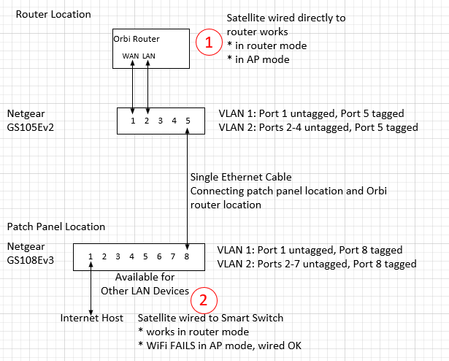
I would appreciate assistance diagnosing a VLAN problem. Now that many homes have Ethernet cables installed from most rooms to a central patch panel, some users find that the patch panel is not a gre...

schumaku
Apr 14, 2025Guru - Experienced User
The reason why these dumb unmanaged switches appear to be workable, while the 802.1q capable switches are not, is in the fact that the unmanaged switch does forward all packets regardless of the type, while a 802.1q capable switch needs to be configured for the relevant VLAN. Otherwise, frames including the additional bytes with the VLAN information among others are stripped.
As CrimpOn owns two taps, has invested in adapters and computers for Wireshark capture, it should be relatively easy* to find the VLAN frames, identified by the Ethernet type 0x8100.
*The crux is that most OS and network drivers need to be forced to accept these frames, as most more sophisticated adapter drivers tend to strip the VLAN details. FMI: https://wiki.wireshark.org/capturesetup/vlan#windows
This thread could be quickly resolved by Netgear Orbi engineering (note: you are barking up the wrong tree here!), simply by letting the knowledgeable network admins know if 802.1q VLAN tags are used for the consumer Orbi guest network, and which one please. Then we can come up with a simple example of a trunk config for the link involved. Sure, they could simply wait and see if CrimpOn and other knowledgeable community members figure this out, by what is called reverse engineering.
Not sure what complaint on 150 USD for these configurable (not "managed") switches is about: A Netgear GS308E goes over the counter for about 32 USD, a GS305E start at about USD 26.50 (or CHF here, 8.1% VAT and next day Swiss Post shipping included). Sure, this comes at the "cost* of one year only warranty, otherwise some 8...15% more would have to be calculated in this price sensitive market field.
Welcome to the wonderful world of networking dear friends.
-Kurt.

FURRYe38
Apr 14, 2025Guru - Experienced User
Ya I have some smart managed switches that I've been testing with and with the NG engineers. GS108T, GS808, MS105E and GS728Tv3. All have failed when it comes to AP mode and Guest Network while RBS are ethernet connected thru them. I've been able to use 4092 Tag on all ports and this solved RBS behaviors while in router mode. Someone in a beta showed me this. I wish I had checked AP mode as well back then.
Ya hoping if Wireshark can show something. I have this ability and will see if can get a trace from it. I presume the test PC would need to be connected behind the RBS or at the connecting switch to get data?
- schumakuApr 14, 2025Guru - Experienced User
All switches except of the non-manage ones failed? No, Netgear Orbi design flaw, or the lack of documentation. Wrong tree, stop barking here: All these switches behave mostly correct and standards compliant.
Should the VLAN 4092 be the solution, go for it, configure a trunk with the main VLAN 1 as an accessoire, and 4092 tagged -: consistently through the network with the Orbi Router and sattelite LAN ports.
Don't forget to give credit to the unknown Orbi beta tester please.
For my part, I still don't understand why in AP mode the WAN and the LAN port should behave differently.
- CrimpOnApr 14, 2025Guru - Experienced User
FURRYe38 wrote:
I've been able to use 4092 Tag on all ports and this solved RBS behaviors while in router mode. Someone in a beta showed me this. I wish I had checked AP mode as well back then.
Netgear has multiple switch models:
- Unmanaged (except for IGMP Snooping, Green feature, etc.) - dirt cheap (well, not TP-Link cheap, but...)
- Easy Smart Managed - (5 port $40US, 8 port $60US)
- Smart Managed Pro with Cloud Management - (GS108Tv3 - $75US)
https://www.netgear.com/business/wired/switches/smart-cloud/gs108tv3/
This one can be "Cloud Managed" and the User Manual talks about Auto VLANs :
The user manual for the GS109T is way complicated.
Here in a minute I will drag my Ethernet cable down the hall and begin capturing packets.
- FURRYe38Apr 14, 2025Guru - Experienced User
What I mean is that when those managed switches are in the mix, RBS Guest Network Fails when these switches are in use. No matter if VLAN tag is used or not. Non managed switches don't exhibit this issue in the mix and GN works at the RBS, and managed switches are not present.
The 4092 was help from a switch beta tester that I had posted having RBS issues with the managed switch I had tested. I was lucky this user was in the beta as well and mentioned that this tag would solve it. This was for router mode though on the Orbi system. It solved the RBS and Guest Network issue. But I didn't test AP Mode back then so didn't get a chance to get help from the beta user on that.
Ya, I agree, why is AP Mode and GN so different from Router mode with a managed switch in the middle fails on Guest Network at the RBS, when router mode and vlan tag works. Can only think of some subnet maybe with GN that could be at play. We know that GN uses 192.168.2.x subnet that when in router mode is isolated from the main LAN. While in AP mode, I believe GN is still on same .2.x subnet regardless of what the LAN side configuration for AP mode is. I don't know if GN is isolated still from the AP Mode LAN or is accessible. Just thoughts here.
Where should we best capture packets at? Behind the RBS when ethernet connected or at the switch?
schumaku wrote:
All switches except of the non-manage ones failed? No, Netgear Orbi design flaw, or the lack of documentation. Wrong tree, stop barking here: All these switches behave mostly correct and standards compliant.
Should the VLAN 4092 be the solution, go for it, configure a trunk with the main VLAN 1 as an accessoire, and 4092 tagged -: consistently through the network with the Orbi Router and sattelite LAN ports.
Don't forget to give credit to the unknown Orbi beta tester please.
For my part, I still don't understand why in AP mode the WAN and the LAN port should behave differently.
- CrimpOnApr 14, 2025Guru - Experienced User
Good Question. (Things change over time.) This afternoon, it looks like this:
Taps are inserted into the cable path between RBS750 and GS108Ev3 and between RBR750 LAN and GS105Ev2.
Tap A is an $11 "Throwing Star" passive tap that reduces the communication rate to 100Mbps.
This requires two Ethernet connections to the PC to capture traffic in both directions. I'm using Ethernet-USB adapters for this.
Tap B is a $229 Dualcomm Gigabit tap that requires only one Ethernet connection to capture traffic in both directions. (Yes, it is ghastly expensive, but this is what I do instead of playing golf or dining out.)
By moving cables around, it is possible to change what is being monitored. For example, instead of a cable going from Tap A to the GS108Ev3, it could go from Tap A directly to Tap B. This removes the managed switches from the cable path entirely. The WAN connection still goes through the managed switches, but the LAN to satellite connection now does not.
- CrimpOnApr 14, 2025Guru - Experienced User
Concerning VLAN 4092. I want to get the mechanics correct.
On the CS105Ev2
- port 2 that goes to the RBR750 LAN port should belong to VLAN 4092, but the port itself should be untagged?
- port 5 that goes to the other switch should belong to VLAN 1 and VLAN 4092 and has to be tagged?
- other ports that would connect customer devices to the router LAN belong to VLAN 4092, but are not tagged?
On the CS108Ev3
- port 8 that connects to the other switch belongs to VLAN 1 and VLAN 4092 and is tagged.
- port 2 that connects to the RBS750 satellite belongs to VLAN 4092 and is (tagged or untagged?)
- other ports that would connect customer devices to the router LAN would belong to VLAN 4092 (3,4,5,6,7)
Basically, every port that was VLAN 2 is now VLAN 4092.
- FURRYe38Apr 15, 2025Guru - Experienced User
I would remove one managed switch to help you with testing this. Having two only makes things worse.
Yes, VLAN tagged on all ports for ease of configuration.
- schumakuApr 15, 2025Guru - Experienced User
Re-think please. The Orbi LAN Port (and the Orbi Satellite port of course) is supposedly carrying two networks:
These are [U]ntagged Orbi LAN (also == the PVID) making the every device you connect like connected to this same router LAN keeping a simple flat network, plus the [T]agged 4092 guest network, same for the Orbi Satellite LAN port.
All you have to to - regardless of the switch brand or model - is to define that additional VLAN 4092, and make every port [T]agged for the VLAN ID 4092.
No worries, in this example, the guest network is on the VLAN 1977, available as [T] on all Swisscom routers available since the last to decades (almost).
All you have to do is to change your switch to the advanced 802.1Q mode (this retains the default LAN config for VLAN 1, [U]ntagged, and PVID 1 on each port; then [Add] the VLAN 1977 to the switch. The process can be different based on the WebUI version, on the classic switch Web UI it has to be defined, omn the modern mobile device WebUI it can be done in one step.
On my switches, each port is defined as a trunk, for the basic VLAN 1, plus for the guest VLAN 1977 here in these examples, but I'm convinced you can handle the difference.:
Very similar when using Netgear Insight
...
On the VLAN ID intended, [Select All] and click [Trunk Port] ...
In each case, the VLAN 1 remains unchanged, since my home network is pure flat, the ISP router does DHCP for the LAN here, the VLAN 1, ...
- schumakuApr 15, 2025Guru - Experienced User
CrimpOn wrote:
FURRYe38 wrote:
I've been able to use 4092 Tag on all ports and this solved RBS behaviors while in router mode. Someone in a beta showed me this. I wish I had checked AP mode as well back then.
Netgear has multiple switch models:
- ...
- ...
- Smart Managed Pro with Cloud Management - (GS108Tv3 - $75US)
https://www.netgear.com/business/wired/switches/smart-cloud/gs108tv3/
This one can be "Cloud Managed" and the User Manual talks about Auto VLANs :
The AutoVLAN feature is a nice idea. However, the inability to define these VLAN IDs is prohibitive for implementing into existing infrastructures and network configs - no network admin will re-design his VLAN layout just because one manufacturer does implement something that inflexible.
CrimpOn wrote:The user manual for the GS108T is way complicated.
Changed the quote to GS108Tv3, undoubted this is what it is you are referring here.
Almost 600 pages User Manual for 8-Port Gigabit (PoE+) Ethernet Smart Managed ProSwitch with 2 SFP or 2 Copper Ports and Cloud Management where most only lightly touching the many available features, plus more than 100 pages in the Lite CLI Reference Manual for Smart Switches with Optional Remote/Cloud Management.
Asking different: When have you read the full documentation of your favorite desktop OS, like Windows 11, MacOS, or Linux?
For what you intend to achieve here, there is not much need for such a little "beast" with all that functionality. Sure, Enough said.
- CrimpOnApr 15, 2025Guru - Experienced User
The Luddite is still confused.
When a VLAN port on a switch is "tagged", that means that every packet going out that port will contain the 802.1Q Header Type/Size field immediately after the Source MAC address. When the packet goes into another managed switch, the VLAN tag remains part of the packet. When the packet exits that second switch:
- If that port is "tagged", then the VLAN tag remains in the packet.
- If that port is "untagged", then the VLAN tag is removed.
- When packets go through unmanaged switches, nothing is done to the payload. If there is a tag in the packet, it remains in the packet. If the tag has no packet, it just goes through the unmanaged switch "as is".
So, on switch 1 everything from the LAN port on the router is configured to be part of VLAN 4092. If the switch sends it out any of the untagged Ports, it has no VLAN tag. When it goes to switch 2, the 4092 tag goes with it. In switch 2, if the packet goes out any untagged port (like to a printer, computer, etc.) the tag is removed.
If the packet goes out the port leading to the satellite, we want to keep VLAN tag 4092 in the packet.
This is where I am confused. When observing the connection between Orbi router and satellite, I do not pick up any packets that contain VLAN tags. (no switches, just a simple Etherent cable.) Are they optional? i.e. the satellite is so smart it can recognize router packets with or without a VLAN tag?
- schumakuApr 16, 2025Guru - Experienced User
If a "managed switch" (your wording, not mine) does receive VLAN Ethernet frames type 0x8100 it does ignore these - unless explicitly configured to deal with the VLAN ID the port is configured for.
To draw this a little bit more obvious example:
If a switch would strip Ethernet frames with the type 0x0800 -no- IPv4 packets will ever pass the switch.
If a switch would strip Ethernet frames with the type 0x86dd -no- IPv6 packets will ever pass the switch.
Back to the main thread...
If a switch port is configured to accept VLAN frames -and- is configured to take frames with the VLAN ID 4092 (the Orbi Guest VLAN, 1977 in my Swisscom guest network example) it will put these to the VLAN 4092 -internally-.
If a port is defined as [T]agged 4092 it will also forward these frames to the link making up a trunk.
If a port is configured for the PVID 4092, it will forward these VLAN ID 4092 frames after stripping the additional VLAN information.
With that same port configured for [U]tagged 4092, (together with the PVID 4092) that would make it an Access Port for that VLAN 4092.
All basic VLAN networking confusion cleared up a little bit now? These switches are wonderful machines!
It's like a water hose where water is flowing to, and there are some oil drops in it (not mixing into an emulsion) 8-)
A possible reason, why you don't pick up any tagged frames might be on your (Windows?) systems, where you are operating the Wireshark App. Drivers can have (and will have) an impact... This is what the Wireshark article I had referred before is about.
Coffee time for me now.
- schumakuApr 16, 2025Guru - Experienced User
CrimpOn wrote:
Are they optional? i.e. the satellite is so smart it can recognize router packets with or without a VLAN tag?
How else should a even a simple Wireless Access Point (with it's own local management by default on the untagged network) associate different SSID with different, independant logical networks? Everything is on the same physical Ethernet link, the SSIDs on air making different logical networks - on the same physical network commonly known as "air"?
- schumakuApr 16, 2025Guru - Experienced User
CrimpOn wrote:
If the packet goes out the port leading to the satellite, we want to keep VLAN tag 4092 in the packet.
Of course, correct!
This is why one has to configure the Ethernet port making up
- the physical between router and switch,
- between the switches,
- and from the other switch to the satellite as a trunk.
The main network will run untagged, while the other network(s) will run tagged.
- CrimpOnApr 16, 2025Guru - Experienced User
This gets more and more fun!
Next step appears to be how to determine if I am able to capture and display Ethernet frames with VLAN tags. The only tagged link in the current experiment is between switch 1 and switch 2. So, tap that link and see if Wireshark displays VLAN tags. (The Wireshark documentation on VLAN is a bit vague and seems to indicate that Realtek adapters may ignore VLAN tags and some other adapters will strip them.)
Does this affect the basic design? The assumption was "two separate Layer 2 networks":
- One for the ISP-WAN port traffic. To be kept separate from the LAN traffic so that no local devices (including Orbi satellites) appear on the WAN port.
- One for devices on the LAN (including Orbi satellites).
Because the VLAN tags are needed only to keep the two networks separate as they pass through the single Ethernet cable and to identify which ports they use to enter and exit the two switches, the actual switch ports are untagged.
This leads to more questions:
- What about connections to other devices? (not Orbi satellites) Printers, computers, etc. are not likely to understand 802.1Q VLAN. Will they always strip the VLAN tag? Should there be another VLAN for non-satellite devices? The "tagged" link can handle as many VLANs as needed. So, add another link from the router to Switch 1 for 'non-satellite' connections?
- What about the router to switch Port? If it is an untagged port with VLID set to 4092, then every frame will have a tag for 4095 added to it. Should it be set to a tagged port with a VLID of (???) for times the router sends out a packet without a tag?
- What about the port going to the satellite. It probably needs to be a tagged port?
Looks like the entire experiment hinges on being able to detect and display VLAN tags.
- schumakuApr 16, 2025Guru - Experienced User
CrimpOn wrote:
- What about connections to other devices? (not Orbi satellites) Printers, computers, etc. are not likely to understand 802.1Q VLAN. Will they always strip the VLAN tag? Should there be another VLAN for non-satellite devices? The "tagged" link can handle as many VLANs as needed. So, add another link from the router to Switch 1 for 'non-satellite' connections?
I'll try to provide some ideas, so you can answer this question by yourself:
Where would you connect these "other devices" on an Orbi system?
- My answer (never having touched an Orbi consumer system in more than a decade): On the Orbi LAN port! These could be the Orbi router box LAN port, as well as the one of the Orbi satellite(s) LAN port - these are either bridged through the Orbi Mesh wireless backhaul, or direct connected by this network "cable" linking the Orbi satellite(s) LAN ports, and the Orbi router LAN port. At that point, the satellites are becoming pure wireless access ports (no magic at all!)
Would these other devices have to be VLAN aware?
- My answer: No, of course not!
CrimpOn wrote:
- ...
- What about the router to switch Port? If it is an untagged port with VLID set to 4092, then every frame will have a tag for 4095 added to it. Should it be set to a tagged port with a VLID of (???) for times the router sends out a packet without a tag?
- ...
See my network laboratory session below! I can't take away your learning curve on these basics. But please scratch and forget the basic port based config options from the Plus switches - it's about the advanced VLAN settings only-
CrimpOn wrote:
- ...
- ...
- What about the port going to the satellite. It probably needs to be a tagged port?
It's a trunk port, carrying the LAN untagged, and the Guest network Tagged. Same as for connecting the Orbi router LAN port.
Of course, assuming you have a dedicated network making up the "WAN" (being your standard consumer grade NAT router LAN with the default NAT and private IP subnet, being a more sophisticated Internet connection supporting more than a single LAN and IP subnet, or handing out more than one public IP address by DHCP (to be configured with multiple NAT routers). Easy to create an additional VLAN (for example VLAN 1234), operating this Tagged over the single Ethernet link. defining a port on the central point ([U]ntagged, PVID 1234, ... the only one) plus one on the far end where you want to operate or test your systems, again [U]ntagged, PVID 1234, ... the only one) ... now you have a "virtual" WAN network Ethernet cable. No rocket science, a simple network laboratory training session for VLAN newbies you have to go through on your own, building your own experience.
- CrimpOnApr 16, 2025Guru - Experienced User
Thanks for not giving up.
Well, the plot thickens! The Tap I had been using at first (Throwing Star with two Ethernet-USB adapters) never showed anything with a VLAN tag on the Ethernet link between RBR750 router and RBS750 satellite. I just now installed the other Tap with a different Ethernet-USB adapter on that cable link (no switches) and it does show two kinds of packets:
- Between the router LAN port and satellite LAN port are ordinary (untagged) Ethernet frames.
- Between the router WiFi MAC address and the satellite WiFi MAC address are frames with VLAN tag 4093.
This may be why "it ain't gonna work."
When the router/satellite transmit Ethernet frames with and without VLAN tags, dumb old Ethernet switches are totally oblivious. They care only about their internal routing tables. "which port do I transmit this packet out to reach this MAC address?"
Now I have to investigate what "managed" switches from Netgear and TP-Link do when some packets appear on a port with VLAN tag and some appear without a VLAN tag. The cool process would be to simply shove another VLAN tag into the packet when it comes into the managed switch. Let that VLAN direct the flow through the switches, and remove that VLAN tag when the packet emerges out the other switch (leaving the original VLAN tag intact for the satellite to deal with).
And, how did the router know where the MAC address for the Satellite WiFi is? With WiFi, it's is radio waves. With Ethernet, the router has to pick one of the Ethernet LAN ports. Have to go back and start the capture before connecting the Ethernet cable.
- schumakuApr 17, 2025Guru - Experienced User
CrimpOn wrote:
..and it does show two kinds of packets:
- Between the router LAN port and satellite LAN port are ordinary (untagged) Ethernet frames.
- Between the router WiFi MAC address and the satellite WiFi MAC address are frames with VLAN tag 4093.
This may be why "it ain't gonna work."
Time to add the VLAN 4093 plus define the [T]agged 4093 on the trunk links connecting (I guess now something for some internal comms on these Orbis), and on the trunk where you connect your switches - so you have the plain VLAN 1 plus two tagged VLANs 4092 (guest) and 4093 (Orbi internal use?)
CrimpOn wrote:
When the router/satellite transmit Ethernet frames with and without VLAN tags, dumb old Ethernet switches are totally oblivious. They care only about their internal routing tables. "which port do I transmit this packet out to reach this MAC address?"
That's' exactly what an Ethernet bridge does!
Try to avoid the term Routing, as this is on network technology more the L3 routing for IPv4 and IPv6. We talk about switches, so it's internally bridging - that is what happens in between the different Ethernet segments.
Sigh, you must be in the age using networks for a longer time I guess - remember fat yellow Ethernet, and much more Thin Ethernet where the meaning of an Ethernet segment was more obvious back than. Breaking a modern switch down to that ancient tec does kind a proof every switch port and it's link does make a network segment, the switch became a very fast Ethernet bridge. This is why the old term of an Ethernet Hub (technically a pure bridge with Ethernet PHYs on each port) does still float around in the net and some wally brains 8-)
CrimpOn wrote:
Now I have to investigate what "managed" switches from Netgear and TP-Link do when some packets appear on a port with VLAN tag and some appear without a VLAN tag. The cool process would be to simply shove another VLAN tag into the packet when it comes into the managed switch. Let that VLAN direct the flow through the switches, and remove that VLAN tag when the packet emerges out the other switch (leaving the original VLAN tag intact for the satellite to deal with).
Sure, you could create some simple config on your two switches where you "invert" the logic, making PVID 1 on the "input" port, VLAN 1 [Tagged], and run the 4093 [U]ntagged between two switch ports if this would simplify your re-engineering efforts (permitting we are allowed to talk like that here in the public Netgear community here, guess they don't care).
CrimpOn wrote:
And, how did the router know where the MAC address for the Satellite WiFi is? With WiFi, it's is radio waves. With Ethernet, the router has to pick one of the Ethernet LAN ports. Have to go back and start the capture before connecting the Ethernet cable.
Looks like we have to open a new break-out session here. A Wireless Access Point (as implemented on the Orbi Router -and- all Satellite(s)) is just yet another Bridge - enhanced with some more or less smart "config and monitoring" tools.
The Orbi Backhaul capabilities (undoubted able to be run over a wireless connection -or- the Orbi LAN ports) are again nothing else then clearly tuned Ethernet bridges, allowing to seamless extend (in a customer friendly way when it comes to "air" or a simple Ethernet cable), avoiding network loops. Together with the wireless all operating on the same SSID, the same security, and letting the APs announce the same SSID all over - that makes up a Mesh system at the end of the day.
And because these additional proprietary control channels are model-specific, only select models of Orbi routers and satellites can be operated into the same config.
Wish everyone happy and peaceful Easter holidays with friends and families.
Regards,
-.Kurt.
- schumakuApr 18, 2025Guru - Experienced User
Was looking around the secondhand market for Orbi 770 and 970 series offerings, and was almost shocked reading about the reasons why such modern Orbi are sold at young age, often less than a year old kits or units. Appears there is no IPTV support, no IGMP Multicast support for what makes thinking about such expensive models obsolete, at least in many market. And no, don't try to convince me that IPTV VLAN bridging to selected ports on the main unit is available (like on many decades old consumer routers.
Not so long ago some active community member explained in the Orbi community section that Guest and IoT "networks" are just differing on the possible access direction - but there are no dedicated, isolated networks and subnets available for these. So confusion complete,nowhere was the impression coming from eg. the guest network should be on a VLAN -:while everything is on the same broadcast domain with just some clever MAC and preset traffic direction control..
What have I missed now here please?
- CrimpOnApr 18, 2025Guru - Experienced User
My impression is that Netgear's new WiFi7 models continue the same features as the WiFi5, WiFi6, and WiFi6E products in respect to:
- IPTV Support. Using the ISP required VLAN tag isolates IPTV devices from the router NAT function.
(See page 87 of the 770 manual: https://www.downloads.netgear.com/files/GDC/RBE773/RBE771_RBE770_UM.pdf ) This apparently misleads some customers into thinking that the product supports customer defined VLANs, when the only purpose of the setting is to support ISP provided IPTV. - IGMP Snooping. Likewise, every Orbi product has the same capability as most Ethernet switches in the area of IGMP Snooping. Users have the option to disable it on page 71 of the manual.
The IoT network feature seems to be Netgear's response to customer frustration with WiFi devices which are difficult to connect to modern mesh networks. Since 2016, customers have begged for one of two solutions:
- Allow the ability to create a different SSID for 2.4G and 5G WiFi, like Netgear WiFi routers prior to mesh systems offered. or...
- Allow the ability to temporarily shut down the 5G radio signal.
Netgear's response for years was (a) modern mesh systems use one single SSID for both 2.4G and 5G networks. Live with it. (b) mesh systems never turn off their radios. (c) if you don't like it, then buy something else. Users on the forum came up with a number of work-arounds for people who were desperate. (Keep an old router. Set up a WiFi Hot Spot. etc.)
Finally, Netgear released this new feature called IoT Network. Wonder of wonders. It has a different SSID than the primary network, and the radios can be turned off and on at will.
Isolating IoT devices from the primary network was never a significant topic. Sort of shame now that customers have become paranoid about the vulnerability of their gizmos.
The original WiFi5 Orbi had devices on the Guest WiFi network in the same IP subnet as devices on the primary network and the firmware had internal programming to allow them to be isolated from the primary network (or not isolated). Whenthe WiFi6 products came out, Guest WiFi was moved to a different IP subnet and there is no longer an option to allow guest devices to communiate with the primary network.
VLAN with regard to Orbi satellites appears to be a different issue. Amazon delivered more Ethernet-USB adapters this afternoon, so I will document that situation shortly.
- IPTV Support. Using the ISP required VLAN tag isolates IPTV devices from the router NAT function.
- CrimpOnApr 19, 2025Guru - Experienced User
Just a brief update to vent my frustration.
After discovering that a Wireshark capture on Windows 11 laptop revealed the RBR750 producing packets with VLAN tag 4093 and the capture on a Windows 11 desktop did not, my assumption was that the Ethernet-USB adapters being used on the desktop were the cause. Amazon delivered new Ethernet-USB adapters to match the one that is working on the laptop, and (damn) they, also, did not capture any VLAN packets! It now appears that the ASIX driver on the desktop is at a version from 2012 and the version on the laptop is from 2024. Only the new driver has the "advanced" feature to enable VLAN capture.
Both the laptop and desktop were purchased within the past two years and are both running the most current version of Windows 11. Grrrrrr.
Eventually this will all get resolved. What appears to have been determined thus far is that:
- The 750 product uses VLAN 4093 to communicate information over the Ethernet link about the network configuration. (topology)
- This is using ieee1905 protocol. https://en.wikipedia.org/wiki/IEEE_1905
- When a device connects to the primary WiFi network on an RBS750, it uses regular (untagged) Ethernet packets.
- When a device connects to the Guest WiFi on an RBS750 satellite, it uses VLAN 4093 for communication to the router over the Ethernet backhaul link. Perhaps this is linked to the use of a different IP subnet for Guest WiFi in the AX products? (perhaps not?)
Potential "to do item": once I get the damn Ethernet adapter issue worked out, it is worth figuring out how the original WiFi5 Orbi product handles Ethernet backhaul? There is the obvious intellectual curiosity. But the WiFi5 products are End of Life. Maybe how they did things is not particularly helpful.
- FURRYe38Apr 19, 2025Guru - Experienced User
What build version and edition are these Windows 11 OS that is on the Laptop and Desktop?
Home or Pro/ 32 or 64bit versions?Build 23H2 or 24H2?
I tried both 4092 and 4093 IDs at the same time Tagged on ALL Ports with the managed switch and Guest Network is not working for devices connected behind the RBS thats ethernet connected to same switch with the RBR.
Would be a good test to try same thing with the 50 series. I can help test this too.

Related Content
NETGEAR Academy

Boost your skills with the Netgear Academy - Get trained, certified and stay ahead with the latest Netgear technology!
Join Us!
