NETGEAR is aware of a growing number of phone and online scams. To learn how to stay safe click here.
Forum Discussion

CrimpOn
Mar 27, 2025Guru - Experienced User
VLAN Puzzle
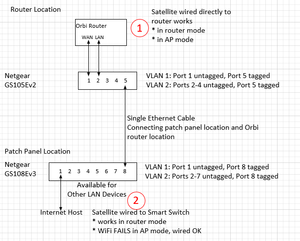
I would appreciate assistance diagnosing a VLAN problem. Now that many homes have Ethernet cables installed from most rooms to a central patch panel, some users find that the patch panel is not a gre...

CrimpOn
Apr 15, 2025Guru - Experienced User
Concerning VLAN 4092. I want to get the mechanics correct.
On the CS105Ev2
- port 2 that goes to the RBR750 LAN port should belong to VLAN 4092, but the port itself should be untagged?
- port 5 that goes to the other switch should belong to VLAN 1 and VLAN 4092 and has to be tagged?
- other ports that would connect customer devices to the router LAN belong to VLAN 4092, but are not tagged?
On the CS108Ev3
- port 8 that connects to the other switch belongs to VLAN 1 and VLAN 4092 and is tagged.
- port 2 that connects to the RBS750 satellite belongs to VLAN 4092 and is (tagged or untagged?)
- other ports that would connect customer devices to the router LAN would belong to VLAN 4092 (3,4,5,6,7)
Basically, every port that was VLAN 2 is now VLAN 4092.

schumaku
Apr 15, 2025Guru - Experienced User
Re-think please. The Orbi LAN Port (and the Orbi Satellite port of course) is supposedly carrying two networks:
These are [U]ntagged Orbi LAN (also == the PVID) making the every device you connect like connected to this same router LAN keeping a simple flat network, plus the [T]agged 4092 guest network, same for the Orbi Satellite LAN port.
All you have to to - regardless of the switch brand or model - is to define that additional VLAN 4092, and make every port [T]agged for the VLAN ID 4092.
No worries, in this example, the guest network is on the VLAN 1977, available as [T] on all Swisscom routers available since the last to decades (almost).
All you have to do is to change your switch to the advanced 802.1Q mode (this retains the default LAN config for VLAN 1, [U]ntagged, and PVID 1 on each port; then [Add] the VLAN 1977 to the switch. The process can be different based on the WebUI version, on the classic switch Web UI it has to be defined, omn the modern mobile device WebUI it can be done in one step.
On my switches, each port is defined as a trunk, for the basic VLAN 1, plus for the guest VLAN 1977 here in these examples, but I'm convinced you can handle the difference.:
Very similar when using Netgear Insight
...
On the VLAN ID intended, [Select All] and click [Trunk Port] ...
In each case, the VLAN 1 remains unchanged, since my home network is pure flat, the ISP router does DHCP for the LAN here, the VLAN 1, ...
Related Content
NETGEAR Academy

Boost your skills with the Netgear Academy - Get trained, certified and stay ahead with the latest Netgear technology!
Join Us!
