NETGEAR is aware of a growing number of phone and online scams. To learn how to stay safe click here.
Forum Discussion

CrimpOn
Mar 27, 2025Guru - Experienced User
VLAN Puzzle
I would appreciate assistance diagnosing a VLAN problem. Now that many homes have Ethernet cables installed from most rooms to a central patch panel, some users find that the patch panel is not a gre...
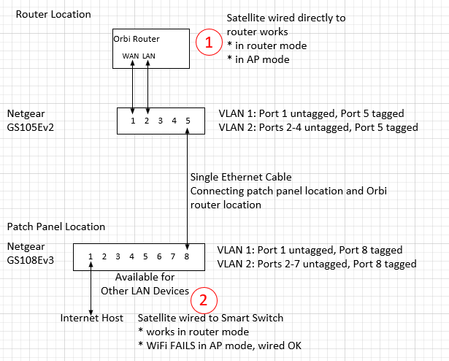

CrimpOn
Apr 24, 2025Guru - Experienced User
Appreciate the patience. (I REALLY do.)
Now, to the mechanics to make this happen.
- The WAN-ISP link must be separate from all other traffic. No broadcast packets (like DHCP requests) from network devices hitting the ISP except for the router itself.
- The switch port connected to the router LAN port must accept both untagged frames and VLAN 4093 tagged frames. Untagged frames addressed to other devices have to go through the switch and come out the correct port. Both untagged and tagged frames addressed to the satellite (or a device connected to the satellite) must go through the switch and come out the same way they came in (untagged and VLAN 4093 tagged).
- Likewise, both untagged and VLAN 4093 frames sent from the satellite to the router must come out this port the same way they went in. (some untagged. some VLAN 4093 tagged.)
- This is the setting I cannot find.
- This would seem to indicate that the ports connecting both switches must be 802.1Q tagged. (otherwise, broadcast and multicast frames would go 'everywhere') But, that means that both switches must be set up as 802.1Q VLAN. Not "Port Based" VLAN.
Here is the design

FURRYe38
Apr 24, 2025Guru - Experienced User
Your theory seems to lead to some think I've thought about. GN is isolated from the main lan and I believe tied directly to the WAN port for internet resources. I presume may not be behind any firewall layer either.
How you have this laid out has the RBS at the 1st switch with the ISP services on same switch. Seems to have some credence on getting around the GN isolation barrier when in normal configuration modes.
- CrimpOnApr 24, 2025Guru - Experienced User
Guest WiFi is definitely behind a NAT firewall that prevents access from the internet or from the primary network. Devices on the Guest WiFi can open a connection TO the internet, which allows applications to communicate with cloud resources.
The problem is when a device is on the Guest WiFi of a satellite, and has to communicate with the Guest WiFi on the router through the LAN ports. I would have thought, "no problem. Primary IP subnet is 192.168.1.x. Guest subnet is 192.168.2.x. Just set up a static route." It appears that Netgear decided to use VLAN tag 4093 for any frames going from Guest WiFi on one Orbi to Guest WiFi on another Orbi.
As long as the entire network is "ordinary Ethernet" (wires or dumb switches), these VLAN packets just go where they are supposed to go. The ARP based switch mechanisms will route frames through the switches and cables until they get where they need to go.
What kills things is (a) using the 'wired' router to satellite connection, and (b) running the connection through managed switches.
What would be really cool is if someone could capture the traffic between router and satellite on a BE system. i.e. put a tap on an Ethernet cable. Start Wireshark. Connect the cables. Capture a couple of minutes.
BE Router >--cable--> Tap <---cable--->BE Satellite (leave this cable off until ready)
||
Wireshark
- CrimpOnApr 24, 2025Guru - Experienced User
OMG. Kurt Rules!!!!
Using 802.1Q VLAN, a port can be part of multiple VLANs. It can be "tagged" on some of them and "untagged" on others.
Knowing about VLAN 4093 was the key, and reading the earlier posts more carefully. Will test in AP mode later, but see no reason for it not to work. Kurt's instruction on VLAN Port 4093 in earlier posts is exactly correct!
Both switches are set to Advanced VLAN 802.1Q
- CrimpOnApr 24, 2025Guru - Experienced User
Confirmed that this configuration also works when 750 is in Access Point (AP) mode.
I will need some "alone time" to test this on the original RBR50/RBS50 system. Since wired backhaul was not part of the original RBR50 design and that product handles Guest WiFi differently than the AX series, I have no expectation as to whether VLAN 4093 is part of that setup or not.
WiFi7 products, likewise, are unknown. "probably?"
- FURRYe38Apr 25, 2025Guru - Experienced User
Can this tap be a non managed HUB switch, not a newer LAN switch that has separation on the ports, however, I have a older NG 100Mb LAN Hub that should see traffic all on ports. Would this work?
So does Guest Network work with something connected at the RBS using your new found two switch configuration?
"What kills things is (a) using the 'wired' router to satellite connection, and (b) running the connection through managed switches." < Too be clear, this is only in AP mode. I've been able to make the RBS and Guest Network work with 1 managed switch when the RBR is in Router mode.
- CrimpOnApr 25, 2025Guru - Experienced User
One of those ancient switches might work as a tap. It would be fun to set it up and find out. I had one of those years ago. (Geez. What the heck did I do with it? Will dig through boxes.)
Yes. With that "tagged" VLAN 4093 definition, I connected a tablet to the satellite Guest WiFi and it worked just fine. The network tap captured frames to/from the tablet and all were tagged VLAN 4093. Without that VLAN tag, the satellite would have received the frames but not sent them to the tablet.
Related Content
NETGEAR Academy

Boost your skills with the Netgear Academy - Get trained, certified and stay ahead with the latest Netgear technology!
Join Us!
