Forum Discussion

CrimpOn
Mar 27, 2025Guru - Experienced User
VLAN Puzzle
I would appreciate assistance diagnosing a VLAN problem. Now that many homes have Ethernet cables installed from most rooms to a central patch panel, some users find that the patch panel is not a gre...
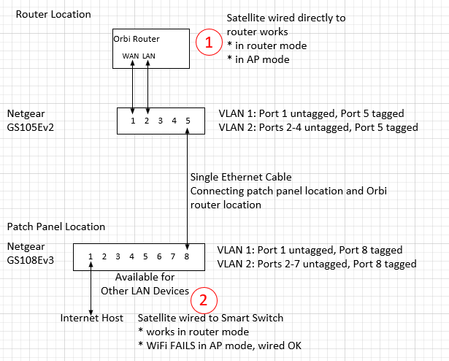

FURRYe38
May 01, 2025Guru - Experienced User
Ok so got home today and checked the single RBS that was still ethernet connected to the switch with the RBR in AP Mode, GN connected clients still getting internet access. Woo hoo.
So I then connected the 2nd RBS wirelessly first to get it synced to the RBR, after that connected 2nd RBS to same switch as 1st RBS. Waited and waited and waited, RBS failed to switch over to ethernet BH: 🤔
Kinda worried that something on switch was blocking something however I figured, lets try a reboot from the RBRs web page. After system was back online, both RBS showed ethernet BH, Woo Hoo.
Guest Network clients still working behind 1st RBS. Will get something connected to 2nd RBS to test GN. Should be good I hope.
Yes, GN connected clients behind 2nd RBS is working. Woo hoo.
FURRYe38
May 05, 2025Guru - Experienced User
CrimpOn Have you tried one managed switch yet with VLAN 4093 with the Orbi 750 series in AP mode?
- CrimpOnMay 05, 2025Guru - Experienced User
Yes. Did so this morning.
In AP mode, the RBR750 appears on the primary network with 2 IP addresses:
192.168.1.115, and
192.168.2.1
The RBS750 appears with one IP address:
192.168.1.118
When the Ethernet cable is connected to perform the switch from WiFi backhaul to Ethernet backhaul, VLAN 4093 frames immediately appear.
Connected a Samsung tablet to the Guest WiFi on the satellite. Was assigned IP 192.168.2.2. Does not appear on the primary network Attached Devices (hidden by 750 NAT), but does appear on the 750 Attached Devices. Tablet can browse the web, etc.
Switch configuration is:
VLAN 1 - Ports 1,5 (1 is untagged. 5 is tagged for WAN traffic)
VLAN 2 - Ports 2,3,4,5 untagged
VLAN 4093 - Ports 2,3,4,5 tagged
Works exactly the same as two switches. The key is setting up two VLANs, one not tagged and VLAN 4093 tagged on both the router LAN port and the port leading to the satellite.
- FURRYe38May 05, 2025Guru - Experienced User
Can you try the following on your one switch instead of 4093?
VLAN 4091 - Ports 2,3,4,5 tagged, then change to 4090 please.
Please post your findings for both.
And what ports are you using for the connection between the RBR and the RBS on your switch?
- CrimpOnMay 05, 2025Guru - Experienced User
On this switch, port 2 is connected to the RBR750 LAN and port 4 is connected to the RBS750 LAN. This is the same switch that I used to perform the original VLAN setup:
Switch 1:
Port 1 to router WAN port. VLAN 1 untagged
Port 2 to router LAN port, VLAN 2 untagged and VLAN 4093 tagged
Port 5 to switch 2, VLAN 1, 2, 4093 all tagged
Switch 2:
Port 1 to internet connection. (in my case the Orbi RBR50 network) VLAN 1, untagged
Port 2 to RBS750, VLAN 2 untagged and VLAN 4093 tagged
Port 8 to switch 1, VLAN 1, 2, 4093 all tagged.
It is not clear to me what setting different VLANs on switch ports can accomplish. When I capture a straight cable connection between the router and satellite (no switches at all), VLAN 4093 is the only VLAN observed. That is what led me to add VLAN 4093 to the switch configuration. (after Kurt pointed out that I was not reading the switch user manual correctly) Since neither the router nor the satellite output frames with any VLAN except 4093, setting ports to any other VLAN will simply be reverting back to the original setup where the VLAN frames "disappear".

Related Content
NETGEAR Academy

Boost your skills with the Netgear Academy - Get trained, certified and stay ahead with the latest Netgear technology!
Join Us!
