NETGEAR is aware of a growing number of phone and online scams. To learn how to stay safe click here.
Forum Discussion

MikeDC
May 10, 2024Aspirant
VLan working but .... why?
I have setup a VLAN with my GS728TP as per the diagram below and it is working OK. It's fairly simple, packets on g1 ingress tagged with VLAN 11 and egress untagged on g4. Untagged packets ingressing...
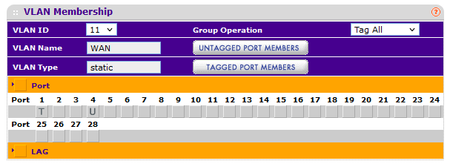

schumaku
May 11, 2024Guru - Experienced User
MikeDC wrote:
I have setup a VLAN with my GS728TP as per the diagram below and it is working OK. It's fairly simple, packets on g1 ingress tagged with VLAN 11 and egress untagged on g4. Untagged packets ingressing g4 should egress g1 with a tag of 11.
There seems to be some misunderstanding on the nomenclature and the simple way VLAN-capable network switches are working.
Defining the PVID does not tag anything, it just does send the untagged frames to the defined switch internal VLAN pipe.
Said this, untagged frames ingressing on the port defined can be assigned just to one single VLAN in the switch. The untagged frames on this port are assigned into the VLAN in the switch.
Sometimes it's allowed to "overload" a port (or LAG) definition, only one VLAN should be configured as [U]ntagged on a port.
MikeDC
May 11, 2024Aspirant
Thanks for the reply. The point I'm trying to make is that the packets ingressing into g4 get tagged with vlan 11 whether I have PVID set to 11 or 1. It seems that setting U on that port for VLAN 11 causes the incoming packets to be tagged, and setting PVID appears to do nothing.
- schumakuMay 12, 2024Guru - Experienced User
The tagging is applied on the egress, not on ingress port. As I wrote before, the PVID definition does make the switch to put untagged ingress frames to the VLAN designated by the PVID. So the PVID config does not nothing, and untagged ingress frames can be sent to one VLAN lane only.
Related Content
- Feb 22, 2022Retired_Member
NETGEAR Academy

Boost your skills with the Netgear Academy - Get trained, certified and stay ahead with the latest Netgear technology!
Join Us!
