NETGEAR is aware of a growing number of phone and online scams. To learn how to stay safe click here.
Forum Discussion

just_me2
Oct 24, 2016Aspirant
Can't access remote LAN through VPN
Hi, I've got a problem with VPN configuration as L2TP (yes, I saw manual, it seems to be easy-to-go but it not works ;-) I've configured L2TP VPN, add user - after restart router configuration seem...
just_me2
Nov 01, 2016Aspirant
According to e-mail notifications sent to me - problem is still NOT resolved!
I think it was really bad idea to buy this router :(
I was doing everything like in recommended solutions - no result, using everything like in knowledge base (btw wrote in 2007) - no result.
In addition I tried to run content filtering, using keyword or site name. Result? Of course - DOESN'T WORK! (yes - I've added computers to group, etc.)
I've configured VPN on other, borrowed router, made by other manufacturer (no matter of the name and model - it's not advertisement) - 10 minutes and everything works fine, WITHOUT problems! VPN connects quick and perfect on Windows 10, using L2TP!
So why it's impossible on FVS336G v3 ????????
Why everything on this router make so many troubles?????
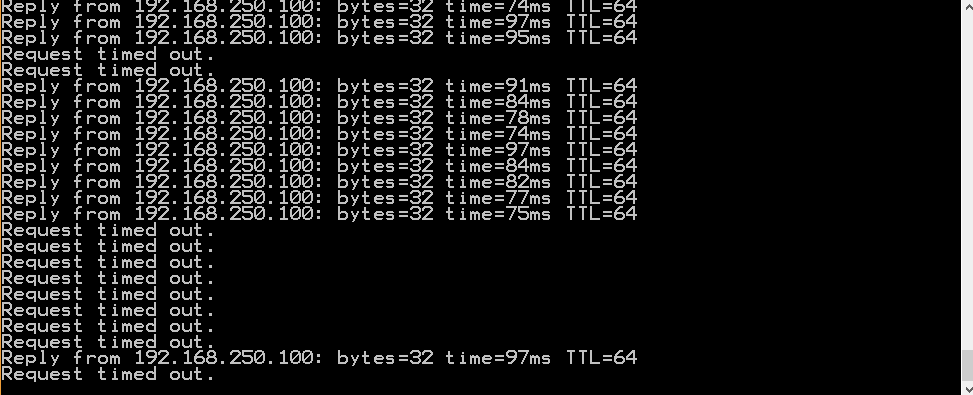
That's how pings to router in VPN tunnel are looking (I have no access to remote LAN):
- DaneANov 02, 2016NETGEAR Employee Retired
Hi just_me2,
With regard to this, I suggest you to open an online case with NETGEAR Support at anytime. Let them know about your concern and the troubleshooting steps you did to isolate the problem for further assistance.
Regards,
DaneA
NETGEAR Communtiy Team
- just_me2Nov 02, 2016Aspirant
I tried to contact support but I've bought router more than 3 months ago so bye bye support....
Please help me to make some kind of resolution of my problems with VPN:
1. I've configured my Win Server to work as VPN server (L2TP with IPSec) - is there any way to connect with server using NAT or DMZ? I need to forward ports using UDP and protocol 50, 51 - is this possible on FVS336G ?
2. Where can I find manual how to config VPN in CLI ?
3. I've noticed that I can connect with router using VPN L2TP (with PSK) on FVS336G using Win7 and Win10, sometimes also I can get access to remote LAN (randomly), but after few seconds (sometimes about one minute) seems to be disconnected (ping are dying).
Connection takes a long time. Best result was on Win7 installed on VirtualBox - connection duration was about 10 minutes without problems. It was only one time :-)
4. I'm afraid I threw away box and documentation of router - can I recover serial number to VPN Client Lite? Maybe using this software give me a chance to win this battle with VPN...!!!!
- DaneANov 03, 2016NETGEAR Employee Retired
Hi just_me2,
You may open ports 50 and 51 on the FVS336Gv3. Kindly read pages 230-233 and 255-261 of the FVS336Gv3 reference manual here.
There is no CLI manual for the FVS336Gv3.
I suggest you to enable WAN to LAN logging on the firewall. The logs will tell if the L2TP traffic coming from external is hitting the FVS336Gv3 and if it is then forwarding the traffic to the correct LAN IP for the Windows Server. This will help to see if the problem is before the FVS336Gv3 or after the traffic hits the FVS336Gv3. Also, configure a simple firewall rule to pass other traffic to the server, like RDP (TCP 3389) just to see if it can pass just fine to the server.
With regard to the license key to activate the VPN Client Lite software, do you still have the CD that came with the FVS336Gv3? If ever you lost it, kindly register your FVS336Gv3 to your MyNETGEAR account and try to open an online case with either the NETGEAR E-mail Support or NETGEAR Chat Support here to inquire on how to get the license key.
Regards,
DaneANETGEAR Community Team

Related Content
NETGEAR Academy

Boost your skills with the Netgear Academy - Get trained, certified and stay ahead with the latest Netgear technology!
Join Us!
